EasyManua.ls Logo

Sony MDS-E12 - Display Window Descriptions; Using the Display Window

Sony MDS-E12
120 pages
Print Icon
To Next Page IconTo Next Page
To Previous Page IconTo Previous Page
Loading...
=
i
8
®
2
ry
3
B
8
&
i
A
:
z
z
a
3
&
FT
a
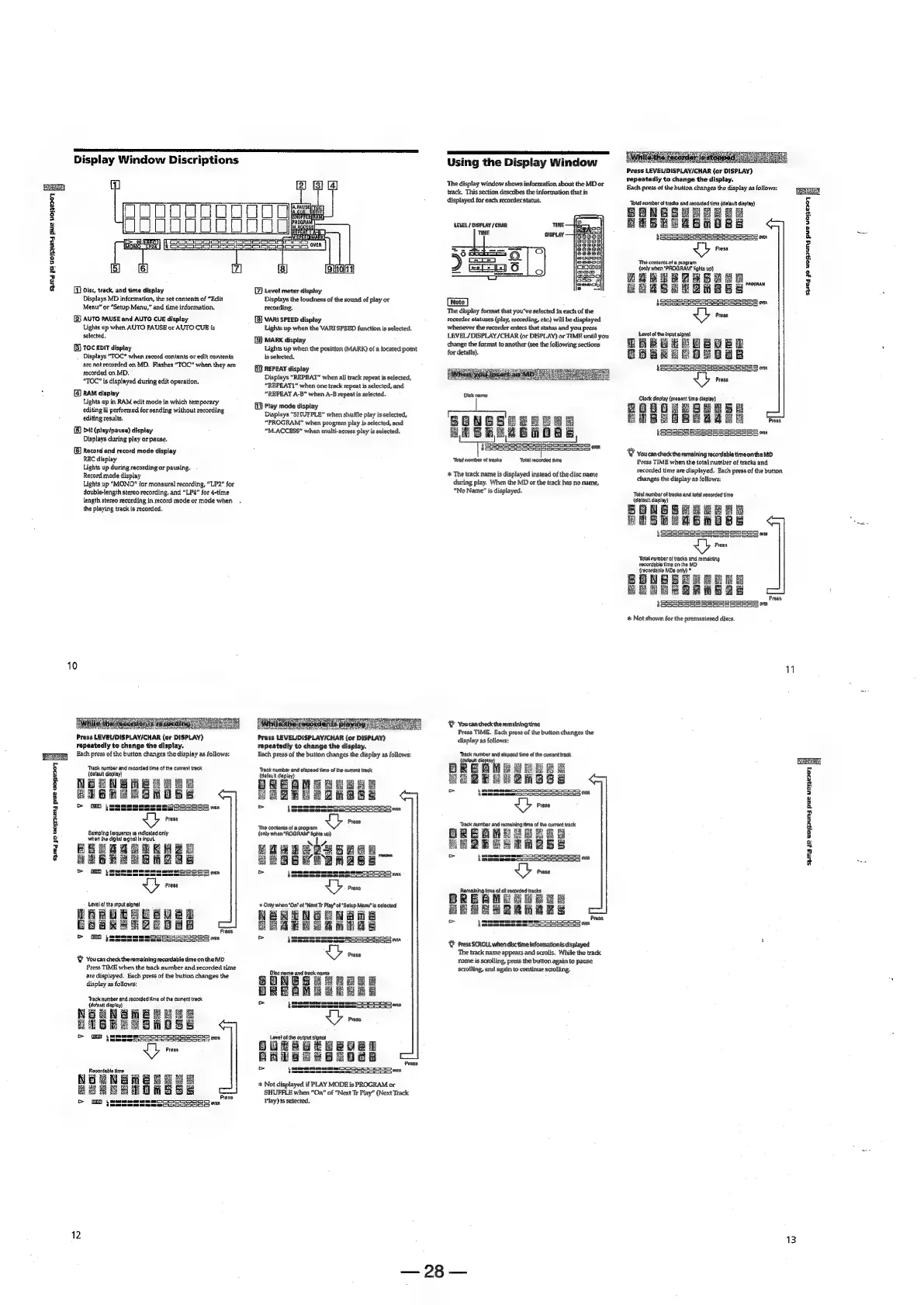
Display
Window
Discriptions
Disc,
track,
and
time
display
Displays
MD
information,
the
set
contents
of
“Edit
Menu”
or
“Setup
Menu,”
and
time
information.
[2]
AUTO
PAUSE
and
AUTO
CUE
display
Lights
up
when
AUTO
PAUSE
or
AUTO
CUE
is
selected,
(3)
toc
ent
display
Displays
“TOC”
when
record
contents
or
edit
contents
are
not
recorded
on
MD.
Flashes
“TOC”
when
they
are
recorded
on
MD.
"TOC"
is
displayed
during
edit
operation.
RAM
display
Lights
up
in
RAM
edit
mode
in
which
temporary
editing
is
performed
for
sending
without
recording
editing
results.
{B)
bt
(play/pause)
display
Displays
during
play
or
pause.
(B)
Record
and
record
mode
display
REC
display
Lights
up
during
recording
or
pausing.
Record
mode
display
Lights
up
“MONO”
for
monaural
recording,
“LP2”
for
double-length
stereo
recording,
and
“LP4”
for
4-time
length
stereo
recording
in
record
mode
or
mode
when
the
playing
track
is
recorded.
&
10
uh
EASIAS
FESO
s
Press
LEVEL/DISPLAY/CHAR
(or
DISPLAY)
repeatedly
to
change
the
display.
Each
press
of
the
button
changes
the
display
as
follows:
‘Track
number
and
recorded
time
of
the
current
track
(Gafault
display}
BENSMBRE
Bie
Bs
Smo
ES
N
ih
6
a
Ss
i
se
Sampling
frequency
ts
indicated
only
whan
the
digital
signa}
is
input,
BB
ae
Ra
2
S20
JGBUREERUED
Boake
T0008
IIIS
ey
GED
tammeen
307
tres
AROS
&
You
can
check
the
remaining
recordable
time
onthe
MD
Press
TIME
when
the
track
number
and
recorded
time
ate
displayed.
Bach
press
of
the
bution
changes
the
display
as
follows:
‘rack
amber
and
recorded
lime
of
tha
current
track
(dofaultt
disptay)
NEGNGHEEE
ME
HEEB
GSHDSE
vb
Prose
12
Leve!
meter
display
Displays
the
loudness
of
the
sound
of
play
or
recording.
VARI
SPEED
display
Lights
up
when
the
VARI
SPEED
function
is
selected.
{3}
MARK
display
Lights
up
when
the
position
(MARK)
of
a
located
point
is
selected.
REPEAT
display
Displays
“REPEAT”
when
all
track
repeat
is
selected,
“REPEAT1”
when
one
track
repeat
is
selected,
and
“REPEAT
A-B”
when
A-B
repeat
is
selected.
{i
Play
mode
display
Displays
“SHUFFLE”
when
shuffle
play
is
selected,
“PROGRAM”
when
program
play
is
selected,
and
“M.ACCESS”
when
multi-access
play
is
selected,
Press
LEVELID
repeatedly
to
change
the
display.
Each
press
of
the
button
changes
the
display
as
follows:
‘Track
number
and
etapsed
time
of
the
current
track
{dofauit display)
DREGMEBRESE
HEARRE2ZRESS
cm
ISIS
wyey
=
ISIS
Ub
rs
Ths
contents
of
&
program
(only
when
*ROGRAM'
lights
up)
&
Not
displayed
if
PLAY
MODE
is
PROGRAM
or
SHUFFLE
when
“On’
of
“Next
Tr
Piay”
(Next
Track
Play)
is
selected.
Using
the
Display
Window
‘The
display
window
shows
information
about
the
MD
or
track,
This
section
describes
the
information
that
is
displayed
for
each
recorder
status.
LEVEL
/
DISPLAY
/
CHAR,
‘The
display
format
that
you've
selected
in
each
of
the
recorder
statuses
(play,
recording,
etc.)
will
be
displayed
whenever
the
recorder
enters
that
status
and
you
press
LEVEL/
DISPLAY
/CHAR
(or
DISPLAY)
or
TIME
unti]
you
change
the
format
to
another
(see
the
following
sections
for
details).
SONEGSHEERRE
HUB
hEABRORE
1
SaaS
SS
SSS
SoS
yey
I
SeSScSSeseSSeassss
|
‘Tots!
number
of
tracks
‘Total
recorded
time.
+*
The
track
name
is
displayed
instead
of
the
disc
name
during
play.
When
the
MD
or
the
track
has
no
name,
“No
Name”
is
displayed.
&
Youcan
check
theremainingtime
Press
TIME.
Each
press
of
the
bution
changes
the
display
as
follows:
‘Track
number
and
elapsed
time
of
the
current
track
BREaMBSREeS
HOQEONGMBSs
et
=
EI
III
oy,
SEe3
UY
rss
‘Track
umber
and
remaining
time
of
the
current
track
EL
B2QmakS
=
SOOO
a,
Saeeesen
SOSSSoeoS:
°&
Press
SCROLL
when
disc
time
informationis
displayed
‘The
track
name
appears
and
scrolls.
While
the
track
‘name
is
scrolling,
press
the
button
again
to
pause
scrolling,
and
again
to
continue
scrolling.
28
Press
LEVEL/DISPLAY/CHAR
{or
DISPLAY)
repeatedly
to
change
the
display.
Each
press
of
the
button
changes
the
display
as
follows:
‘Total
aN
ae
re
Sanan
SHBREABMORS
LSrmemmenaSem~SSDOS
on,
§SSeeSSSSS55S5a5s55,
Press
‘The
contents
of
a
program
{only
when
“PROGRAM
fights
up)
ZaSLeAaSeaa
HRASELANEES
LORS
SSS
SOAS
g_y
iSSRSSSeSSSeeessea,
i
$
i
°
i
Press
BEBUBH
OR
Oa
ICI
SITS]
ogg
Beasesaas
Pross
Clock
display
(present
time
display)
Press
SSS
SSS
555=5
oxy
BeSoeeeasoD>|
Ht
&
Vou
can
check
the
remaining
recordable
time
onthe
MD
Press
TIME
when
the
total
number
of
tracks
and
recorded
time
are
displayed.
Each
press
of
the
button
changes
the
display
as
follows:
‘Total
number
of
tracka
and
total
recorded
tina
(dotault
display)
SONGEERER
HS
APSR
AB
RABE
ge
(SpomDonomosaaD
aa,
IBSSSSSseesseess05
Press
‘Total
number
of
tracks
and
remaining
recordable
time
on
the
MD
(acoedablo
MDs
only)
*
ONESHERRRE
SPEEA
cee
{SSSESESSSSSS=REEo
0"
%
Not
shown
for
the
premastered
discs.
WV
3
3
H
3
a
z
2
a
o
s
8
ny
¢
\
13

Other manuals for Sony MDS-E12

Related product manuals