EasyManua.ls Logo

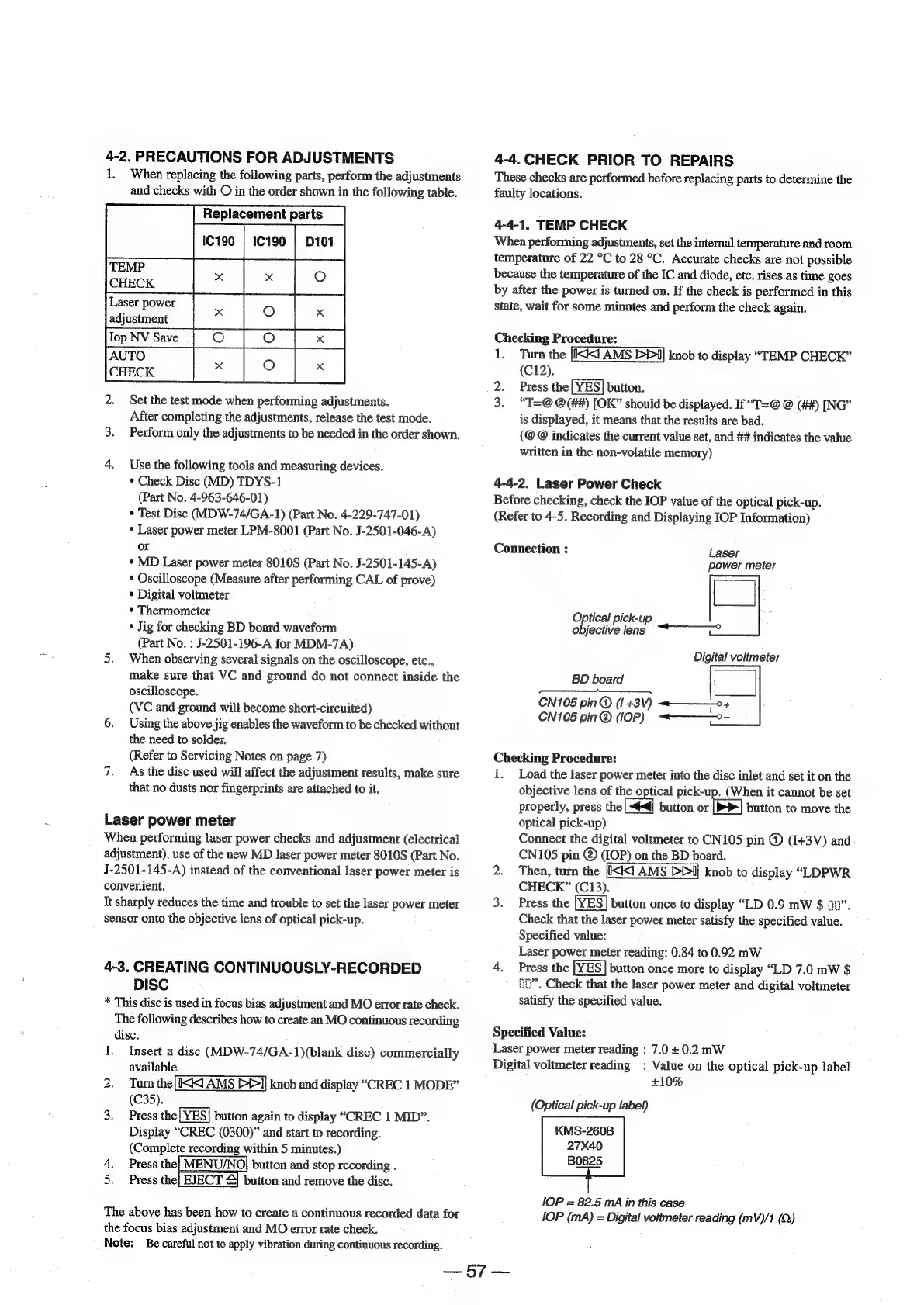
Sony MDS-E12 - 4-2. Precautions for Adjustments; Replacement Parts; 4-3. Creating Continuously-Recorded Disc; 4-4. Check Prior to Repairs

Sony MDS-E12
120 pages
Print Icon
To Next Page IconTo Next Page
To Previous Page IconTo Previous Page
Loading...
4-2.
PRECAUTIONS
FOR
ADJUSTMENTS
1,
When
replacing
the
following
parts,
perform
the
adjustments
and
checks
with
O
in
the
order
shown
in
the
following
table.
Replacement
parts
en
|
TEMP
CHECK
adjustment
lop
NV
Save_|_O_
AUTO
2.
Set
the
test
mode
when
performing
adjustments.
After
completing
the
adjustments,
release
the
test
mode.
3.
Perform
only
the
adjustments
to
be
needed
in
the
order
shown.
x
4.
Use
the
following
tools
and
measuring
devices.
*
Check
Disc
(MD)
TDYS-1
(Part
No.
4-963-646-01)
*
Test
Disc
(MDW-74/GA-1)
(Part
No.
4-229-747-01)
*
Laser
power
meter
LPM-8001
(Part
No.
J-2501-046-A)
or
*
MD
Laser
power
meter
8010S
(Part
No.
J-2501-145-A)
*
Oscilloscope
(Measure
after
performing
CAL
of
prove)
*
Digital
voltmeter
¢
Thermometer
*
Jig
for
checking
BD
board
waveform
(Part
No.
:
J-2501-196-A
for
MDM-7A)
5.
When
observing
several
signals
on
the
oscilloscope,
etc.,
make
sure
that
VC
and
ground
do
not
connect
inside
the
oscilloscope.
(VC
and
ground
will
become
short-circuited)
6.
Using
the
above
jig
enables
the
waveform
to
be
checked
without
the
need
to
solder.
(Refer
to
Servicing
Notes
on
page
7)
7.
As
the
disc
used
will
affect
the
adjustment
results,
make
sure
that
no
dusts
nor
fingerprints
are
attached
to
it.
Laser
power
meter
When
performing
laser
power
checks
and
adjustment
(electrical
adjustment),
use
of
the
new
MD
laser
power
meter
8010S
(Part
No.
J-2501-145-A)
instead
of
the
conventional
laser
power
meter
is
convenient.
It
sharply
reduces
the
time
and
trouble
to
set
the
laser
power
meter
sensor
onto
the
objective
lens
of
optical
pick-up.
4-3.
CREATING
CONTINUOUSLY-RECORDED
DISC
*
This
disc
is
used
in
focus
bias
adjustment
and
MO
error
rate
check.
The
following
describes
how
to
create
an
MO
continuous
recording
disc.
1.
Insert
a
disc
(MDW-74/GA-1)(blank
disc)
commercially
available.
2.
Turn
the[IKK
AMS
D1]
knob
and
display
“CREC
1
MODE”
(C35).
3.
Press
the
[YES]
button
again
to
display
“CREC
1
MID”.
Display
“CREC
(0300)”
and
start
to
recording.
(Complete
recording
within
5
minutes.)
Press
the|
MENU/NO]
button
and
stop
recording
.
Press
the
button
and
remove
the
disc.
WP
EJECT
&
The
above
has
been
how
to
create
a
continuous
recorded
data
for
the
focus
bias
adjustment
and
MO
error
rate
check.
Note:
Be
careful
not
to
apply
vibration
during
continuous
recording.
4-4.
CHECK
PRIOR
TO
REPAIRS
These
checks
are
performed
before
replacing
parts
to
determine
the
faulty
locations.
4-4-1.
TEMP
CHECK
When
performing
adjustments,
set
the
internal
temperature
and
room
temperature
of
22
°C
to
28
°C.
Accurate
checks
are
not
possible
because
the
temperature
of
the
IC
and
diode,
etc.
rises
as
time
goes
by
after
the
power
is
turned
on.
If
the
check
is
performed
in
this
State,
wait
for
some
minutes
and
perform
the
check
again.
Checking
Procedure:
1.
Turn
the
knob
to
display
“TEMP
CHECK”
(C12).
2.
Press
the
button.
3.
“T=@
@(##)
[OK”
should
be
displayed.
If
“T=@
@
(##)
[NG”
is
displayed,
it
means
that
the
results
are
bad.
(@
@
indicates
the
current
value
set,
and
##
indicates
the
value
written
in
the
non-volatile
memory)
4-4-2.
Laser
Power
Check
Before
checking,
check
the
IOP
value
of
the
optical
pick-up.
(Refer
to
4-5.
Recording
and
Displaying
IOP
Information)
Connection
:
Laser
power
meter
Optical
pick-up
i“
objective
lens
“2
Digital
voltmeter
BD
board
CN105
pin
@
(1
+3V)
+
CN105
pin@
(IOP)
«—--—-°-
Checking
Procedure:
1.
Load
the
laser
power
meter
into
the
disc
inlet
and
set
it
on
the
objective
lens
of
the
optical
pick-up.
(When
it
cannot
be
set
properly,
press
the
button
or
[>>|
button
to
move
the
optical
pick-up)
Connect
the
digital
voltmeter
to
CN105
pin
@)
(1+3V)
and
CN105
pin
@
(IOP)
on
the
BD
board.
2.
Then,
turn
the
knob
to
display
“LDPWR
CHECK”
(C13).
3.
Press
the
button
once
to
display
“LD
0.9
mW
§$
2”.
Check
that
the
laser
power
meter
satisfy
the
specified
value.
Specified
value:
Laser
power
meter
reading:
0.84
to
0.92
mW
4.
Press
the
button
once
more
to
display
“LD
7.0
mW
$
tHP’.
Check
that
the
laser
power
meter
and
digital
voltmeter
satisfy
the
specified
value.
Specified
Value:
Laser
power
meter
reading
:
7.0
+
0.2
mW
Digital
voltmeter
reading
:
Value
on
the
optical
pick-up
label
+10%
(Optical
pick-up
label)
KMS-260B
27X40
B0825
IOP
=
82.5
mA
in
this
case
IOP
(mA)
=
Digital
voltmeter
reading
(mV)/1
Q)
ney
xy
eo

Other manuals for Sony MDS-E12

Related product manuals