25
• Discs that this unit CANNOT play
– Discs with labels, stickers, or sticky tape or
paper attached. Doing so may cause a
malfunction, or may ruin the disc.
– Discs with non-standard shapes (e.g., heart,
square, star). Attempting to do so may
damage the unit.
–8 cm (3
1
/4 in) discs.
Notes on CD-R/CD-RW discs
• The maximum number of: (CD-R/CD-RW
only)
– folders (albums): 150 (including root folder)
– files (tracks) and folders: 300 (may less than
300 if folder/file names contain many
characters)
– displayable characters for a folder/file name:
32 (Joliet)/64 (Romeo)
• If the multi-session disc begins with a CD-
DA session, it is recognized as a CD-DA disc,
and other sessions are not played back.
• Discs that this unit CANNOT play
– CD-R/CD-RW of poor recording quality.
– CD-R/CD-RW recorded with an
incompatible recording device.
– CD-R/CD-RW which is finalized incorrectly.
– CD-R/CD-RW other than those recorded in
music CD format or MP3 format conforming
to ISO9660 Level 1/Level 2, Joliet/Romeo or
multi-session.
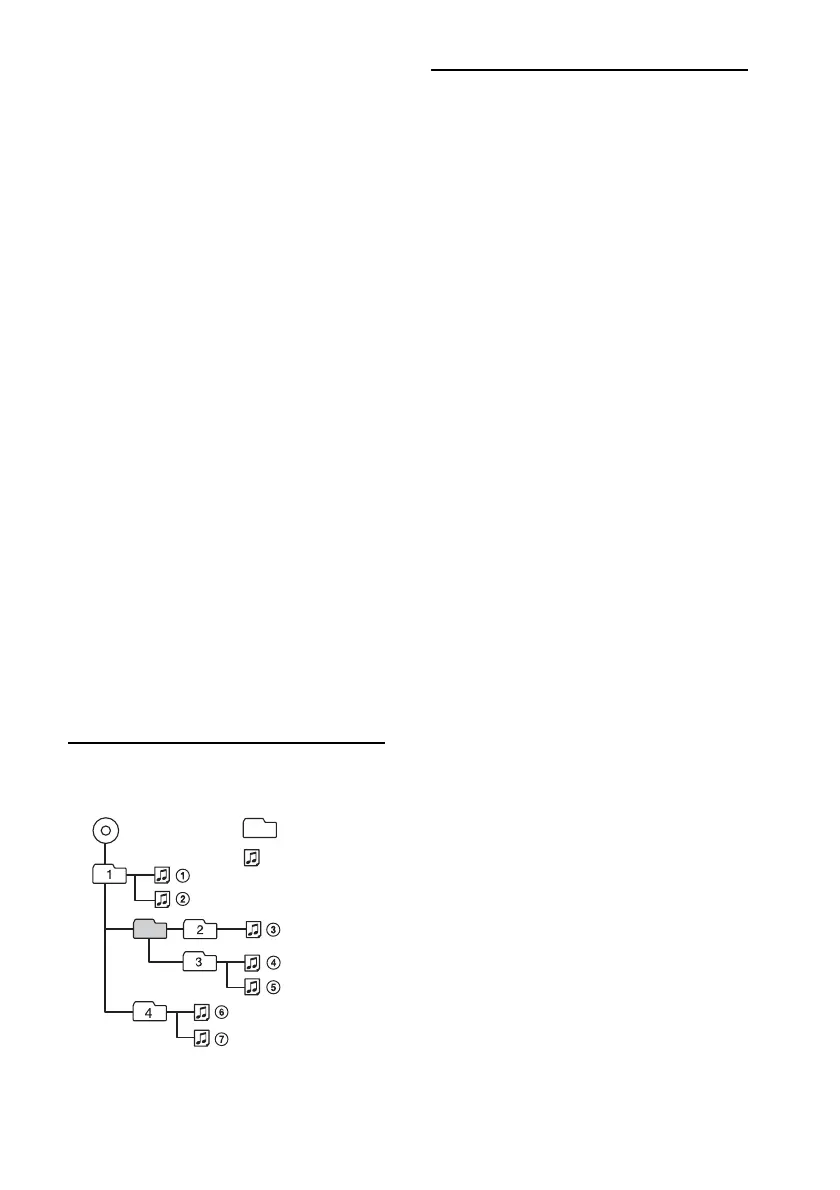
Playback order of MP3/WMA
files
About Bluetooth function
What is Bluetooth technology?
• Bluetooth wireless technology is a short-
range wireless technology that enables
wireless data communication between digital
devices, such as a cellular phone and a
headset. Bluetooth wireless technology
operates within a range of about 10 m (about
33 feet). Connecting two devices is common,
but some devices can be connected to
multiple devices at the same time.
• You do not need to use a cable for
connection since Bluetooth technology is a
wireless technology, neither is it necessary
for the devices to face one another, such is
the case with infrared technology. For
example, you can use such a device in a bag
or pocket.
• Bluetooth technology is an international
standard supported by millions of
companies all over the world, and employed
by various companies worldwide.
On Bluetooth communication
• Bluetooth wireless technology operates
within a range of about 10 m.
Maximum communication range may vary
depending on obstacles (person, metal, wall,
etc.) or electromagnetic environment.
• The following conditions may affect the
sensitivity of Bluetooth communication.
– There is an obstacle such as a person, metal,
or wall between this unit and Bluetooth
device.
– A device using 2.4 GHz frequency, such as a
wireless LAN device, cordless telephone, or
microwave oven, is in use near this unit.
• Because Bluetooth devices and wireless LAN
(IEEE802.11b/g) use the same frequency,
microwave interference may occur and result
in communication speed deterioration,
noise, or invalid connection if this unit is
used near a wireless LAN device. In such as
case, perform the following.
– Use this unit at least 10 m away from the
wireless LAN device.
– If this unit is used within 10 m of a wireless
LAN device, turn off the wireless LAN device.
– Install this unit and Bluetooth device as near
to each other as possible.
Folder
(album)
MP3/WMA file
(track)
MP3/WMA



 To Next Page