7
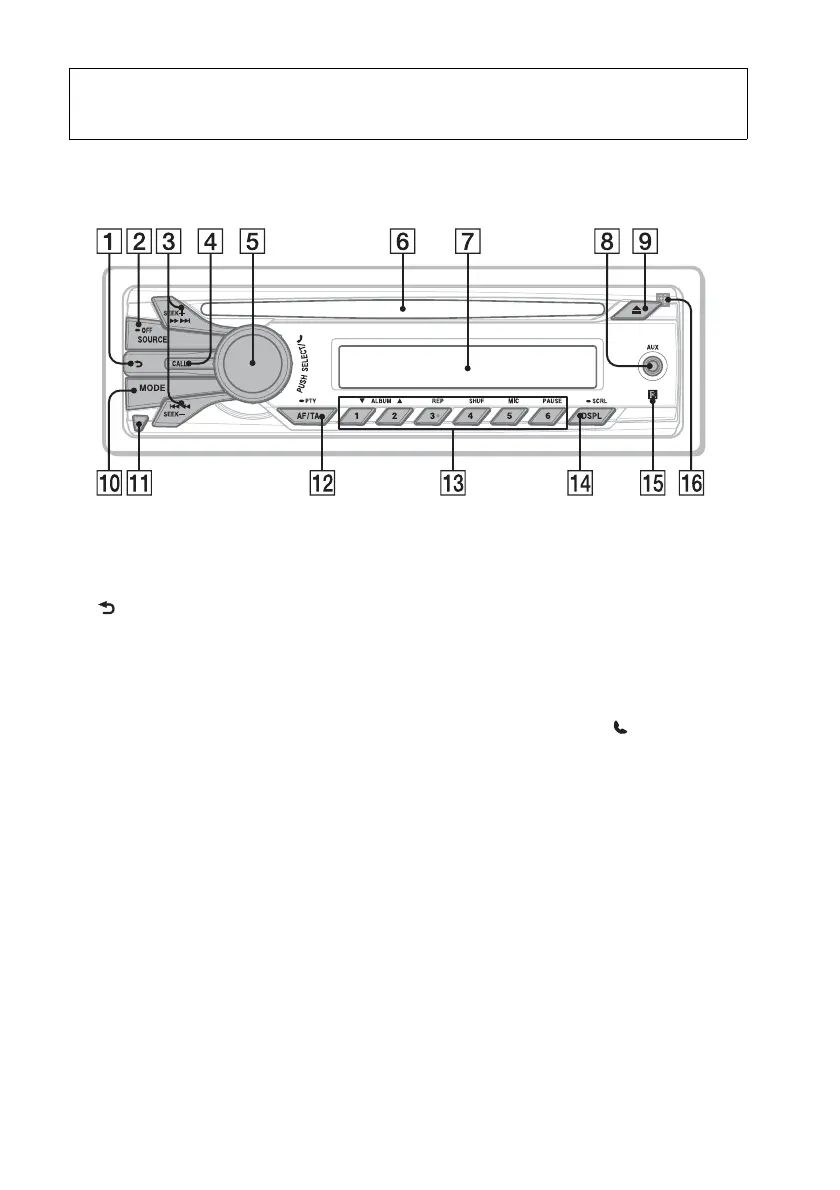
Location of controls
Main unit
This section contains instructions on the
location of controls and basic operations.
(BACK) button
To return to the previous display.
SOURCE/OFF button
Press to turn on the power/change the
source (Radio/CD/AUX/Bluetooth
audio/Bluetooth phone).
Press and hold for 1 second to turn off
the power.
Press and hold for more than 2 seconds
to turn off the power and the display
disappears.
SEEK +/– buttons
Radio:
To tune in stations automatically
(press); find a station manually (press
and hold).
CD:
To skip a track (press); skip tracks
continuously (press, then press again
within about 1 second and hold);
reverse/fast-forward a track (press and
hold).
Bluetooth Audio*
1
:
To skip a track (press); reverse/fast-
forward a track (press and hold).
CALL button page 12
To enter the call menu (press); switch
the Bluetooth signal (press and hold
more than 2 seconds).
Control dial/select/ (handsfree)
button page 16, 17, 20, 21
To adjust volume (rotate); select items
(press and rotate); receive/end a call
(press).
Disc slot
Insert the disc (label side up), playback
starts.
Display window
AUX input jack page 23
(eject) button
To eject the disc.
MODE button page 9, 17
Radio:
To select the radio band (FM/MW/
LW).












 To Next Page