MHC-EC59.GB.4-188-893-11(1)
7
GB
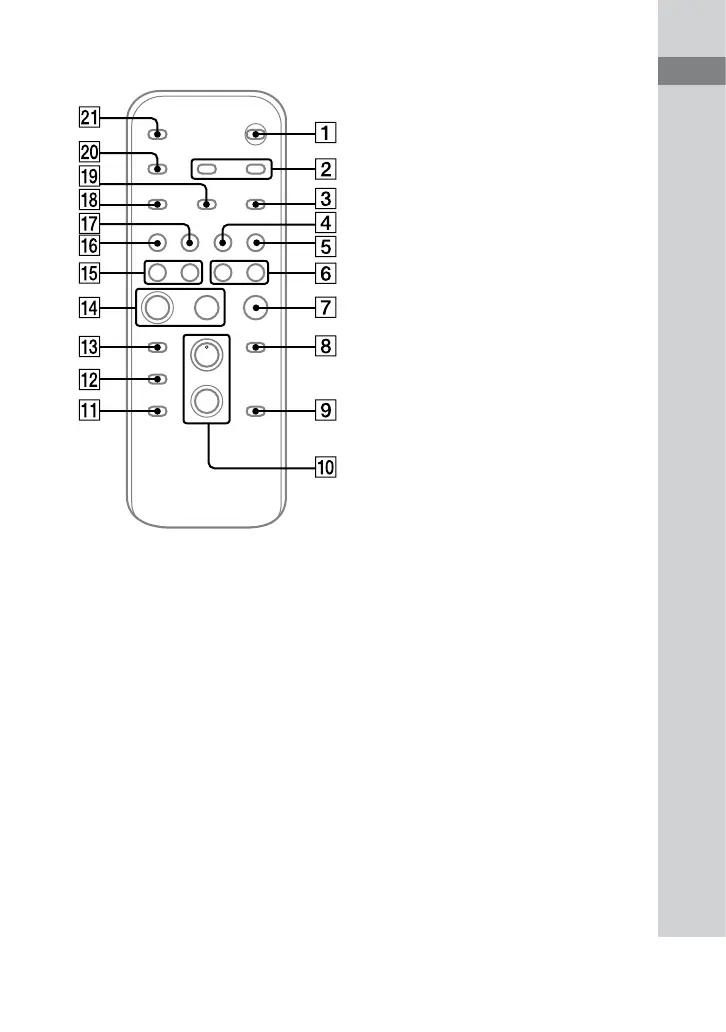
Guide to parts and controls
Remote
/ (on/standby) button
Press to turn on or o the system.
CLOCK/TIMER SELECT button
(page 24)
CLOCK/TIMER SET button
(page 11, 23)
Press to set the clock and the Play Timer.
REPEAT/FM MODE button
(page 12, 13, 19)
Press to listen to a disc, a USB device, a
single track or le repeatedly.
Press to select the FM reception mode
(monaural or stereo).
TUNER/BAND button
Press to select the TUNER function.
Press to select FM or AM reception
mode.
FUNCTION button
Press to select the function.
/ (rewind/fast forward)
button
Press to nd a point in a track or le.
(stop) button
Press to stop playback or transferring.
ENTER button
Press to enter the settings.
Continued








 To Next Page