Chapter 6: Additional Features
EN
20
To change the timer
Select the timer display you desire in step 2
of “To check the preset timer settings”.
To cancel the timer
1 Press TIMER.
2 Press t SELECT and use the jog dial to
choose “TIMER OFF.”
3 Press ENTER/NEXT.
The next time you want to use the timer,
select the timer display you used in step
2 (DAILY 1 or DAILY 2) and press
ENTER/NEXT.
Notes
•You cannot set the Timer if the timer ON
and OFF times are the same.
•You cannot activate wake-up timer and
timer-recording at the same time.
Timer-Recording
Radio Programs
You can set the timer to record from the
radio at a certain time. This timer works
only once for each setting.
Make sure the clock has been set correctly.
1 Press § EJECT and insert a blank tape in
deck B with the side you want to record
on facing forward.
2 Select dual or single-sided recording.
* Recording always stops at the end of the
reverse side. Be sure to start from the
front side.
3 Tune in a station you want to record.
4 Press TIMER.
5 Press t SET.
6Use the jog dial to select REC and press
ENTER/NEXT.
“ON” appears and the hour digits flash
in the display.
1DISC
12345
678
OFF
NRDOLBY
VOL
REC
7Use the jog dial to set the hour you want
the system to turn on and press
ENTER/NEXT.
Set the minutes in the same way. “OFF”
appears and the hour digits flash in the
display.
12345
678
OFF
NRDOLBY
VOL
12345
678
OFF
NRDOLBY
VOL
REC
REC
8Use the jog dial to set the hour you want
the system to turn off and press
ENTER/NEXT.
Set the minutes in the same way.
9Press ENTER/NEXT.
The preset items appear in the display
sequentially.
10 Press POWER to turn off the system.
The power will go on 15 seconds before
the preset time and the volume level is
automatically set to the minimum.
To check the preset times settings
1 Press TIMER.
2 Press t SELECT and use the jog dial to
select “REC”.
3 Press ENTER/NEXT.
The preset items appear in the display
sequentially, then the original display
returns.
To change the preset timer settings
Start over from step 1.
To cancel the timer
1 Press TIMER.
2 Press t SELECT and use the jog dial to
choose “TIMER OFF.”
3 Press ENTER/NEXT.
The timer indicators disappear from the
display.
If the power is on at the preset time
The sound source will automatically
change to the tuner, but tuner recording
will not start.
➔ continued
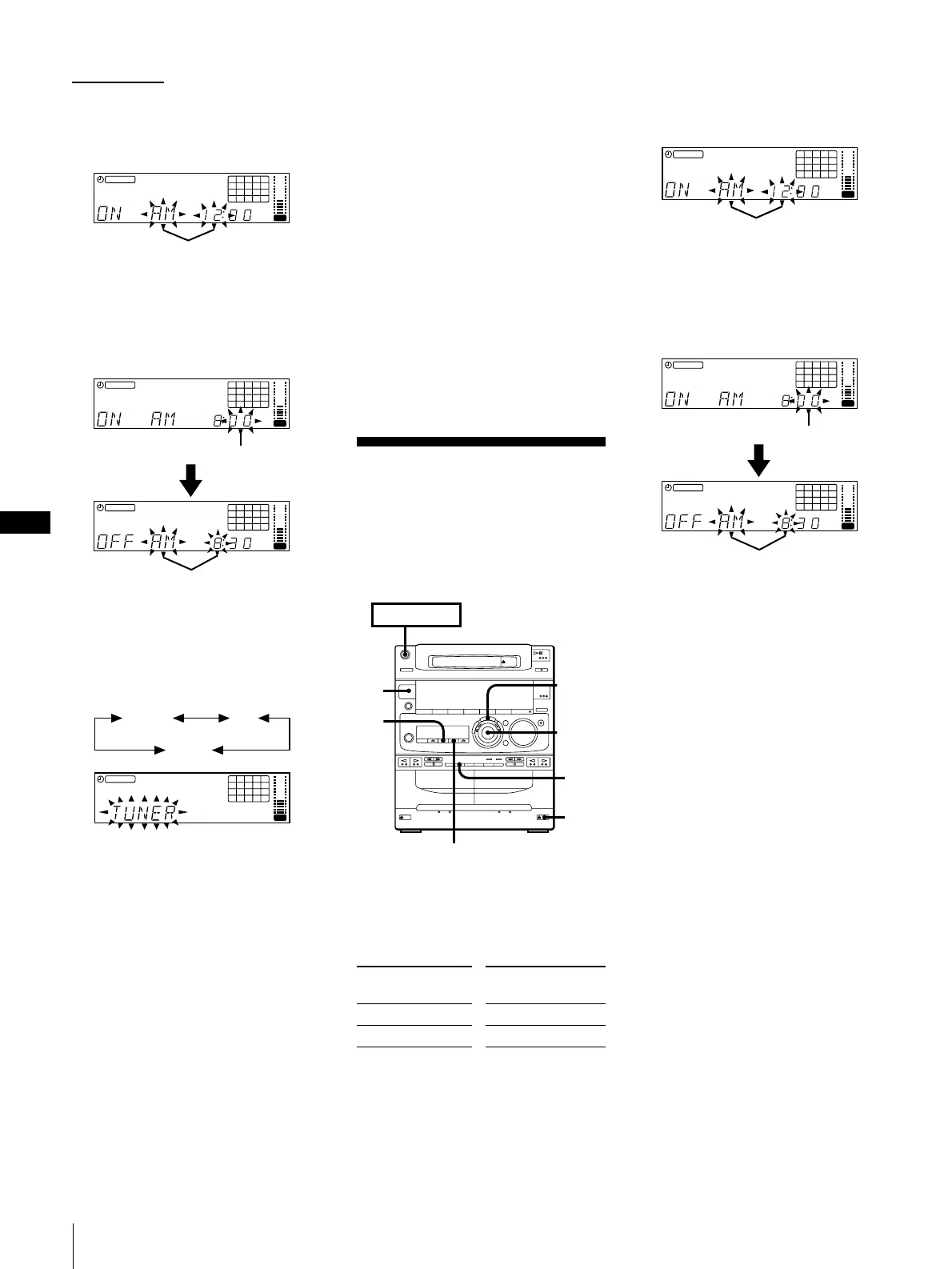
5 Use the jog dial to select either DAILY 1
or 2 and press ENTER/NEXT.
“ON” appears and the hour digits flash
in the display.
1DISC
12345
678
OFF
1
NRDOLBY
VOL
6 Use the jog dial to set the hour you want
the system to turn on and press ENTER/
NEXT.
Set the minutes in the same way. “OFF”
appears and the hour digits flash in the
display.
12345
678
OFF
1
NRDOLBY
VOL
12345
678
OFF
1
NRDOLBY
VOL
7 Use the jog dial to set the hour you want
the system to turn off and press ENTER/
NEXT.
Set the minutes in the same way.
8 Use the jog dial to select a sound source.
The display changes as follows:
12345
678
OFF
1
NRDOLBY
VOL
TUNER CD
TAPE
9 Press ENTER/NEXT.
The preset items appear in the display
sequentially.
10 Press POWER to turn off the system.
The power will go on at the preset time
and the music will play with the volume
you have adjusted. At the turn-off time,
the power will go off again.
To change the preset timer settings
Start over from step 1.
To check the preset timer settings
1 Press TIMER.
2 Press t SELECT and use the jog dial to
choose the mode you want to check.
3 Press ENTER/NEXT.
The preset items appear in the display
sequentially, then the original display
returns.
To record
One side of the tape
Both sides*
Press DIRECTION to
select
A
ß or RELAY
flashing
flashing
1
2
4
,10
5
6,7,
8,9
6,7,
8
POWER
n
ON
tSELECT
flashing
flashing
flashing
flashing



 To Next Page