EN
Chapter 2: the CD Player
8
Playing Tracks in the
Desired Order
(program play)
You can program up to 32 tracks to play in
any order you choose.
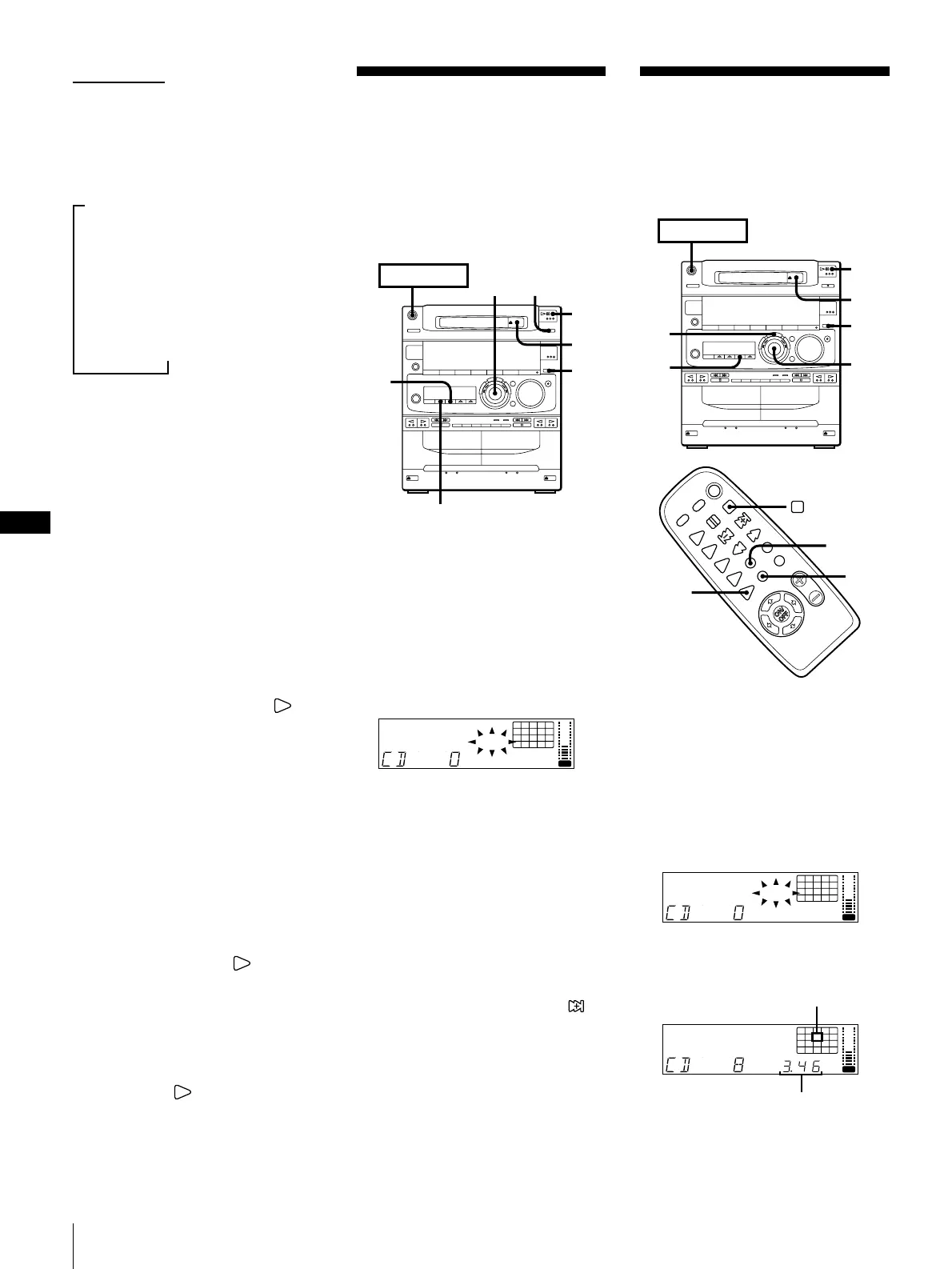
1 Press FUNCTION repeatedly until “CD”
appears in the display.
2 Press § OPEN/CLOSE and place a CD
on the disc tray. Then, press
§ OPEN/CLOSE again to close the disc
tray.
3 Press PROGRAM.
“PROGRAM” and ”DISC” appear in the
display.
DISC
PROGRAM
12345
678
OFF
NRDOLBY
VOL
4 Turn the jog dial to choose a track.
The track number and the total playing
time appear in the display.
DISC
PROGRAM
8
OFF
NRDOLBY
VOL
5 Press ENTER/NEXT.
The chosen track number lights up in
the music calendar. If the track number
and the total playing time disappear
before you press ENTER/NEXT, go
back to step 4.
Playing Tracks in
Random Order
(shuffle play)
You can play all the tracks on the CD in
random order.
Use the buttons on the unit to do this
operation.
1Press FUNCTION repeatedly until “CD”
appears in the display.
2Press § OPEN/CLOSE and place a CD
on the disc tray. Then, press
§ OPEN/CLOSE again to close the disc
tray.
3Press SHUFFLE.
“SHUFFLE” appears in the display.
4Press fl.
“ J ” appears and then all the tracks
play in random order.
To stop shuffle play
Press p on the CD player.
To cancel shuffle play
Press CONTINUE so that “SHUFFLE”
disappears from the display. The tracks
continue playing in their original order.
To skip an undesired track
Turn the jog dial clockwise (or press
on the remote).
➔ continued
4
1
3
2
POWER
n
ON
jog dial
CONTINUE
p
1
CHECK
CLEAR
DISC SHUFFLE
12345
678
OFF
NRDOLBY
VOL
Track number
Total playing time
To check the remaining time during
playback
Press DISPLAY repeatedly.
Each time you press the button, the
display changes as follows:
mPlaying time on the current track
µ
Remaining time on the current track
µ
Remaining time on the CD
µ
Clock display (for eight seconds)
µ
Effect (or P FILE) name or
“EFFECT ON (OFF)”
To check the total playing time and
the total number of tracks
Press DISPLAY in stop mode. When you
press DISPLAY again, the display shows
the clock display for eight seconds and
returns to the previous indication.
Notes
•You cannot check the total playing time
during program play.
•The total playing time and number of
tracks also appear in the display when
you press § OPEN/CLOSE to close the
disc tray.
•“--.--” appears in the display when the
total playing time is 100 minutes or more.
One Touch Play feature
Press fl on the CD player (or CD on
the remote) when the power is off. When a
CD is in the player, you will be able to start
listening to the CD without pressing any
other buttons.
The Music Calendar Display
This display lights according to the number
of tracks on the CD. As each track is played,
the corresponding number disappears.
Tracks numbered in excess of 20 are not
displayed.
Automatic Source Selection
If the CD player has been in the normal
play mode, you can select the CD player
just by pressing fl (or CD on the
remote).
If the CD player has been in the program
play or the shuffle play mode, only fl can
be used for this function.
If there is no CD in the player
“CD no dISC” appears in the display.
Press fl (or CD on the remote) while
the indication is on, then the disc tray will
open automatically.



 To Next Page