17
US
Getting Started
MHC-V21.US.4-736-607-12(1)
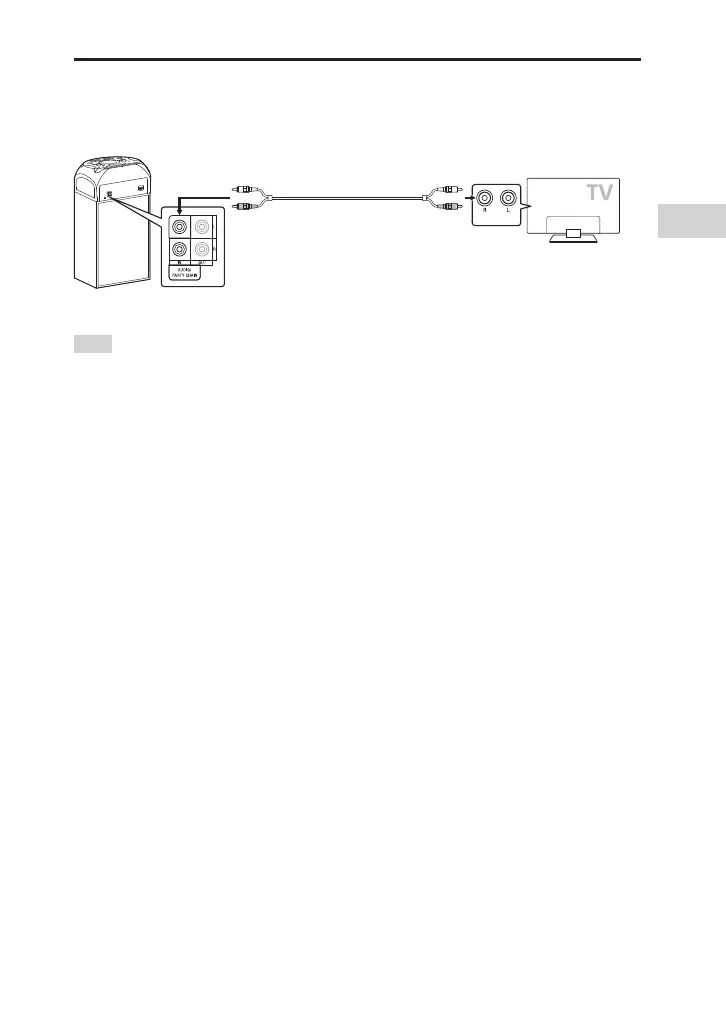
Listening to TV sound via the system
Before connecting cables, be sure to disconnect the AC power cord (mains
lead).
AUDIO OUT
Audio cable (not supplied)
To listen to TV sound, press FUNCTION repeatedly to select “AUDIO IN”.
Hint
••
You can also enjoy the sound of external equipment (DVD players, etc.) via the system
by connecting to the AUDIO/PARTY CHAIN IN L/R jacks. For details, refer to the
operating instructions of your equipment.
••
If the audio output level from the system is low when connecting the external
equipment, try adjusting the audio output settings on the connected equipment. It
may improve the audio output level. For details, refer to the operating instructions of
your equipment.



 To Next Page