7
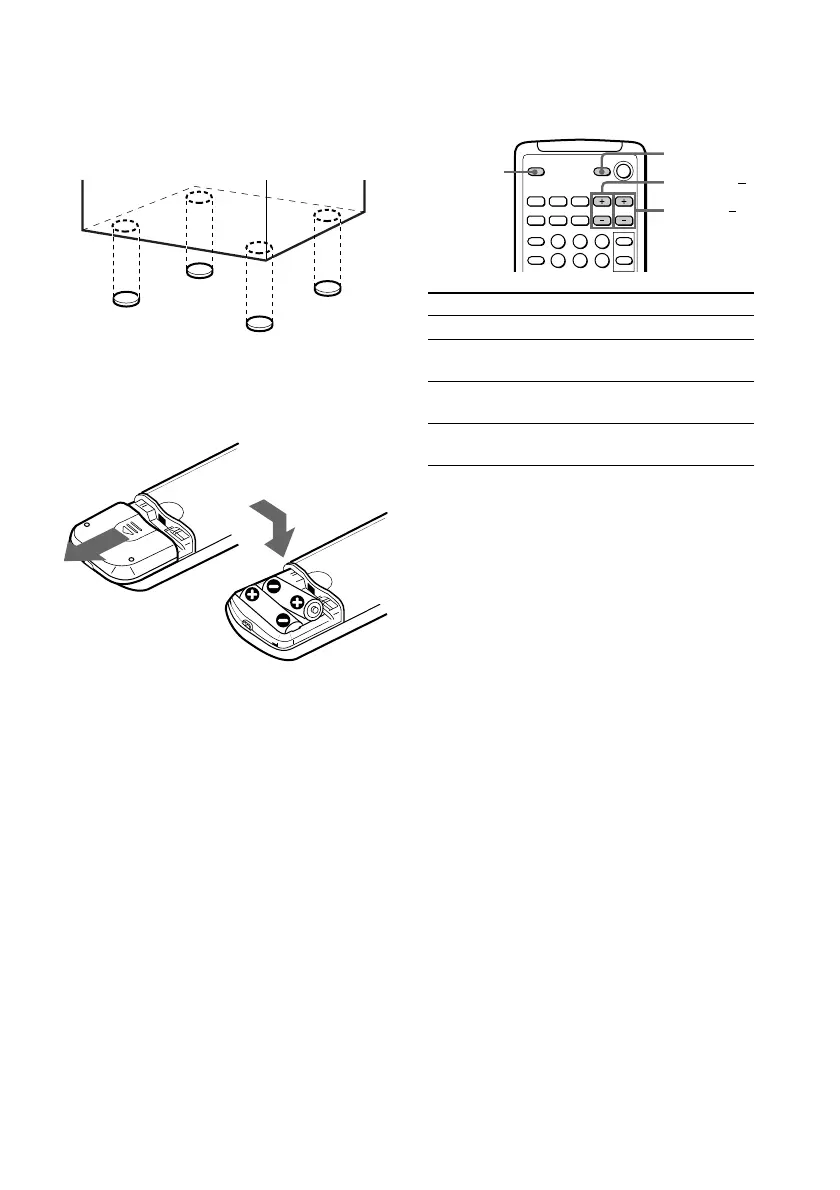
To attach the front and satellite
speaker pads
Attach the supplied front and satellite speaker
pads to the bottom of the speakers to stabilize
the speakers and prevent them from slipping.
Inserting two size AA (R6)
batteries into the remote
TV ?/1
TV VOL +/
TV CH +/
TV/VIDEO
Using the remote
You can use the shaded buttons shown below
to operate a Sony TV.
To Press
Turn the TV on or off TV ?/1
Switch the TV's TV/VIDEO.
video input
Change the TV TV CH +/–.
channels
Adjusts the volume TV VOL +/–.
of the TV speaker(s)
Tip
With normal use, the batteries should last for about
six months. When the remote no longer operates
the system, replace both batteries with new ones.
Note
If you do not use the remote for a long period of
time, remove the batteries to avoid possible damage
from battery leakage.
When carrying this system
Do the following to protect the CD
mechanism.
1 Make sure that all discs are removed from
the unit.
2 Hold down CD and then press ?/1 so that
“LOCK” appears in the display.
3 Unplug the AC power cord.



 To Next Page