
 Need help?
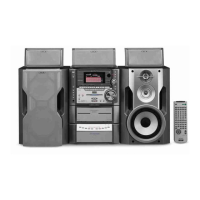
Do you have a question about the Sony MHC-ZX70DVD and is the answer not in the manual?
Guide for connecting the system using supplied cords and accessories.
Instructions for inserting batteries into the remote control for operation.
Details on positioning speakers and attaching pads for optimal audio performance.
Procedures to adjust speaker balance and volume levels for optimal surround sound experience.
Guide on how to set the system's clock, essential for timer functions.
Instructions on how to enable Power Saving Mode to reduce energy consumption while in standby.
How to navigate and use the on-screen setup display for system configuration.
How to select languages for display and configure screen settings like TV type and saver.
Accessing custom settings like color system, pause mode, and parental control for playback.
Adjusting audio settings, digital output, and speaker setup for optimal playback.
How to configure the system for 2-channel mode when only front speakers are connected.
Step-by-step guide for normal playback of DVDs, VIDEO CDs, and CDs.
How to view text, time, and audio information for the current disc.
How to use the title menu to select and play specific titles on a DVD.
Guide to playing VIDEO CDs with PBC, enabling interactive operations and menu navigation.
How to select and configure surround sound modes for immersive audio playback.
Instructions for repeat playback, A-B repeat, and shuffle play modes.
How to search for titles, chapters, tracks, or time points on discs.
How to manage subtitles, audio languages, and viewing angles during DVD playback.
How to use strobe playback and scan modes for detailed disc content viewing.
Steps to preset stations and tune in manually or automatically.
How to use RDS features like station name display and program type search (European models).
Instructions for inserting and playing tapes in deck A or B, including playback modes.
How to record from discs or other tapes, including CD synchro and high-speed dubbing.
How to record tracks from discs in a custom order by editing the program.
How to mix component audio with microphone input for recording onto tape (Asian models).
How to activate sound modes like GROOVE, V-GROOVE, and GROOVE-EX for bass and clarity.
How to select preset audio effect files to customize sound characteristics.
How to create and save custom sound effects and equalizer settings as personal files.
How to change spectrum analyzer display, adjust brightness, and select surround effects.
How to activate and enjoy Dolby Pro Logic Surround sound for enhanced audio playback.
How to manually adjust specific frequency ranges to customize the sound output.
How to set the system to turn off automatically after a preset time, allowing sleep to music.
How to set the system to turn on and play music at a preset time daily.
How to preset radio stations and set timers for automatic radio program recording.
How to connect MD decks digitally and analogically for recording and playback.
How to connect subwoofers, microphones, and headphones for enhanced audio.
How to connect VCRs and external antennas for audio/video input and improved radio reception.
Important notes on operating voltage, safety, placement, disc handling, and cabinet cleaning.
A guide to diagnosing and resolving common problems related to speakers, discs, and tape decks.
Technical details of the system's components, including amplifier, tuner, player, and speaker specifications.
Definitions of technical terms used throughout the manual, such as Bit rate, Dolby Digital, and DVD.
Identification of buttons and their functions on the remote control for various operations.
Lists for language codes, control menu items, and DVD setup menu options.
 General
| Playable Media | CD, DVD, USB |
|---|---|
| Bluetooth | Yes |
| USB Playback | Yes |
| FM Tuner | Yes |
| Speakers | 2 |
| USB Port | Yes |
| NFC | Yes |
| MP3 Playback | Yes |
| WMA Playback | Yes |
| AAC Playback | Yes |
| Audio Formats | MP3, WMA, AAC |
| Karaoke Function | Yes |
| Remote Control | Yes |
| Type | Mini Hi-Fi System |
| RMS Output Power | 470 W |
| Disc Playback | DVD, CD |
| Speaker Configuration | 2.1 |

 To Next Page










