6
GB
3 To eject the floppy disk, drag
the floppy disk icon to the trash
can on your desktop.
A message confirming that you can
eject the floppy disk from the drive
appears.
4 Push the eject button of the
drive.
Notes
• Do not eject the floppy disk by pushing
the eject button before dragging the
floppy disk icon to the trash can as this
may result in data loss or damage.
• It is recommended to eject the floppy
disk from the drive before your
computer goes into sleep mode.
To write-protect a floppy disk
To prevent data on a floppy disk from
being overwritten, you can write-protect
the floppy disk. When the floppy disk is
write-protected, data cannot be saved on
it.
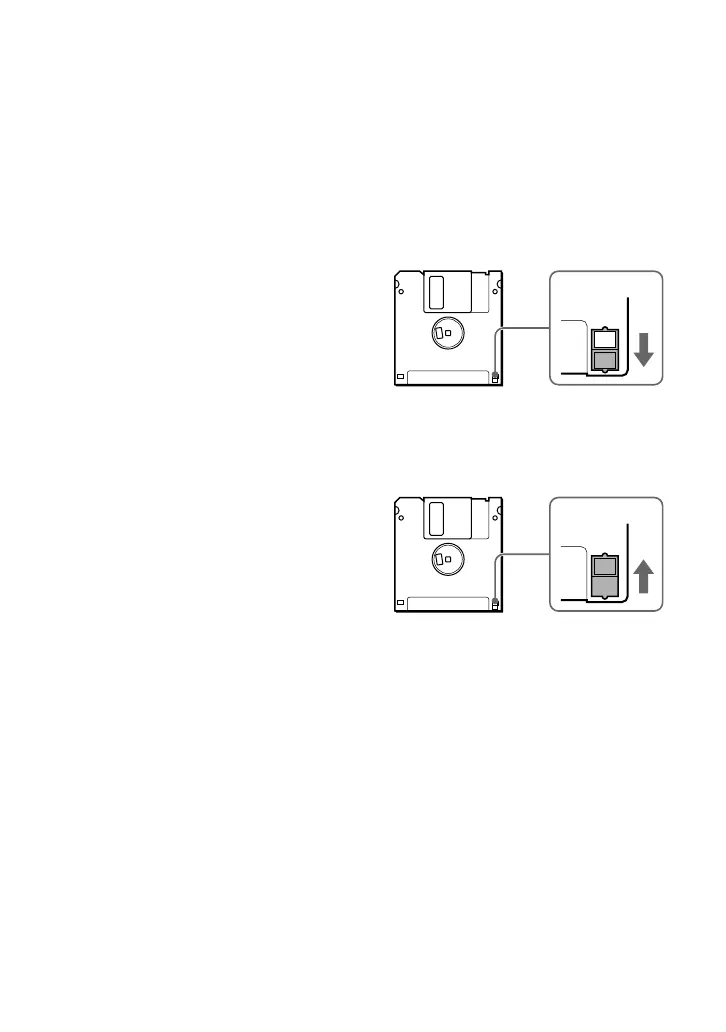
To write-protect a floppy disk, push the
write-protect tab as illustrated below.
To remove the write-protection on a
floppy disk, push the write-protect tab as
illustrated below.


 To Next Page