5
GB
Overview
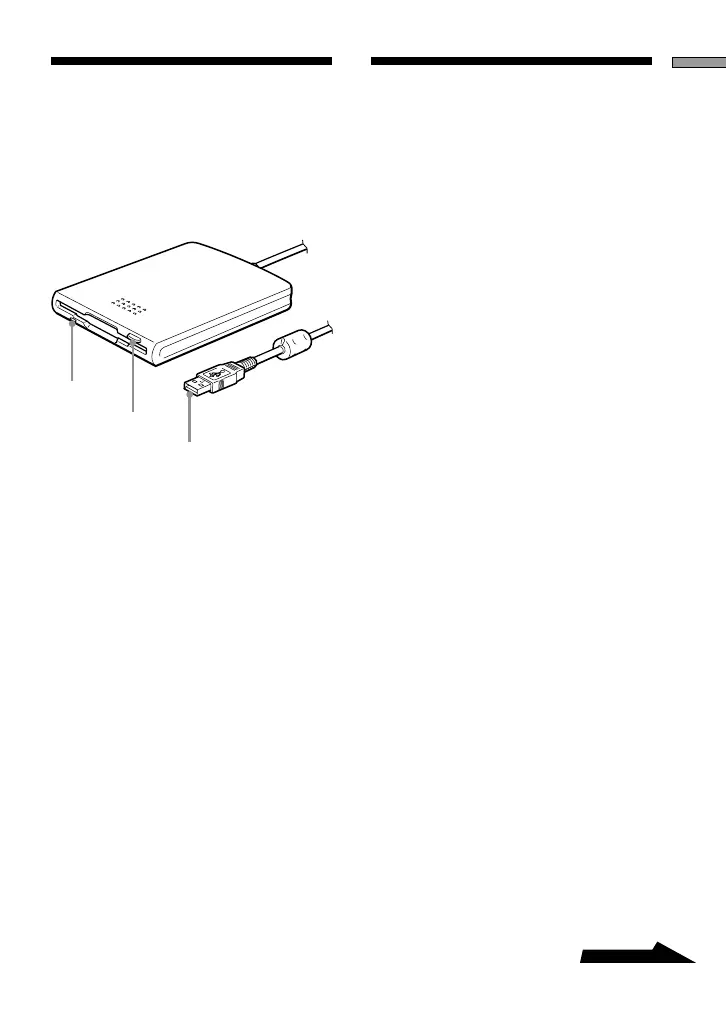
Parts and
Functions
This section describes the USB Floppy
Disk Drive parts and functions.
1
2
3
1Status indicator
Indicates the status of the drive. It lights
when the floppy disk in the drive is
being accessed.
2Eject button
Push this button to eject a floppy disk
from the drive.
3USB connector
Use to connect the drive to your
computer.
Using the USB
Floppy Disk Drive
This section describes how to use the
USB Floppy Disk Drive.
To insert and eject a floppy disk
with Windows
1 Holding a floppy disk label side
up, push it into the drive until
you hear a click.
2 Perform the desired operations
with the floppy disk from your
computer.
3 To eject the floppy disk, wait
until the status indicator goes
off, and then push the eject
button.
Note
Do not eject the floppy disk from the
drive while the status indicator is on as
this may result in data loss or damage.
To insert and eject a floppy disk
with Macintosh
1 Holding a floppy disk label side
up, push it into the drive until
you hear a click.
A floppy disk icon appears on your
desktop.
2 Perform the desired operations
with the floppy disk from your
computer.


 To Next Page