7
GB
Installation
Installation
Installing the
Windows XP
Device Driver
Windows XP does not require a device
driver to use the USB Floppy Disk Drive
because the device driver is already
installed. It is automatically found when
you connect the drive to your computer.
Installing the
Windows Me
Device Driver
This section explains how to install the
USB Floppy Disk Drive device driver on
a system running Windows Me.
To install the device driver
1 Insert USB Floppy Disk Drive
Device Driver CD-ROM into the
CD-ROM drive of your
computer.
2 Connect the USB connector of
the USB Floppy Disk Drive to
the USB port of your computer.
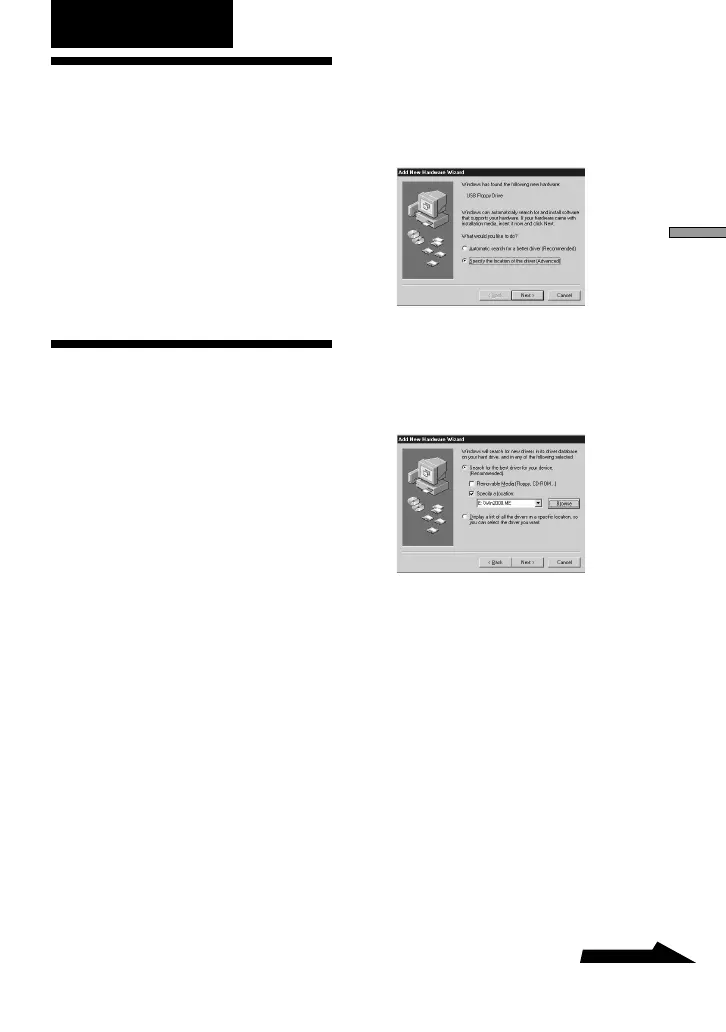
The Add New Hardware wizard starts and
the following dialog box appears.
3 Select “Specify the location of
the driver (Advanced)”, and
then click [Next].
The following dialog box appears.
4 Select the “Specify a location”
check box and type
“X:\Win2000.ME” (where X is
your CD-ROM drive letter) in
the box.
Note
Make sure that all the other check boxes
are clear.


 To Next Page