6
GB
Names and Functions of Parts
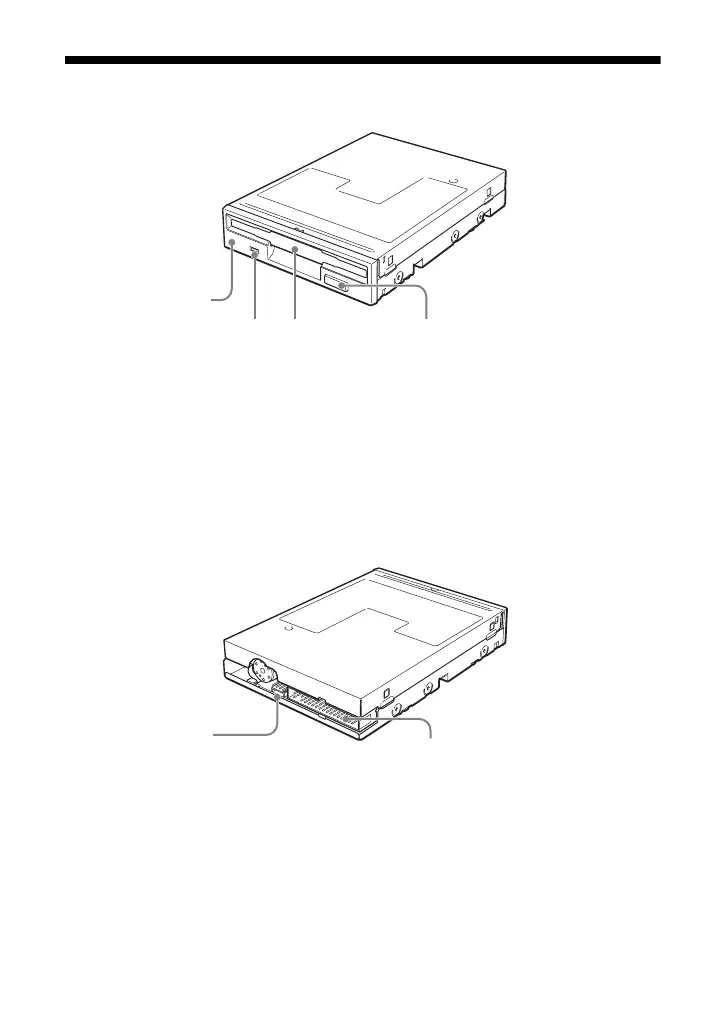
Front
Rear
1 Front Panel 3 Floppy Disk Slot
You can replace the front panel to
match the color of your computer.
For details, see “Replacing the Front
Panel and Eject Button”.
Insert the floppy disk here.
4 Eject Button
Press this button to remove the
floppy disk. You can replace the eject
button to match the color of your
computer. For details, see
“Replacing the Front Panel and Eject
Button”.
2 Floppy Disk Busy Indicator
When data on a floppy disk is
accessed, the indicator lights.
43
1
2
5 Power Connector 6 FDD Interface Connector (34
pins)Connect to the power connector from
your computer’s power supply. Connect to the floppy disk drive
interface cable.
6
5


 To Next Page