20-GB
Recommended ways for connecting this unit
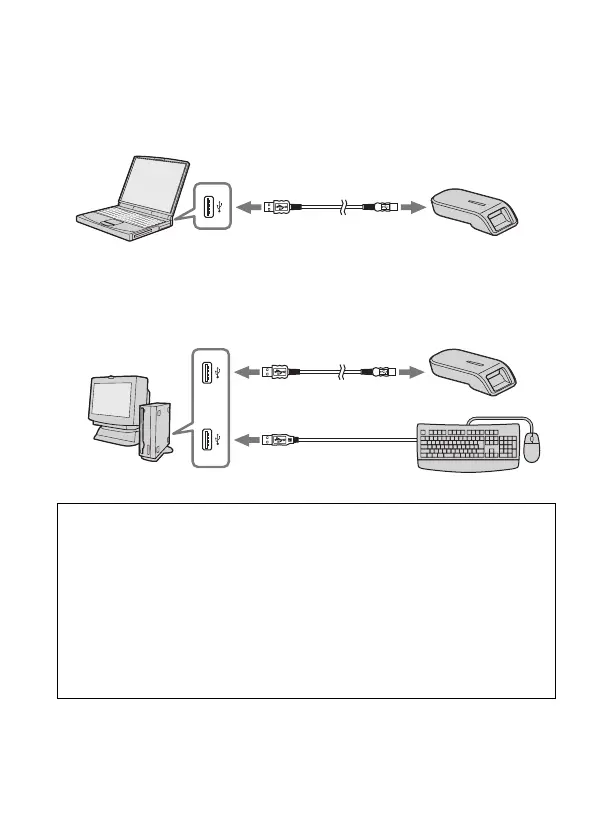
The operation of this unit has been confirmed when connected to the
computer in either of the following ways.
When this unit is connected to a USB port on the computer main unit, and
nothing is connected to other USB ports on the computer main unit.
PNotes
• When two or more USB devices except standard equipment are connected
to one computer, and both are used simultaneously, operation is not
guaranteed depending on the USB devices.
• Make sure to connect the supplied USB cable to a USB port on the
computer main unit. Operation is not guaranteed if the cable is connected
via the keyboard or a USB hub, etc.
• Not all operations are guaranteed on all computers running under the
recommended environment.
• Make sure to use the specified USB cable (supplied) to connect to your
computer.
When, on a computer with a USB keyboard and mouse as standard
equipment, the USB keyboard is connected to one of the USB ports on the
computer main unit, and this unit is connected to another USB port on the
computer main unit with the supplied USB cable.



 To Next Page