EasyManua.ls Logo

Sony Multiscan CPD-1304S - Page 4

Sony Multiscan CPD-1304S
8 pages
Print Icon
To Next Page IconTo Next Page
To Previous Page IconTo Previous Page
Loading...
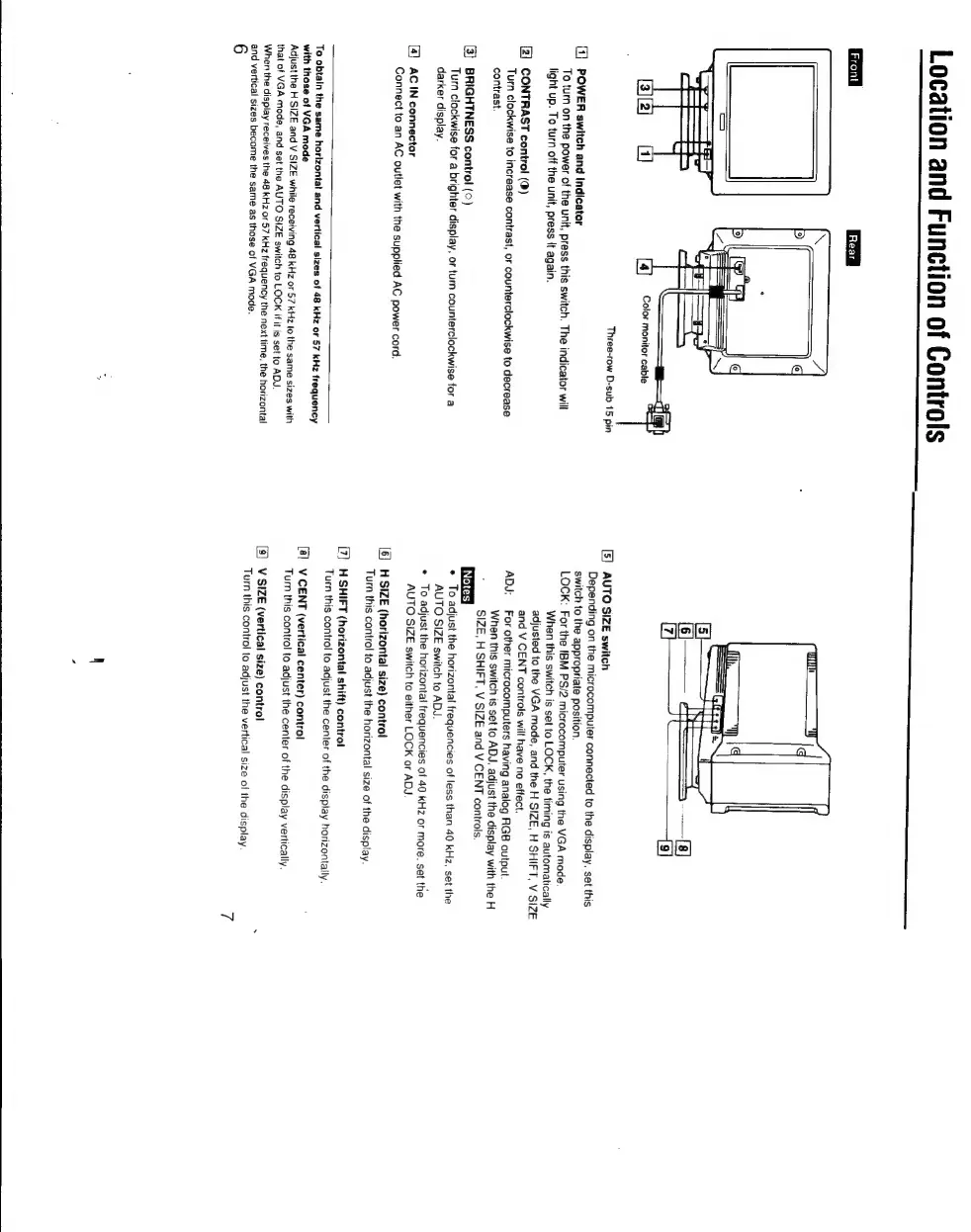
Location
and
Function
of
Controls
S
Ga
|
Rear
|
Three-row
D-sub
15
pin
O]
POWER
switch
and
indicator
To
turn
on
the
power
of
the
unit,
press
this
switch.
The
indicator
will
light
up.
To
turn
off
the
unit,
press
it
again.
[2]
CONTRAST
control
(0)
Turn
clockwise
to
increase
contrast,
or
counterclockwise
to
decrease
contrast.
[3]
BRIGHTNESS
control
(©)
Turn
clockwise
for
a
brighter
display,
or
turn
counterclockwise
for
a
darker
display.
[4]
AC
IN
connector
Connect
to
an
AC
outlet
with
the
supplied
AC
power
cord.
To
obtain
the
same
horizontal
and
vertical
sizes
of
48
kHz
or
57
kHz
frequency
with
those
of
VGA
mode
Adjust
the
H
SIZE
and
V
SIZE
while
receiving
48
kHz
or
57
kHz
to
the
same
sizes
with
thal
of
VGA
mode,
and
set
the
AUTO
SIZE
switch
to
LOCK
if
it
is
set
to
ADJ.
When
the
display
receives
the
48
kHz
or
57
KHz
frequency
the
next
time,
the
horizontal
and
vertical
sizes
become
the
same
as
those
of
VGA
mode.
6
[5]
AUTO
SIZE
switch
Depending
on
the
microcomputer
connected
to
the
display.
set
this
switch
to
the
appropriate
position.
LOCK:
For
the
IBM
PS/2
microcomputer
using
the
VGA
mode
When
this
switch
is
set
to
LOCK,
the
timing
is
automatically
adjusted
to
the
VGA
mode,
and
the
H
SIZE,
H
SHIFT,
V
SIZE
and
V
CENT
controls
will
have
no
effect.
ADJ:
For
other
microcomputers
having
analog
RGB
output
When
this
switch
is
set
to
ADJ,
adjust
the
display
with
the
H
f
SIZE,
H
SHIFT,
V
SIZE
and
V
CENT
controls.
*
To
adjust
the
horizontal
frequencies
of
less
than
40
kHz,
set
the
AUTO
SIZE
switch
to
ADJ.
e
To
adjust
the
horizontal
frequencies
of
40
kHz
or
more.
set
the
AUTO
SIZE
switch
to
either
LOCK
or
ADJ
H
SIZE
(horizontal
size)
control
Turn
this
control
to
adjust
the
horizontal
size
of
the
display.
[7]
H
SHIFT
(horizontal
shift)
control
Turn
this
control
to
adjust
the
center
of
the
display
horizontally.
[8]
V
CENT
(vertical
center)
control
`
Turn
this
control
to
adjust
the
center
of
the
display
vertically.
[9]
V
SIZE
(vertical
size)
control
Turn
this
control
to
adjust
the
vertical
size
of
the
display

Other manuals for Sony Multiscan CPD-1304S

Related product manuals