26
Preparing for the initial
parental setting
Playback of some DVDs can be limited
according to a predetermined level, such as the
age of the viewer. The Parental control
function allows you to set a playback
limitation level. When you use the unit for the
first time, set a password and parental level as
described below.
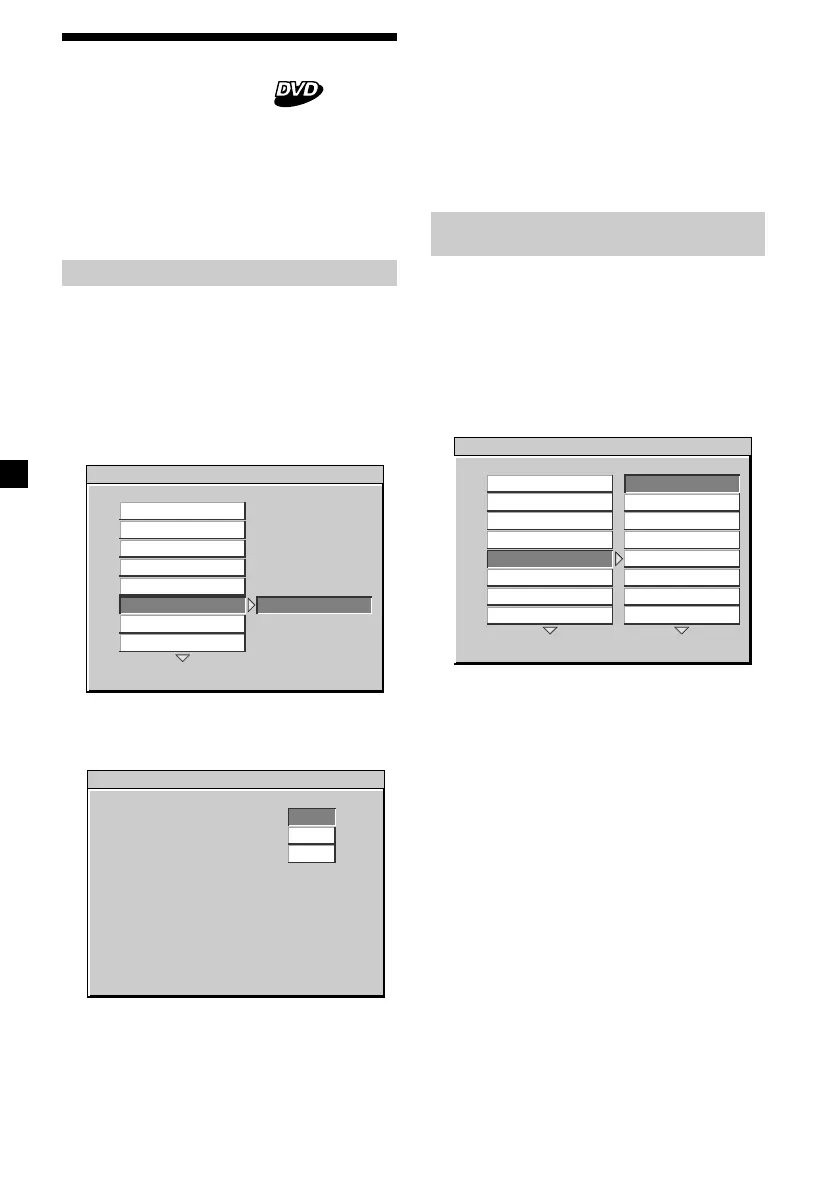
Setting the password
1 Press (SETUP).
The main page for setup appears.
2 Press M or m repeatedly to select
“PREFERENCES,” then press (ENTER).
3 Press M or m repeatedly to select
“PASSWORD,” then press ,.
4 Press (ENTER).
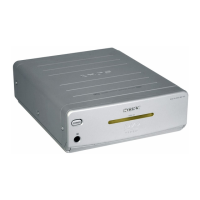
The setup screen for setting your password
is displayed.
5 Press the number buttons to enter 5370
at “OLD PASSWORD.”
6 Press the number buttons to enter your
desired 4-digit number at “NEW
PASSWORD.”
Selecting the desired parental
setting — PARENTAL
1 Press (SETUP).
The main page for setup appears.
2 Press M or m repeatedly to select
“PREFERENCES,” then press (ENTER).
3 Press M or m repeatedly to select
“PARENTAL,” then press ,.
4 Press M or m repeatedly to select the
desired item from “1 G,” “2,” “3 PG,” “4
PG-13,” “5,” “6 PG-R,” “7 NC-17,” “8,” or
“OFF.”
5 Press (ENTER).
The screen for password appears.
6 Press the number buttons to enter your
4-digit password number.
The parental setting is completed.
Note
If you forget your registered 4-digit password
number, press 5370.
7 Press the number buttons to enter your
password* (the same 4-digit number in
step 6) again at “CONFIRM PWD.”
* If you enter a wrong number, press (ENTER).
All the numbers are cleared.
8 Press (ENTER).
-- PREFERENCES PAGE - -
CHANGE PASSWORD
CHANGE
COLOR SYSTEM
AUDIO
SUBTITLE
DISC MENU
PARENTAL
PASSWORD
DEFAULTS
SMART NAVI
PASSWORD CHANGE PAGE
PLEASE ENTER OLD PASSWORD
OLD PASSWORD
NEW PASSWORD
CONFIRM PWD.
-- PREFERENCES PAGE - -
SET TO G
1 G
2
3 PG
4 PG 13
5
6 R
7 NC-17
8
COLOR SYSTEM
AUDIO
SUBTITLE
DISC MENU
PARENTAL
PASSWORD
DEFAULTS
SMART NAVI








 To Next Page