www.SteamPoweredRadio.Com
O
AC
IN (AC power supply) socket
Connect
with
the
supplied
ac
power
cord
to
an ac
power
sour
ce.
The USA and
Canadian
model
s are
equipped
with
a 3-pin socket
and the
models
for
other
c
ountries
are
equipped
with
a 2-pin
socket.
For
the
customers
of
the
model
s
upplied
with
the
ac
plug
adap-
tor:
If the plug
of
the
ac
power
cord
does
not
match
with
the
outlet
,
use the ac plug
adaptor
.
®
POWER switch and pilot lamps
Depress
the
switch
to
turn
on
the
unit.
When
ac
power
is
supplied
,
the
AC
pilot
lamp
will
light.
When de
power
is
supplied
,
the
DC
lamp
will
light.
• If
both
ac and de
power
supplies
are
connected
, the both the
AC and
DC
lamps
will
light.
G)
PEAK indicators
Light
up if
the
corresponding
input
signals
level is
within
5dB
of
the
clipping
level.
ID
INPUT SELECT switches
Select
the
input
sources.
The
switches
of
channel
s 1
to
6
ha
ve
three
positions
; LINE, MIC, PHONO and
the
switche
s
of
chan-
nels 7 and 8 have
two
; LINE, MIC.
®
MIC (microphone gain) controls
Reduce
excessive
microphone
input
level
and
prevent dis
tortion
.
Adjust
these
controls
so
that
the
proper
level can be
obtained
when each
corresponding
fader
is set at
"
7"
.
Turn the
controls
counterclockwise
when
the
corresponding
PEAK
indicators
light
up.
«.)
LCF (low-cut filter) switches
When
the
switches
are
depressed
,
input
signals
belo
w 120 Hz
are
attenuated
at
a
12dB
/
octave
rate.
©
EQ
(equalization) switches and controls
When
the
EQ
switches
are
depressed
,
the
input
signals
pass
through
the
equalizer
cir
c
uits.
Adjust
the
controls
to
equalize
the
sound
sources
. The
HI
controls
are
for
the
high
-
frequenc
y
range
around
10kHz
,
the
MID
control
s are
for
the
middl
e-
frequency
range
around
2.8 kHz and
the
LOW
control
s are
for
the
low-
frequency
range
around
100 Hz.
(D
AUX 1/2 (auxiliary output level) controls
Ajust
the
signals
level
of
each
channel
going
to
the
auxiliary
out
-
puts
1
or
2
respectively
.
@
PRE (pre-fader) switches
When the
switches
are
depressed
,
the
pre-fader
signals
of
the
corresponding
channels
can be fed
to
the
auxiliary
output
1.
These are
especially
useful
when
the
auxiliary
output
1 is used
for
a
fold
-
back
speaker.
©
PAN POT knobs
6
These
permit
panning
of
the
incoming
signals
between
the
out
-
put
Land
R
channels.
The
center
click
positions
place
the
sound
images
in
the
center
.
The
image
moves
to
the
left.
~,
C
~
The
image
~
~
1
r
moves
to
L
0
R
the
right.
©
Channel faders
Adjust
the
signal
level
of
each
channel
going
to
the
line
outputs
for
proper
balance.
The
position
7 (the
thick
line)
indicates
the
reference
level.
W
SUB IN 1/2 LEVEL controls
Adjust
the
signal
levels
from
SUB INPUT 1
or
2
jack
O
respec-
tively.
@
SUB IN 1/2 PAN knobs
Position
the
sound
image
of
SUB INPUT 1
or
2 in
the
desired
place
between
the
output
L and R
channels
.
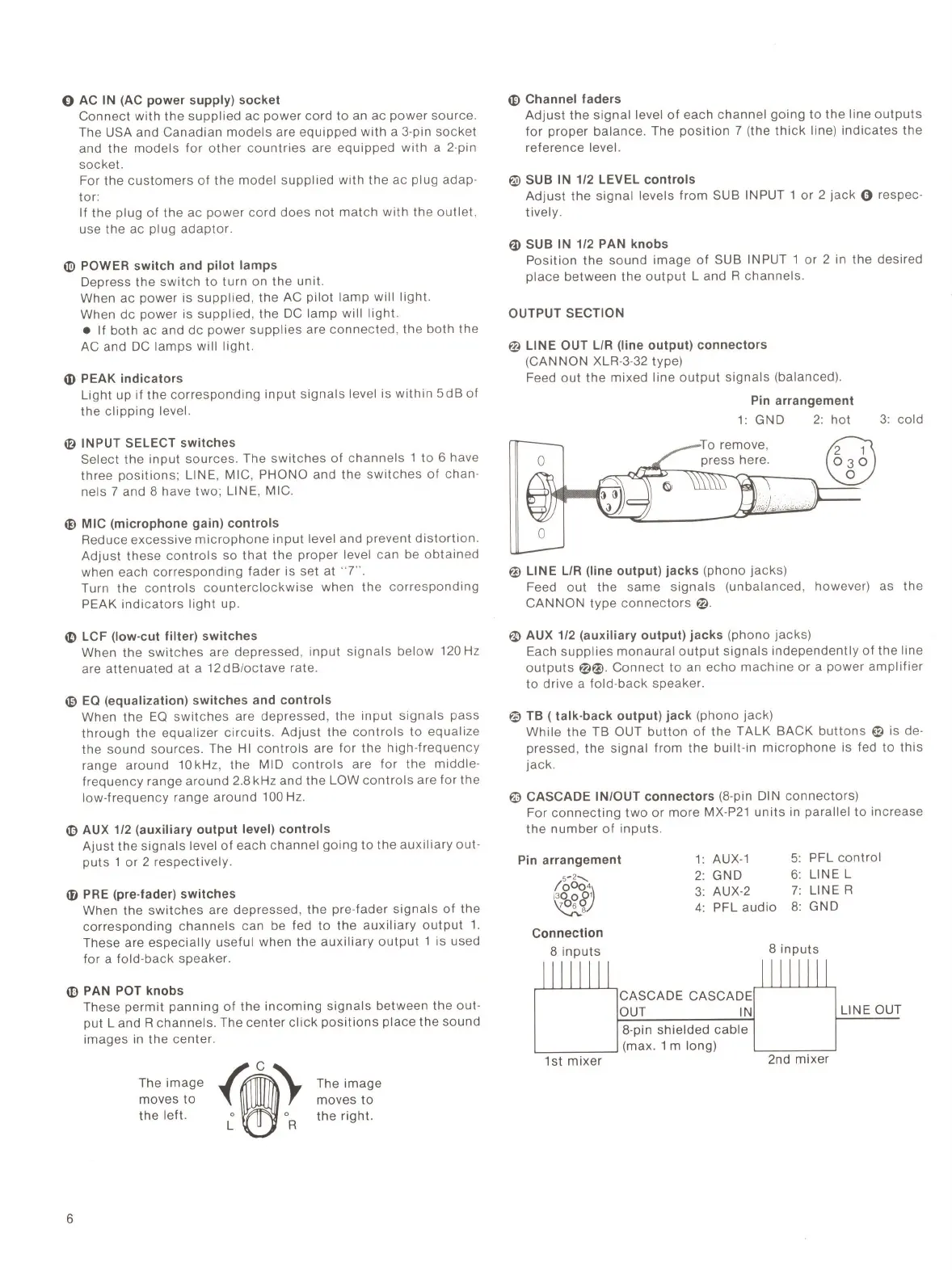
OUTPUT SECTION
@
LINE OUT
L/R
(line output) connectors
(CAN NON XLR-3-32 type)
Feed
out
the
mixed
line
output
signals
(balanced).
Pin
arrangement
1:
GND
2:
hot
3: cold
Q)
0
@ LINE
L/R
(line output) jacks (phono
jacks)
Feed
out
the
same
signals
(unbalanced
, however) as
the
CANNON
type
connectors@
.
~
AUX 1/2 (auxiliary output) jacks (phono
jacks)
Each
supplies
monaural
output
signals
independently
of
the
line
outputs@@
.
Connect
to
an
echo
machine
or
a
power
amplifier
to
drive
a
fold-back
speaker.
@
TB
( talk-back output) jack
(phono
jack
)
While
the
TB OUT
button
of
the
TALK
BACK
buttons~
is de-
pressed,
the
signal
from
the
built
-in
microphone
is fed
to
this
jack
.
©
CASCADE IN/OUT connectors (8-pin DIN
connectors)
For
connecting
two
or
more
MX-
P21
units
in parallel
to
increase
the
number
of
inputs
.
Pin
arrangement
5
--
2
-......
loci
•,
\
1:
AUX-1
2:
GND
3:
AUX-2
5:
PFL
control
6:
LINE L
7: LINE R
~v
4:
PFL
audio
8:
GND
Connection
8
inputs
CASCADE CASCADE
OUT
IN
8-pin
shielded
cable
~---~
(max. 1 m long)
1st
mixer
8
inputs
LINE OUT
2nd
mixer


 To Next Page
 Loading...