EasyManua.ls Logo

Sony MX - Page 37

Sony MX
114 pages
Print Icon
To Next Page IconTo Next Page
To Previous Page IconTo Previous Page
Loading...
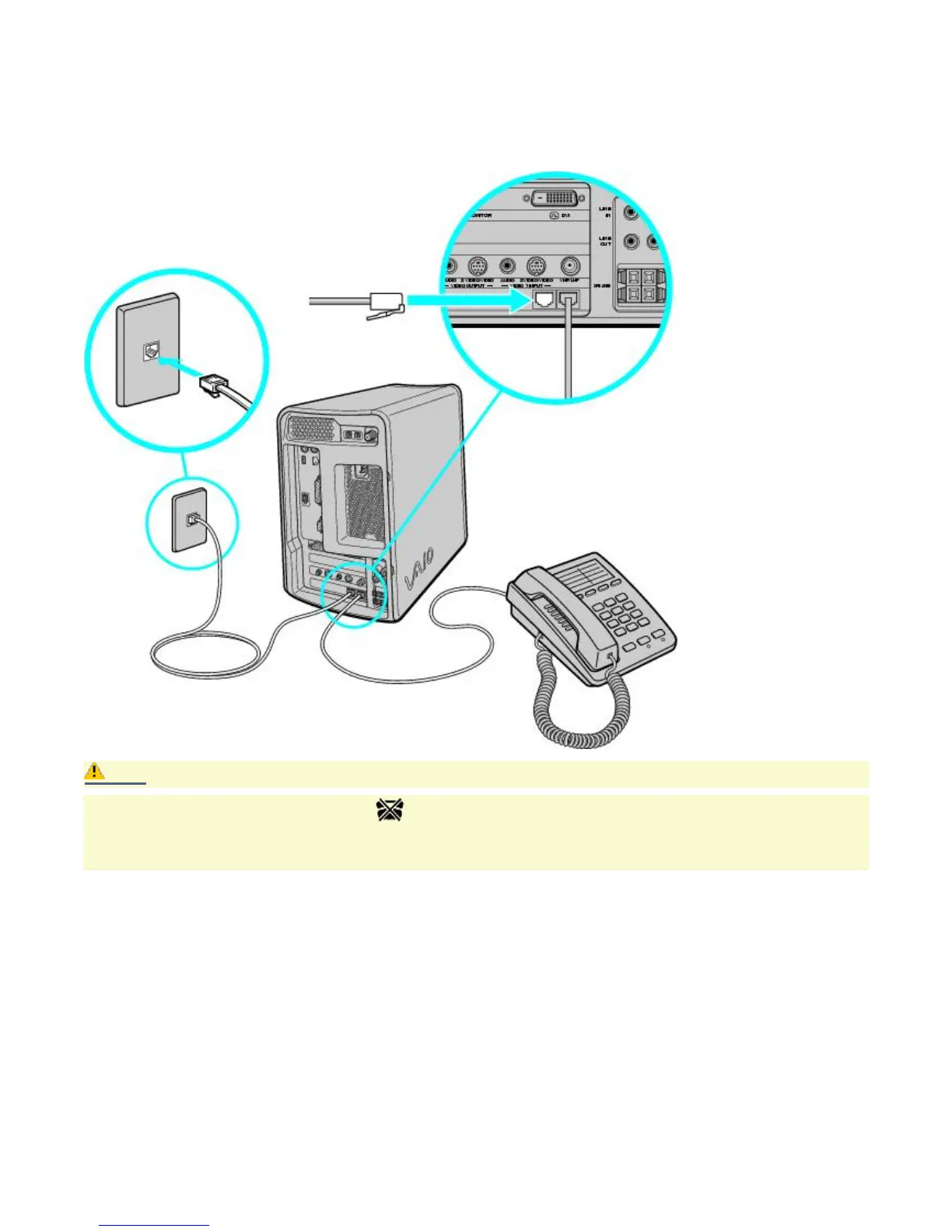
Connecting the phone and modem cables
1.
Unplug your phone's cable from the wall jack, and plug it into the Telephone jack on the computer.
2.
Plug the modem cable (supplied) into the Line jack on the computer, and then plug the other end of the cable
into the wall jack.
Connecting the phone and modem cables
Caution:
Your computer has a protective sticker covering the Ethernet port located on the rear panel. Connect
only 10BASE-T and 100BASE-TX cables to the Ethernet port. Using other cables or a telephone cable may
result in an electric current overload and can cause a malfunction, excessive heat or fire in the port. For
help on connecting to a network, see your network administrator.
Page 37

Other manuals for Sony MX

Related product manuals