EasyManua.ls Logo

Sony MXP-210 - Page 9

Sony MXP-210
38 pages
Print Icon
To Next Page IconTo Next Page
To Previous Page IconTo Previous Page
Loading...
Contro!
Panel
ro)
fo]
ao
6O
}
6O
;
SK
O
N
N
N
C
WOK
MAS
\
a
\
o
@O:
AL
SN
6)
6
|
@
|
N
a
N
NI
Q
N
N
O
N
aU.
pokes!
aia.
N
N
1
Ox
OS:
56:60:
N
10s
66
LOV
SS
yooo
®
®
.
MASTER
L
and
R
faders
AUX
OUT
1
and
2
faders
CLLZZZAGLZZZZANCLZ
LZ
NEZLZZZ
ZANE
ZZ
ZC
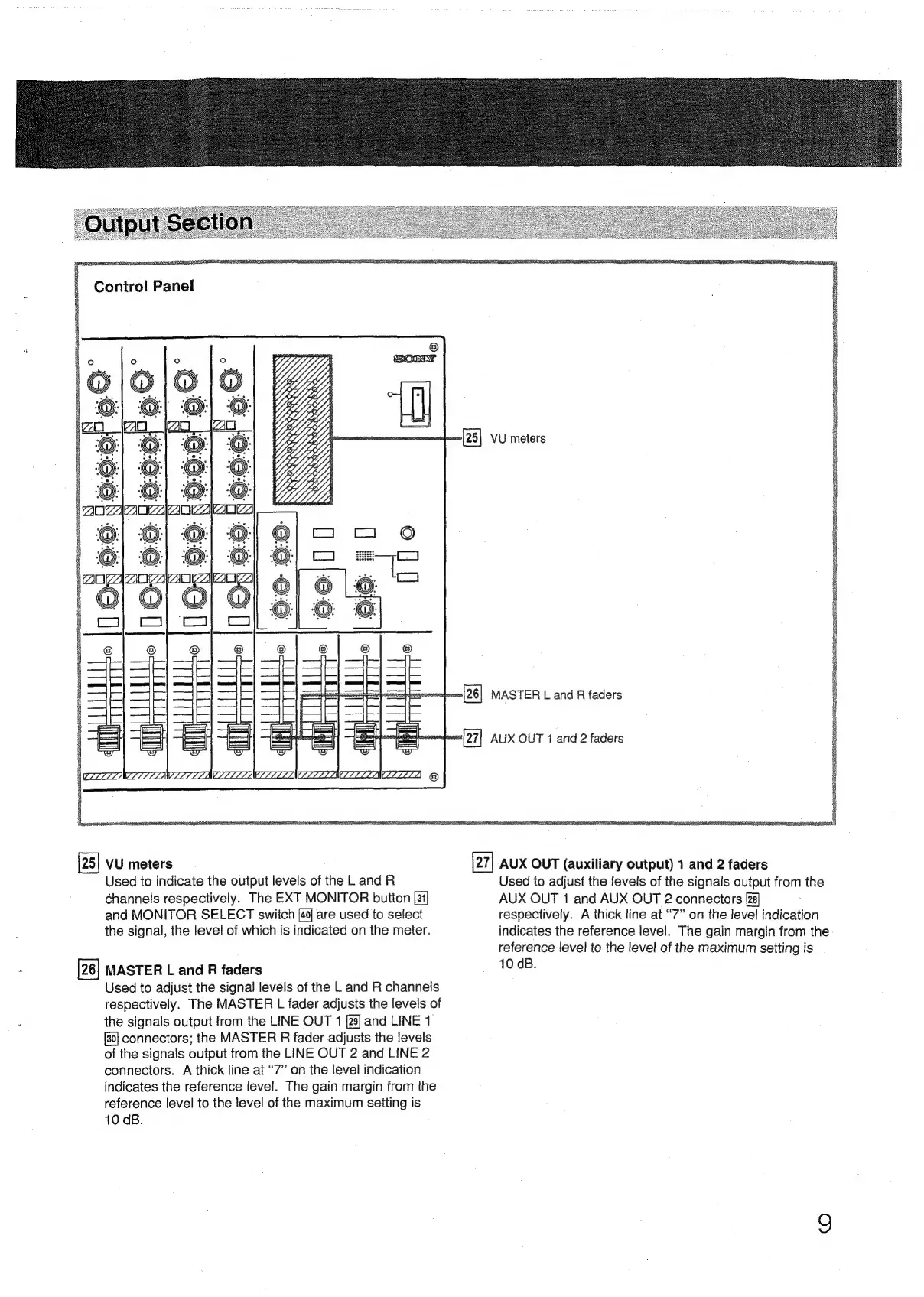
[25]
VU
meters
AUX
OUT
(auxiliary
output)
1
and
2
faders
Used
to
indicate
the
output
levels
of
the
L
and
R
channels
respectively.
The
EXT
MONITOR
button
and
MONITOR
SELECT
switch
40]
are
used
to
select
the
signal,
the
level
of
which
is
indicated
on
the
meter.
MASTER
L
and
R
faders
Used
to
adjust
the
signal
levels
of
the
L
and
R
channels
respectively.
The
MASTER
L
fader
adjusts
the
levels
of
the
signals
output
from
the
LINE
OUT
1
[29]
and
LINE
1
connectors;
the
MASTER
R
fader
adjusts
the
levels
of
the
signals
output
from
the
LINE
OUT
2
and
LINE
2
connectors.
A
thick
line
at
“7”
on
the
level
indication
indicates
the
reference
level.
The
gain
margin
from
the
reference
level
to
the
level
of
the
maximum
seiting
is
10
dB.
Used
to
adjust
the
levels
of
the
signals
output
from
the
AUX
OUT
1
and
AUX
OUT
2
connectors
respectively.
A
thick
line
at
“7”
on
the
level
indication
indicates
the
reference
level.
The
gain
margin
from
the
reference
level
to
the
level
of
the
maximum
setting
is
10
dB.