7
Keyboard operations
The keyboard display appears when you need to
enter text.
When entering addresses, you need only enter
characters in upper case, as the system
automatically converts them to appropriate
characters. You can change the case or enter
special characters/symbols when necessary.
The following types of keyboards are selectable:
• “QWERTY + 123”: QWERTY layout with
number keys.*
• “QWERTY”: Large QWERTY layout without
number keys.*
• “ABC”: Alphabetical layout without number
keys.
* “QWERTY” refers to the top row of letters, reading
from the left, of a traditional typewriter style
keyboard.
For details on how to change the setting, see
page 25.
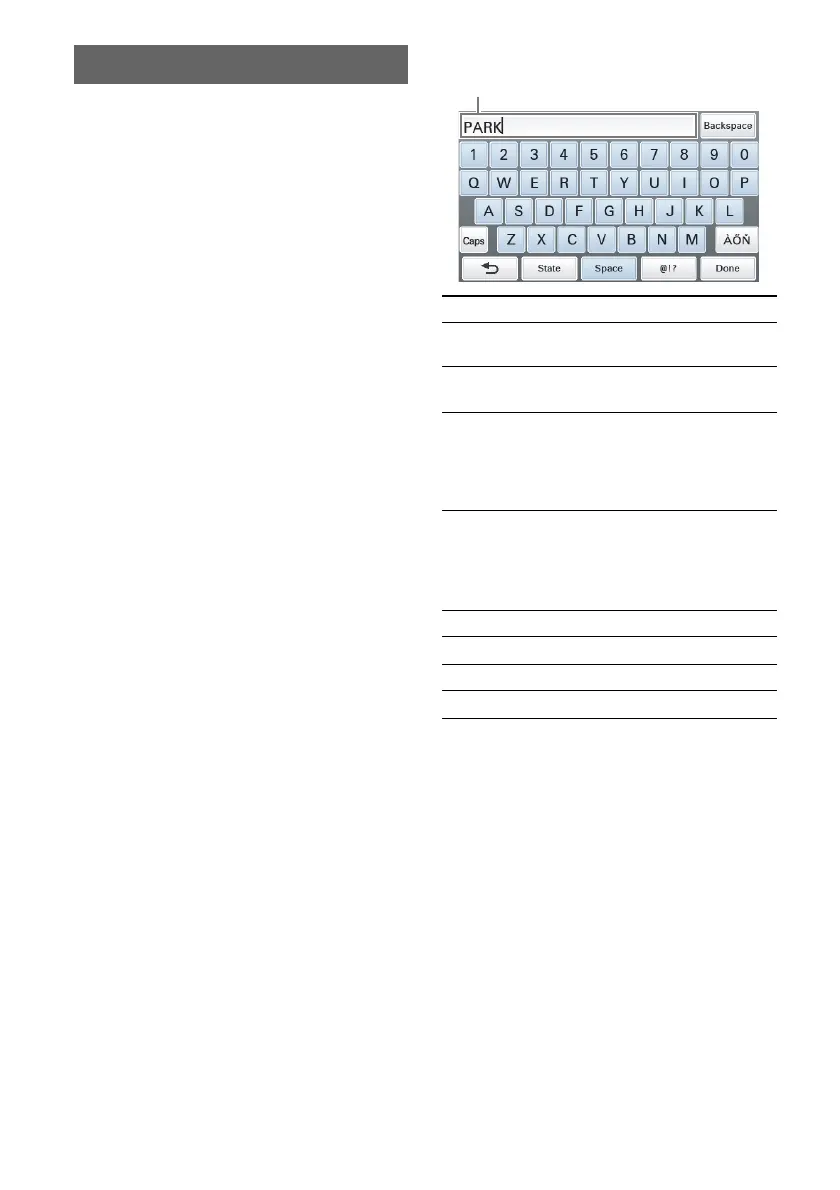
QWERTY layout with number keys:
*1 When another keyboard type is selected, touch
“123” to switch to the numeric keyboard.
*2 The candidate list automatically appears when
candidates are narrowed down as you continue
inputting characters.
To Touch
enter an alphabetical
character
the desired character
key
enter a number the desired number
key*
1
enter a special
character
“ÀŐŇ” to switch to
the special character
keyboard, then the
desired character; and
“ABC” to switch back
enter a symbol “@!?” to switch to the
symbol keyboard, then
the desired symbol
key; and “ABC” to
switch back
enter a space “Space”
delete a character “Backspace”
change the case “Caps”
confirm the entry*
2
“Done”
Entry field



 To Next Page