36
2-2 Rear Panel
Chapter 2 Names and Functions of Parts
The indicator may flash only for five
seconds depending on the alarm.
You can check alarms generated by this unit, using
the alarm log of the utility software. For details,
refer to the help file of the utility software.
If the indicator is flashing four times a second, and
it is not possible to check the alarm log, a
malfunction may have occurred. In this case, contact
your Sony service representative.
When the error is eliminated, the indicator
goes off.
d DISC IN indicator
Lights green when a disc is loaded.
e EJECT button
Ejects a disc (see page 41).
• This button is disabled while the disc is
being accessed. Either stop accessing the
disc before ejecting, or eject by an
operation from the computer.
• When this unit is connected to a
Macintosh computer, this button is
disabled.
f Disc slot
With the label surface on the right, insert
the disc (see page 41).
g Manual eject mechanism
For details, see 3-4-5 “To Eject Discs with the Unit
Powered Off” (page 41).
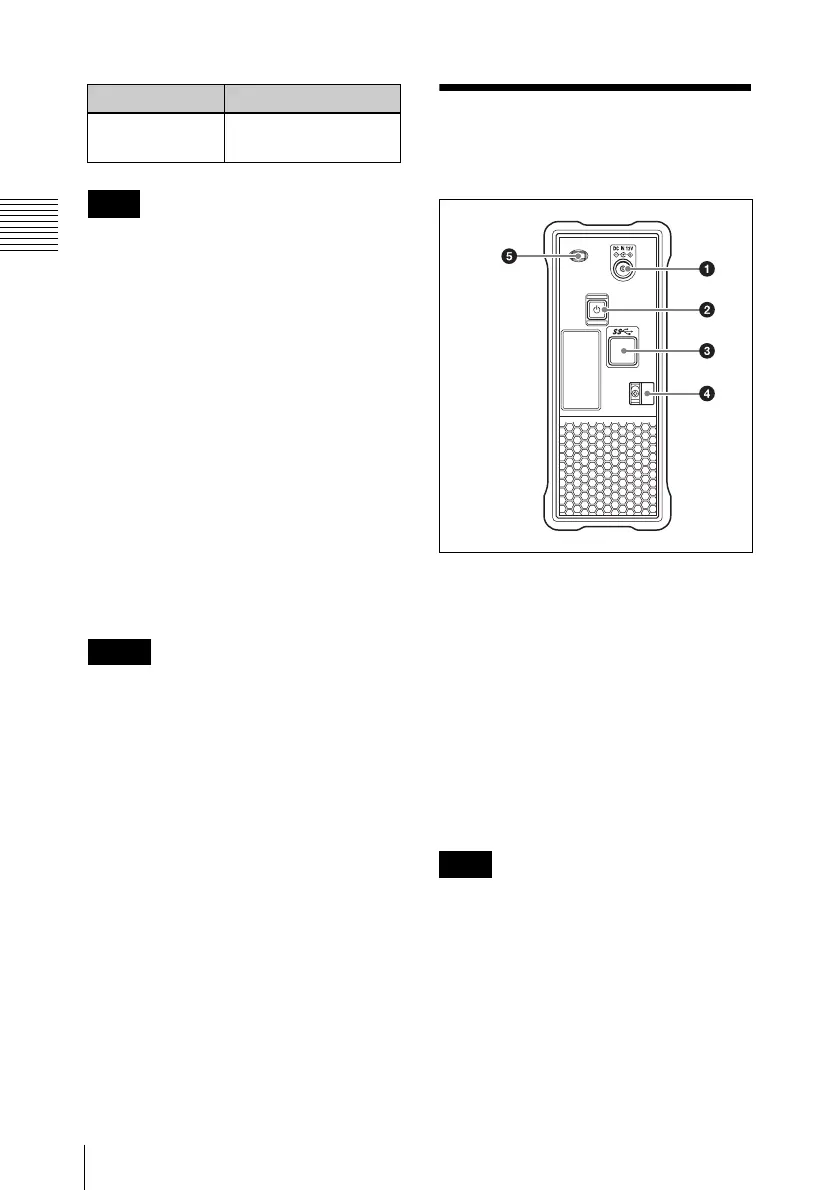
2-2 Rear Panel
a DC power inlet connector
Connect to the AC power using the supplied
AC adaptor and a power cord (not
supplied).
b 1 (power) button
This switches the power on and off.
c USB connector (Super-speed USB
(USB 3.0))
Use the supplied USB cable to connect to
the computer.
If the video and audio are not output on a
computer connected using the USB
connector, try disconnecting the USB cable,
and reconnect making sure it is correctly
inserted.
d Cable clamper
Use this clamper to fix the cable of the AC
adaptor.
Flashing once a
second
An alarm not listed
above occurred.
Note
Notes
Indicator Meaning
Note



 To Next Page