15
EN
CUH-7006B 4-597-874-
32
(2)
EN
/CT/CS
When disposing of the wireless
controller
The lithium-ion battery of the wireless controller is
recyclable. When disposing of the wireless controller, remove
the battery and follow local regulations regarding disposing
of batteries.
Caution
• Remove the battery in a location out of the reach of
small children to help prevent accidental swallowing of
small parts such as the screws.
• Be careful not to hurt your nails or fingers when
removing the controller casing.
• For safety reasons, attach tape or a seal on the metal
part of the battery before disposing.
Notice
Other than when disposing of the wireless controller,
never remove the screws and never remove the battery
from the wireless controller.
1
Disconnect the USB cable from the wireless controller.
2
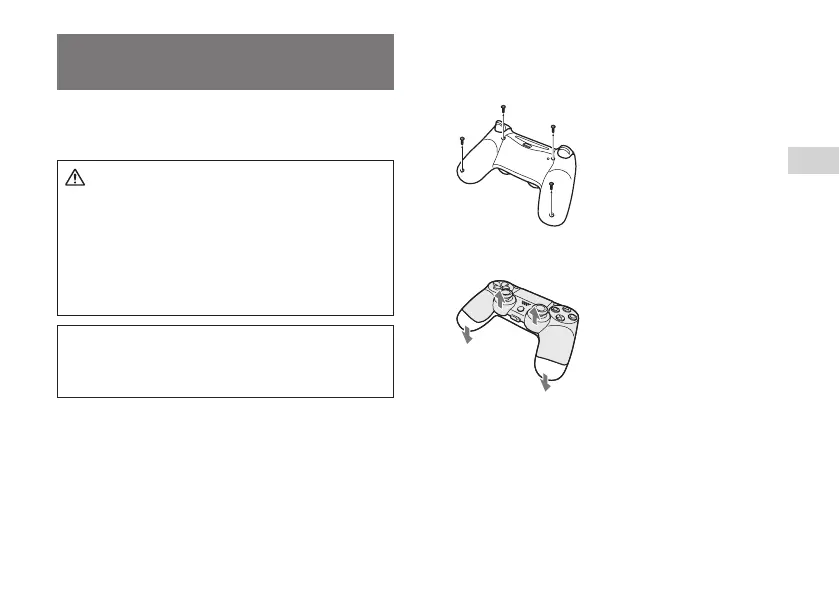
Using a crosshead screwdriver, remove the screws
(4 places).
3
With the front of the controller pointing up, press in
the direction of the arrows to open the cover.
4
With the rear of the controller pointing up, remove the
cover.



 To Next Page