EasyManua.ls Logo

Sony PT-D3 - Page 4

Sony PT-D3
13 pages
Print Icon
To Next Page IconTo Next Page
To Previous Page IconTo Previous Page
Loading...
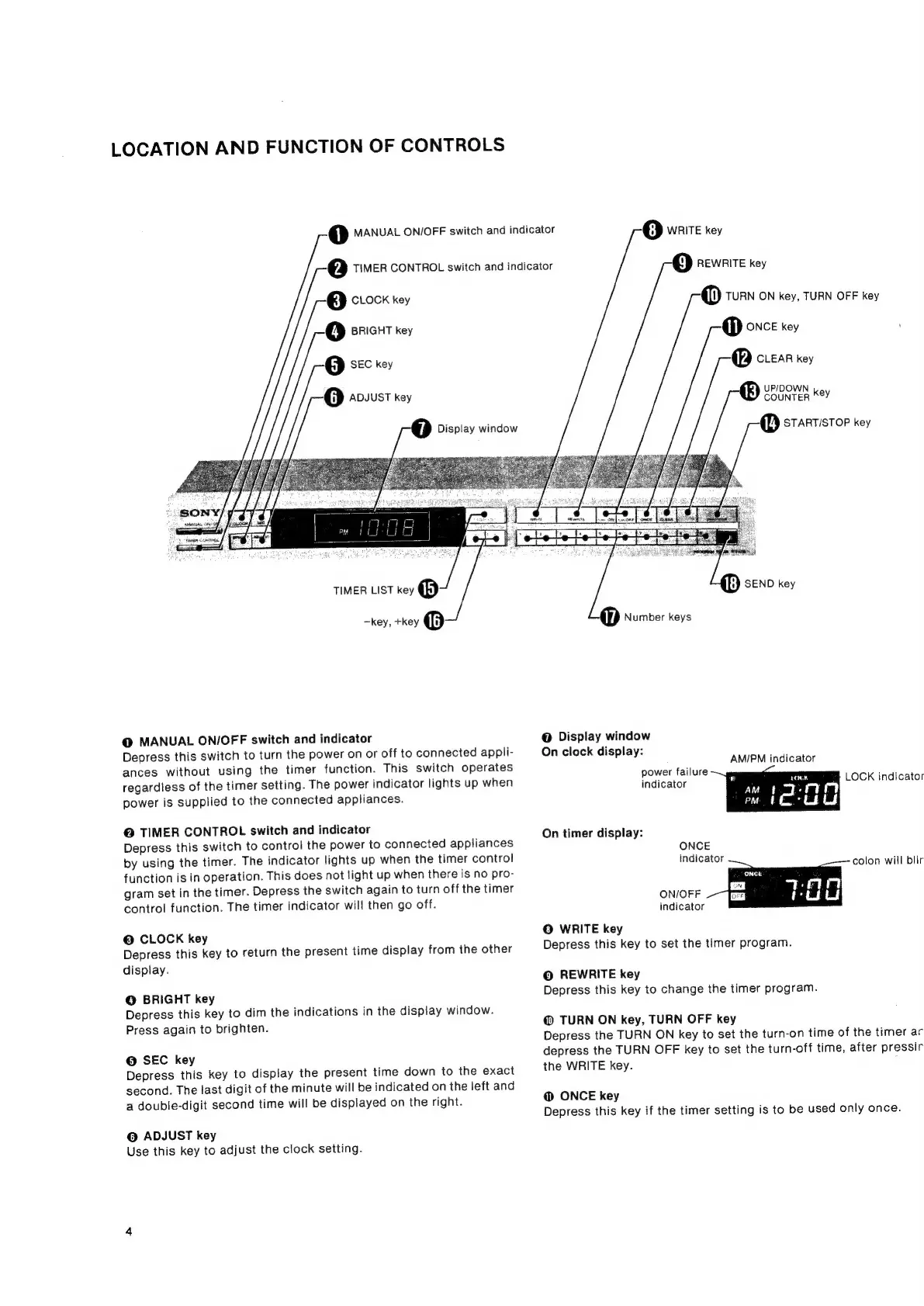
LOCATION
AND
FUNCTION
OF
CONTROLS
@
crock
key
4)
BRIGHT
key
5)
SEC
key
@
ADJUST
key
1)
MANUAL
ON/OFF
switch
and
indicator
@Q
TIMER
CONTROL
switch
and
indicator
(7)
Display
window
8)
WRITE
key
9)
REWRITE
key
@
TURN
ON
key,
TURN
OFF
key
@
ONCE
key
@
cuear
key
UPIDOWN
®
COUNTER
KeY
@
STARTISTOP
key
TIMER
LIST
key
®
—key,
+key
@
@
MANUAL
ON/OFF
switch
and
indicator
Depress
this
switch
to
turn
the
power
on
or
off
to
connected
appli-
ances
without
using
the
timer
function.
This
switch
operates
regardless
of
the
timer
setting.
The
power
indicator
lights
up
when
power
is
supplied
to
the
connected
appliances.
@
TIMER
CONTROL
switch
and
indicator
Depress
this
switch
to
control
the
power
to
connected
appliances
by
using
the
timer.
The
indicator
lights
up
when
the
timer
control
function
is in
operation.
This
does
not
light
up
when
there
is
no
pro-
gram
set
in
the
timer.
Depress
the
switch
again
to
turn
off
the
timer
control
function.
The
timer
indicator
will
then
go
off.
©
CLOCK
key
Depress
this
key
to
return
the
present
time
display
from
the
other
display.
©
BRIGHT
key
Depress
this
key
to
dim
the
indications
in
the
display
window.
Press
again
to
brighten.
@
SEC
key
Depress
this
key
to
display
the
present
time
down
to
the
exact
second.
The
last
digit
of
the
minute
will
be
indicated
on
the
left
and
a
double-digit
second
time
will
be
displayed
on
the
right.
©
ADJUST
key
Use
this
key
to
adjust
the
clock
setting.
if)
SEND
key
@
Display
window
On
clock
display:
AM/PM
indicator
power
failure
indicator
LOCK
indicator
On
timer
display:
ONCE
indicator
colon
will
blir
ON/OFF
indicator
©
WRITE
key
Depress
this
key
to
set
the
timer
program.
@
REWRITE
key
Depress
this
key
to
change
the
timer
program.
@
TURN
ON
key,
TURN
OFF
key
Depress
the
TURN
ON
key
to
set
the
turn-on
time
of
the
timer
ar
depress
the
TURN
OFF
key
to
set
the
turn-off
time,
after
pressir
the
WRITE
key.
@
ONCE
key
Depress
this
key
if
the
timer
setting
is
to
be
used
only
once.