EasyManua.ls Logo

Sony PT-D3 - Page 5

Sony PT-D3
13 pages
Print Icon
To Next Page IconTo Next Page
To Previous Page IconTo Previous Page
Loading...
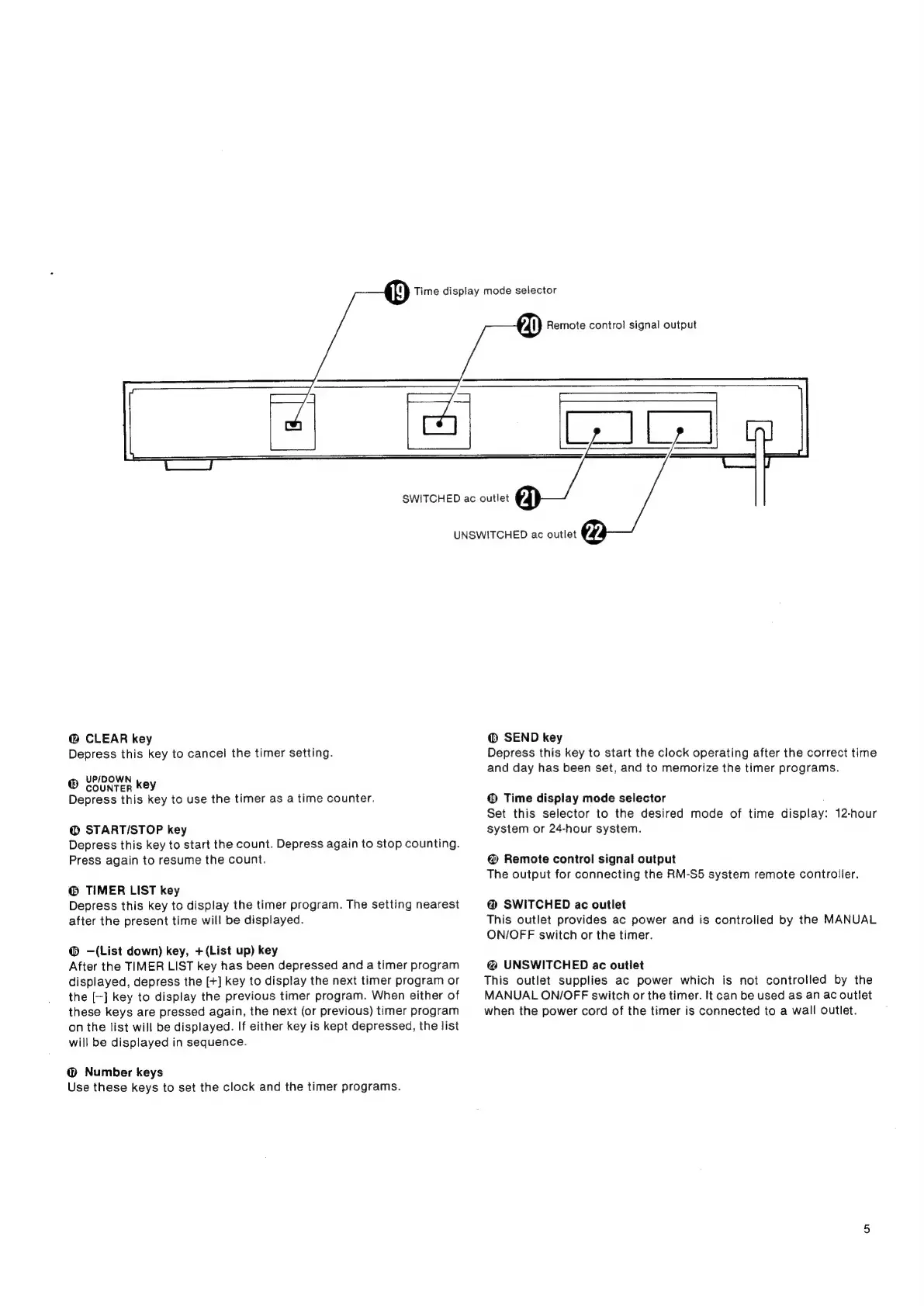
Time
display
mode
selector
Remote
control
signal
output
relere
SWITCHED
ac
outlet
UNSWITCHED
ac
outlet
@
CLEAR
key
Depress
this
key
to
cancel
the
timer
setting.
UP/DOWN
®
counter
key
.
Depress
this
key
to
use
the
timer
as
a
time
counter.
@
STARTI/STOP
key
Depress
this
key
to
start
the
count.
Depress
again
to
stop
counting.
Press
again
to
resume
the
count.
@
TIMER
LIST
key
Depress
this
key
to
display
the
timer
program.
The
setting
nearest
after
the
present
time
will
be
displayed.
@
—(List
down)
key,
+(List
up)
key
After
the
TIMER
LIST
key
has
been
depressed
and
a
timer
program
displayed,
depress
the
[+]
key
to
display
the
next
timer
program
or
the
[-]
key
to
display
the
previous
timer
program.
When
either
of
these
keys
are
pressed
again,
the
next
(or
previous)
timer
program
on
the
list
will
be
displayed.
If
either
key
is
kept
depressed,
the
list
will
be
displayed
in
sequence.
@
Number
keys
Use
these
keys
to
set
the
clock
and
the
timer
programs.
@
SEND
key
Depress
this
key
to
start
the
clock
operating
after
the
correct
time
and
day
has
been
set,
and
to
memorize
the
timer
programs.
@
Time
display
mode
selector
Set
this
selector
to
the
desired
mode
of
time
display:
12-hour
system
or
24-hour
system.
@
Remote
control
signal
output
The
output
for
connecting
the
RM-S5
system
remote
controller.
@
SWITCHED
ac
outlet
This
outlet
provides
ac
power
and
is
controlled
by
the
MANUAL
ON/OFF
switch
or
the
timer.
@
UNSWITCHED
ac
outlet
This
outlet
supplies
ac
power
which
is
not
controlled
by
the
MANUAL
ON/OFF
switch
or
the
timer.
It
can
be
used
as
an
ac
outlet
when
the
power
cord
of
the
timer
is
connected
to
a
wall
outlet.