EasyManua.ls Logo

Sony PT-D3 - Page 6

Sony PT-D3
13 pages
Print Icon
To Next Page IconTo Next Page
To Previous Page IconTo Previous Page
Loading...
HOW
TO
SET
THE
CLOCK
Setting
the
clock
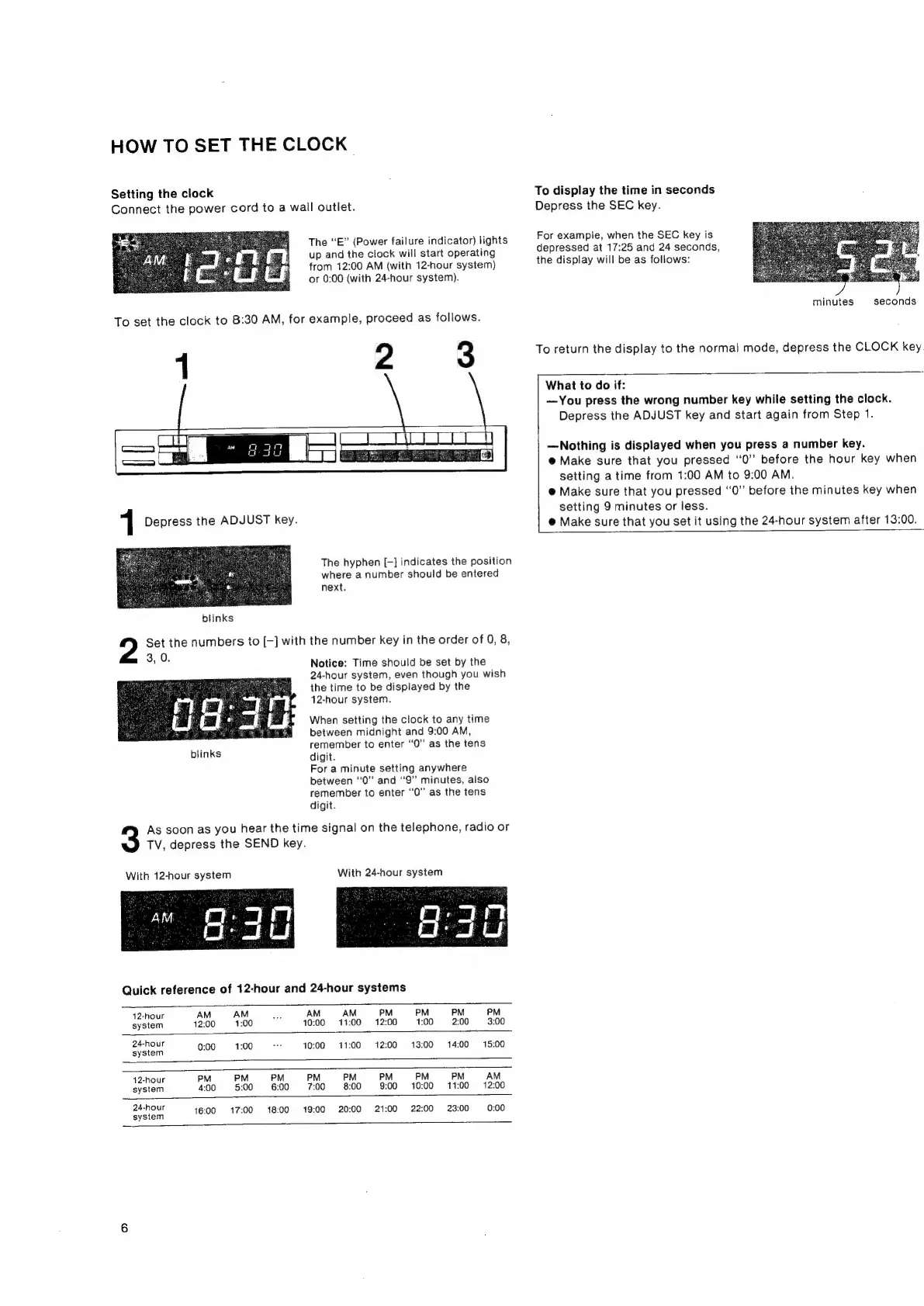
Connect
the
power
cord
to
a
wall
outlet.
The
“E”
(Power
failure
indicator)
lights
up
and
the
clock
will
start
operating
from
12:00
AM
(with
12-hour
system)
or
0:00
(with
24-hour
system).
To
set
the
clock
to
8:30
AM,
for
example,
proceed
as
follows.
:
2
3
1
Depress
the
ADJUST
key.
The
hyphen
[-]
indicates
the
position
where
a
number
should
be
entered
next.
blinks
Set
the
numbers
to
[-]
with
the
number
key
in
the
order
of
0,
8,
3,
0.
Notice:
Time
should
be
set
by
the
24-hour
system,
even
though
you
wish
the
time
to
be
displayed
by
the
12-hour
system.
When
setting
the
clock
to
any
time
between
midnight
and
9:00
AM,
.
remember
to
enter
‘‘0”
as
the
tens
blinks
digit.
For
a
minute
setting
anywhere
between
“0”
and
‘‘9”
minutes,
also
remember
to
enter
“0”
as
the
tens
digit.
As
soon
as
you
hear
the
time
signal
on
the
telephone,
radio
or
TV,
depress
the
SEND
key.
With
12-hour
system
With
24-hour
system
Quick
reference
of
12-hour
and
24-hour
systems
12-hour
AM
AM
on
AM AM
PM
PM
PM
PM
system
12:00
1:00
10:00
11:00
12:00
1:00
2:00
3:00
24-hour
|
:
ss
f
:
-
.
.
.
system
0:00
1:00
10:00
11:00
12:00 13:00
14:00
15:00
42-hour
PM
PM
PM
PM
PM
PM
PM
PM
AM
system
4:00
5:00
6:00
7:00
8:00
9:00
10:00
11:00
12:00
24-hour
. :
:
5
| - .
is
system
16:00
17:00
18:00
19:00
20:00
21:00
22:00
23:00
0:00
To
display
the
time
in
seconds
Depress
the
SEC
key.
For
example,
when
the
SEC
key
is
depressed
at
17:25
and
24
seconds,
the
display
will
be
as
follows:
seconds
minutes
To
return
the
display
to
the
normal
mode,
depress
the
CLOCK
key
What
to
do
if:
—You
press
the
wrong
number
key
while
setting
the
clock.
Depress
the
ADJUST
key
and
start
again
from
Step
1.
—Nothing
is
displayed
when
you
press
a
number
key.
@
Make
sure
that
you
pressed
“0”
before
the
hour
key
when
setting
a
time
from
1:00
AM
to
9:00
AM.
@
Make
sure
that
you
pressed
“0”
before
the
minutes
key
when
setting
9
minutes
or
less.
@
Make
sure
that
you
set
it
using
the
24-hour
system
after
13:00.