EasyManua.ls Logo

Sony PT-D3 - Page 7

Sony PT-D3
13 pages
Print Icon
To Next Page IconTo Next Page
To Previous Page IconTo Previous Page
Loading...
HOW
TO
SET
A
TIMER
PROGRAM
Timer
setting
procedure
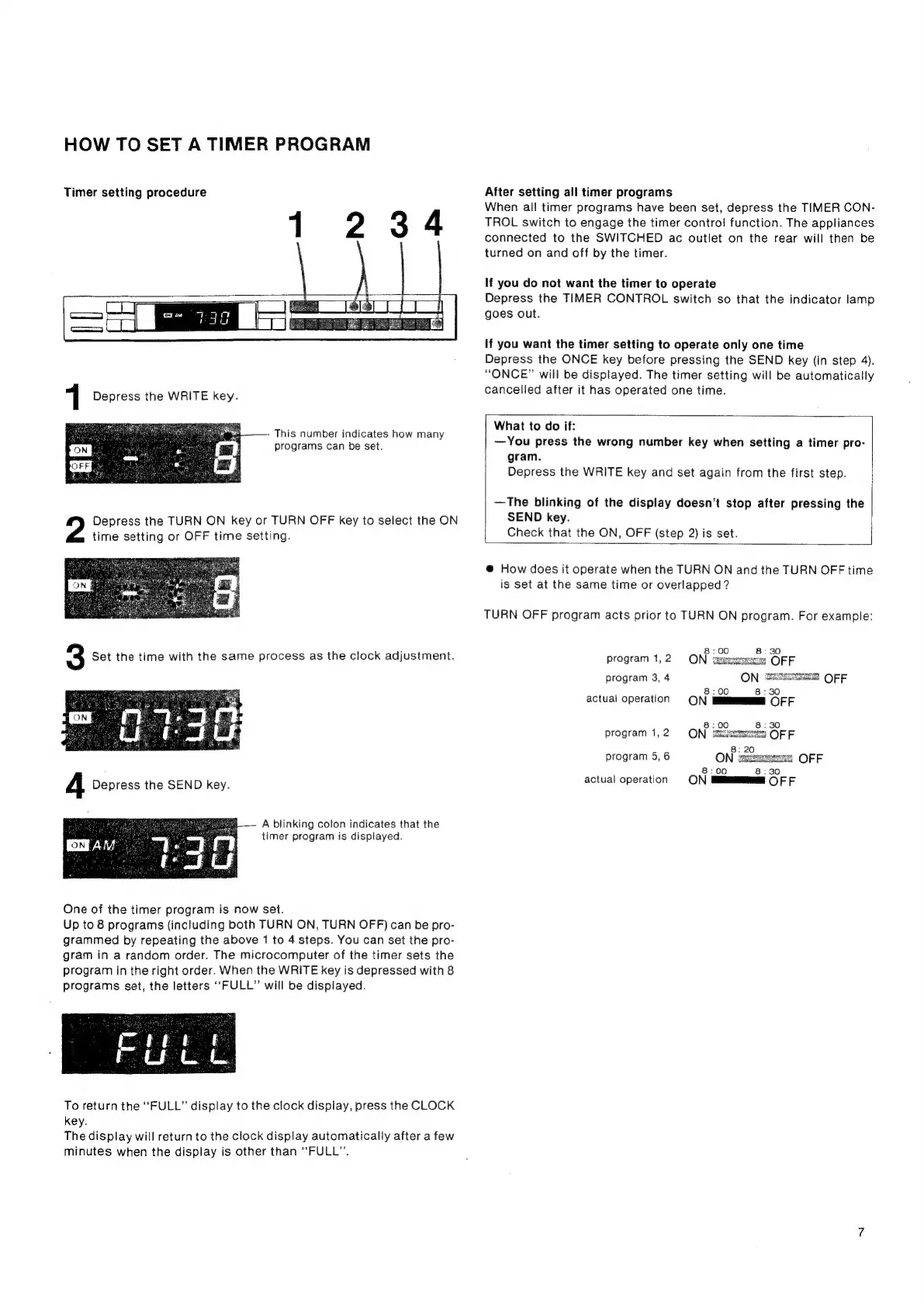
1234
This
number
indicates
how
many
programs
can
be
set.
Depress
the
TURN
ON
key
or
TURN
OFF
key
to
select
the
ON
time
setting
or
OFF
time
setting.
A
blinking
colon
indicates
that
the
timer
program
is
displayed.
One
of
the
timer
program
is
now
set.
Up
to
8
programs
(including
both
TURN
ON,
TURN
OFF)
can
be
pro-
grammed
by
repeating
the
above
1
to
4
steps.
You
can
set
the
pro-
gram
in
a
random
order.
The
microcomputer
of
the
timer
sets
the
program
in
the
right
order.
When
the
WRITE
key
is
depressed
with
8
programs
set,
the
letters
‘‘FULL”
will
be
displayed.
To
return
the
“FULL”
display
to
the
clock
display,
press
the
CLOCK
key.
The
display
will
return
to
the
clock
display
automatically
after
a
few
minutes
when
the
display
is
other
than
“FULL”.
After
setting
all
timer
programs
When
all
timer
programs
have
been
set,
depress
the
TIMER
CON-
TROL
switch
to
engage
the
timer
control!
function.
The
appliances
connected
to
the
SWITCHED
ac
outlet
on
the
rear
will
then
be
turned
on
and
off
by
the
timer.
If
you
do
not
want
the
timer
to
operate
Depress
the
TIMER
CONTROL
switch
so
that
the
indicator
lamp
goes
out.
If
you
want
the
timer
setting
to
operate
only
one
time
Depress
the
ONCE
key
before
pressing
the
SEND
key
(in
step
4).
“ONCE”
will
be
displayed.
The
timer
setting
will
be
automatically
cancelled
after
it
has
operated
one
time.
What
to
do
if:
—You
press
the
wrong
number
key
when
setting
a
timer
pro-
gram.
Depress
the
WRITE
key
and
set
again
from
the
first
step.
—The
blinking
of
the
display
doesn’t
stop
after
pressing
the
SEND
key.
Check
that
the
ON,
OFF
(step
2)
is
set.
@
How
does
it
operate
when
the
TURN
ON
and
the
TURN
OFF
time
is
set
at
the
same
time
or
overlapped?
TURN
OFF
program
acts
prior
to
TURN
ON
program.
For
example:
8:00
8:30
program
1,2
ON
geeeeewerees
OFF
program
3,
4
ON
SS5cNt
OFF
.
8:00
8:30
actual
operation
ON
i
OFF
8:00 8:30
program
1,2)
ON
siemens
OFF
program
5,
6
ON:
oan
|
OFF
actual
operation