EasyManua.ls Logo

Sony PT-D3 - Page 8

Sony PT-D3
13 pages
Print Icon
To Next Page IconTo Next Page
To Previous Page IconTo Previous Page
Loading...
HOW
TO
LOCK
IN
ALL
SETTINGS
After
the
timer
programs
have
been
set,
you
can
lock
them
and
all
other
settings
in
by
depressing
the
number
keys
0,
0
and
7
when
the
present
time
is
displayed.
“LOCK”
will
be
displayed
and
all
settings
will
be
locked
so
that
they
will
not
change
even
if
the
number
keys
are
depressed.
To
release
the
lock,
press
the
number
keys
0,
0
and
7
when
the
present
time
is
displayed.
When
the
timer
programs
are
locked
in,
the
CLOCK
key,
BRIGHT
key,
TIMER
LIST
key,
[+]
key
and
[-]
key
will
still
operate.
What
to
do
if:
—“LOCK”
is
not
displayed
when
you
press
0,
0,
7.
Set
the
display
to
the
clock
display.
HOW
TO
CHECK
A
TIMER
PROGRAM
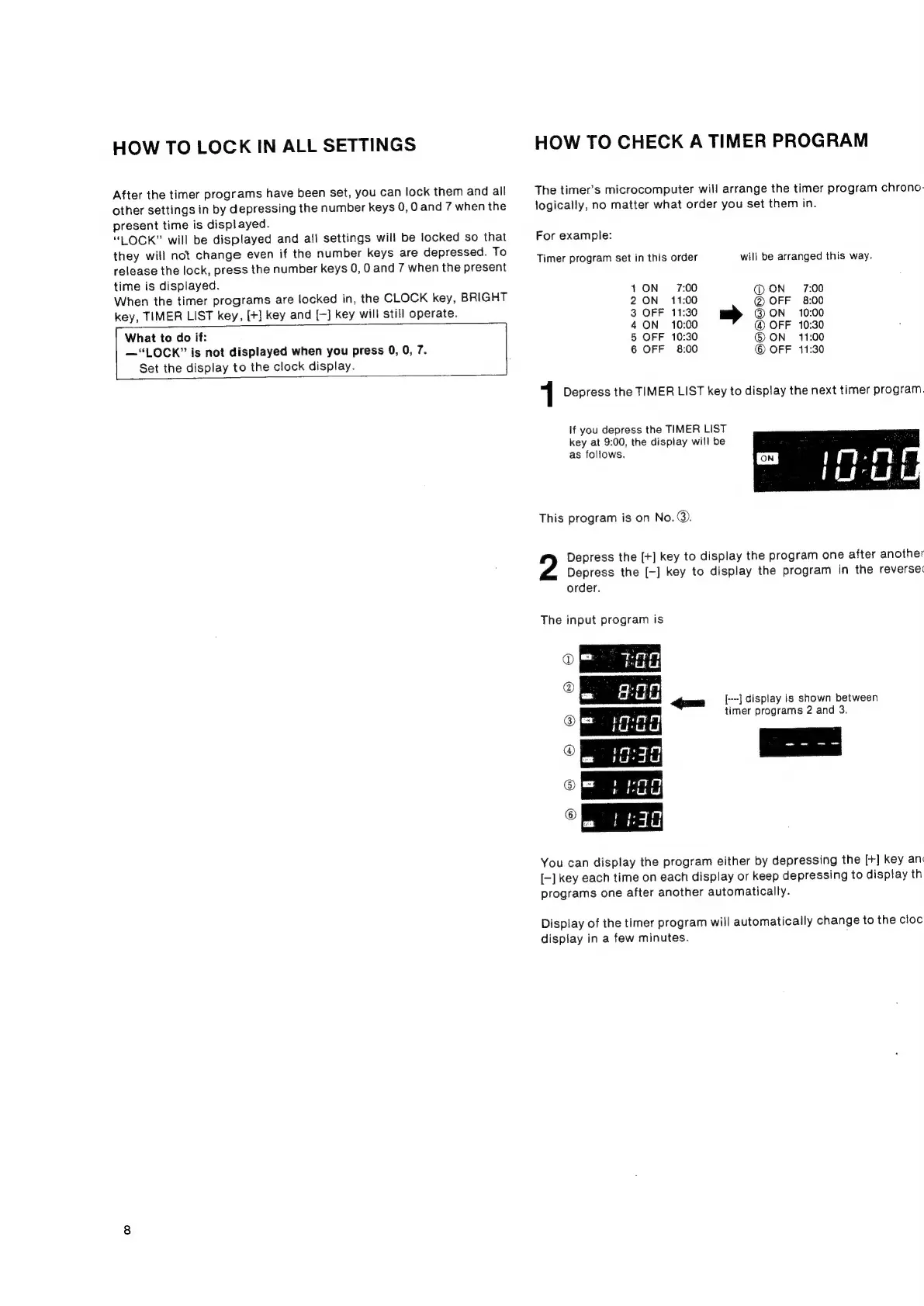
The
timer’s
microcomputer
will
arrange
the
timer
program
chrono-
logically,
no
matter
what
order
you
set
them
in.
For
example:
Timer
program
set
in
this
order
will
be
arranged
this
way.
1
ON
7:00
@ON
7:00
2
ON
11:00
OFF
8:00
3
OFF
11:30
@
ON
10:00
4
ON
10:00
@
OFF
10:30
5
OFF
10:30
©
ON
11:00
6
OFF
8:00
©
OFF
11:30
1
Depress
the
TIMER
LIST
key
to
display
the
next
timer
program.
If
you
depress
the
TIMER
LIST
key
at
9:00,
the
display
will
be
as
follows.
This
program
is
on
No.@.
Depress
the
[+]
key
to
display
the
program
one
after
another
Depress
the
[-]
key
to
display
the
program
in
the
reverse:
order.
The
input
program
is
=
TFET
@
ie
a
me
$00
_
a
am
[--]
display
is
shown
between
@
Ca
etagn
timer
programs
2
and
3.
PO
unt
om
a
=
boeiTth
Fired
©
©
om
|
i
You
can
display
the
program
either
by
depressing
the
[+]
key
an
[-]
key
each
time
on
each
display
or
keep
depressing
to
display
th
programs
one
after
another
automatically.
Display
of
the
timer
program
will
automatically
change
to
the
cloc
display
in
a
few
minutes.