/3-4. WHITE BALANCE/
(Screen (G2) Voltage)
1. Receive a dot signal with the pattern . generator.
2. Switch over COLOR TEMP to 6500° K.
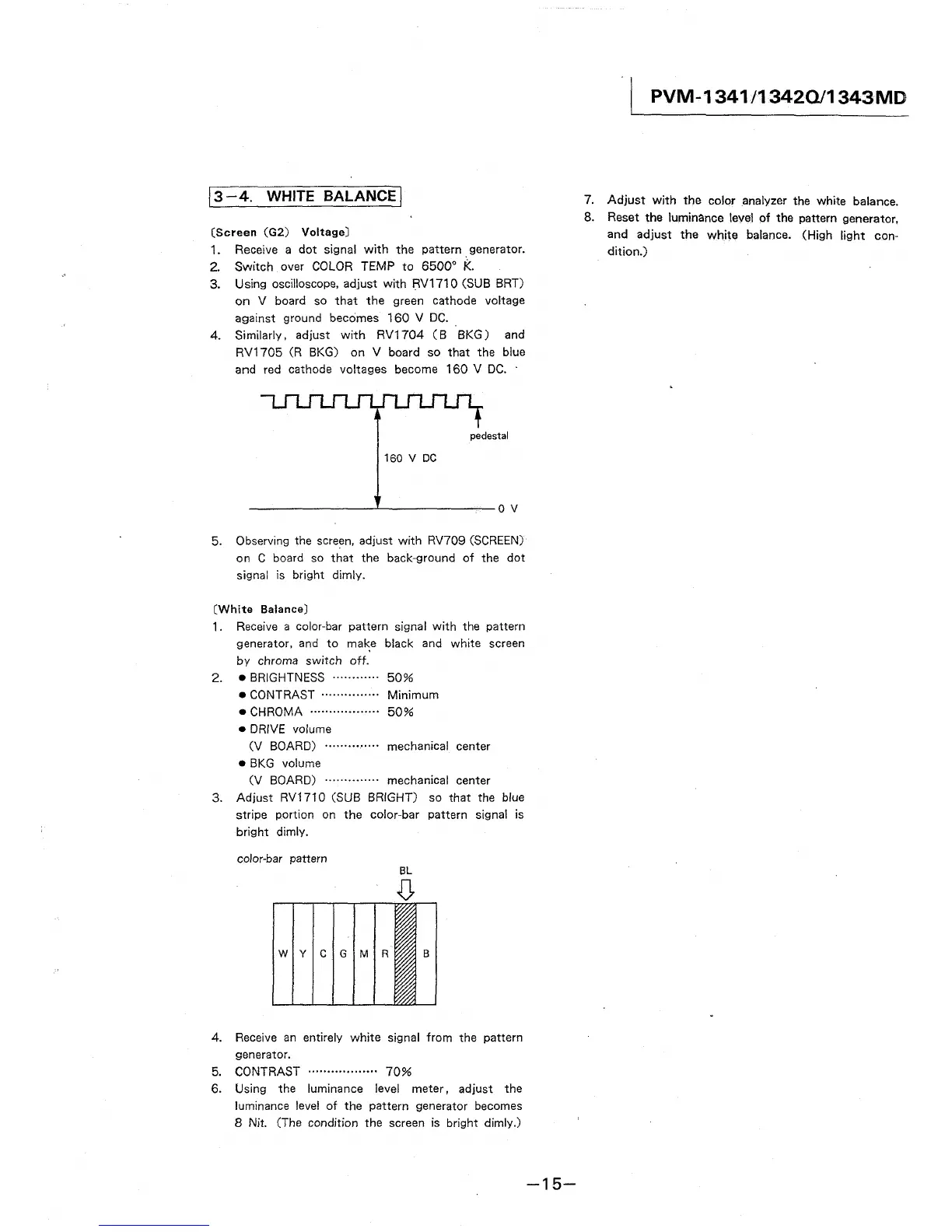
3. Using oscilloscope, adjust with RV1710 (SUB BRT)
on V board so that the green cathode voltage
against ground becomes 160 V DC ..
4. Similarly, adjust with RV1704 ( B 8KG) and
RV1705 (R BKG) on V board so that the blue
and red cathode voltages become 160 V DC. ·
pedestal
160 V DC
---------'--------ov
5. Observing the screen, adjust with RV709 (SCREEN)
on C board so that the back-ground of the dot
signal is bright dimly.
(White Balance)
1. Receive a color-bar pattern signal with the pattern
generator, and to ma~e black and white screen
by chroma switch off.
2. • BRIGHTNESS ............ 50%
• CONTRAST ............... Minimum
• CHROMA .................. 50%
• DRIVE volume
(V BOARD) .............. mechanical center
• BKG volume
(V BOARD) .............. mechanical center
3. Adjust RV1710 (SUB BRIGHT) so that the blue
stripe portion on the color-bar pattern signal is
bright dimly.
color-bar pattern
W Y C G M R B
4. Receive an entirely white signal from the pattern
generator.
5. CONTRAST .................. 70%
6. Using the luminance level meter, adjust the
luminance level of the pattern generator becomes
8 Nit. (The condition the screen is bright dimly.)
-15-
PVM-1341/13420/1343MD
7. Adjust with the color analyzer the white balance.
8. Reset the luminance level of the pattern generator,
and adjust the white balance. (High light con-
dition.)




 To Next Page