76
b Note
The recording time from when recording starts
until recording ends is approximately double the
XAVC recording time.
Playback speed for [FRAME RATE]
and [REC FORMAT] settings during
Super Slow Motion
When [60i] is selected
When [50i] is selected
Recording time for [REC TIMING] and
[FRAME RATE] settings
The approximate recording time based on
the recording timing and frame rate settings
is as follows.
When [60i] is selected
When [50i] is selected
b Note
The same limitations and precautions for XAVC
HD also apply for Super Slow Motion.
See page 65.
Movies recorded in MPEG HD can be
played back in MPEG HD.
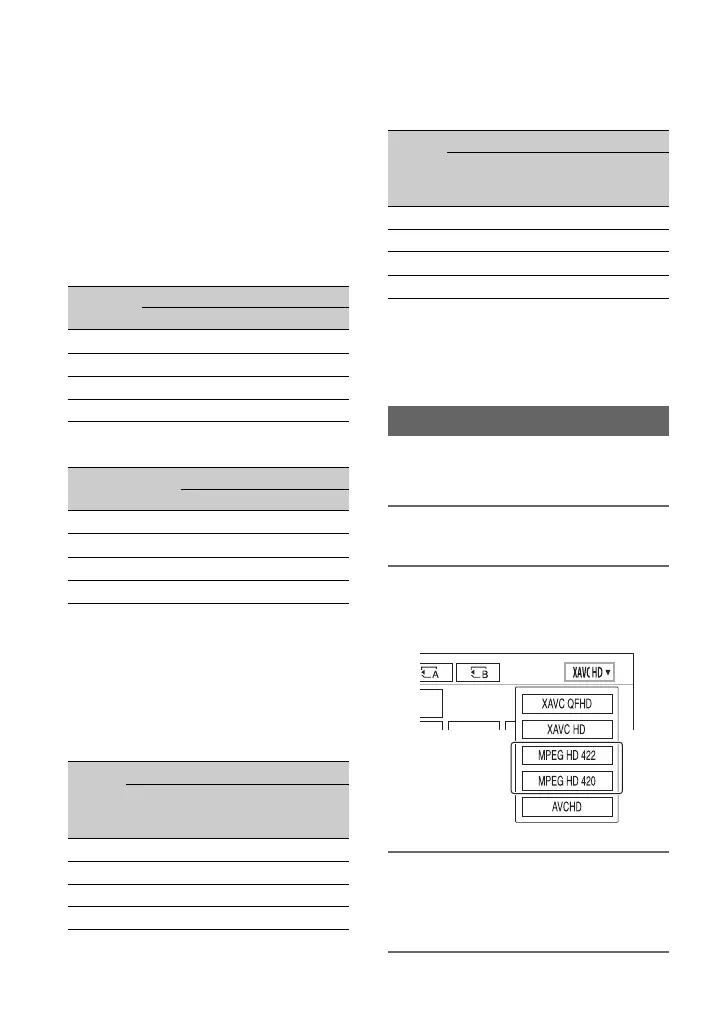
1 Press the THUMBNAIL button.
2 You can switch playback mode to
[MPEG HD 422] or [MPEG HD 420]
on the thumbnail screen.
3 Select the thumbnail of the movie
you want to play to start
playback.
FRAME
RATE
REC FORMAT
1080/24p 1080/30p
960 2.5% slow 3.125% slow
480 5% slow 6.25% slow
240 10% slow 12.5% slow
120 20% slow 25% slow
FRAME RATE
REC FORMAT
1080/25p
800 3.125% slow
400 6.25% slow
200 12.5% slow
100 25% slow
FRAME
RATE
REC TIMING
START
TRIGGER
END
TRIGGER
END
TRIGGER
HALF
960 19 sec 19 sec 9 sec
480 10 sec 10 sec 5 sec
2408 sec8 sec4 sec
120 16 sec 16 sec 8 sec
FRAME
RATE
REC TIMING
START
TRIGGER
END
TRIGGER
END
TRIGGER
HALF
800 23 sec 23 sec 11 sec
400 12 sec 12 sec 6 sec
200 9 sec 9 sec 5 sec
100 19 sec 19 sec 10 sec
Playback in MPEG HD
MPEG HD recording (continued)



 To Next Page