89
Recording
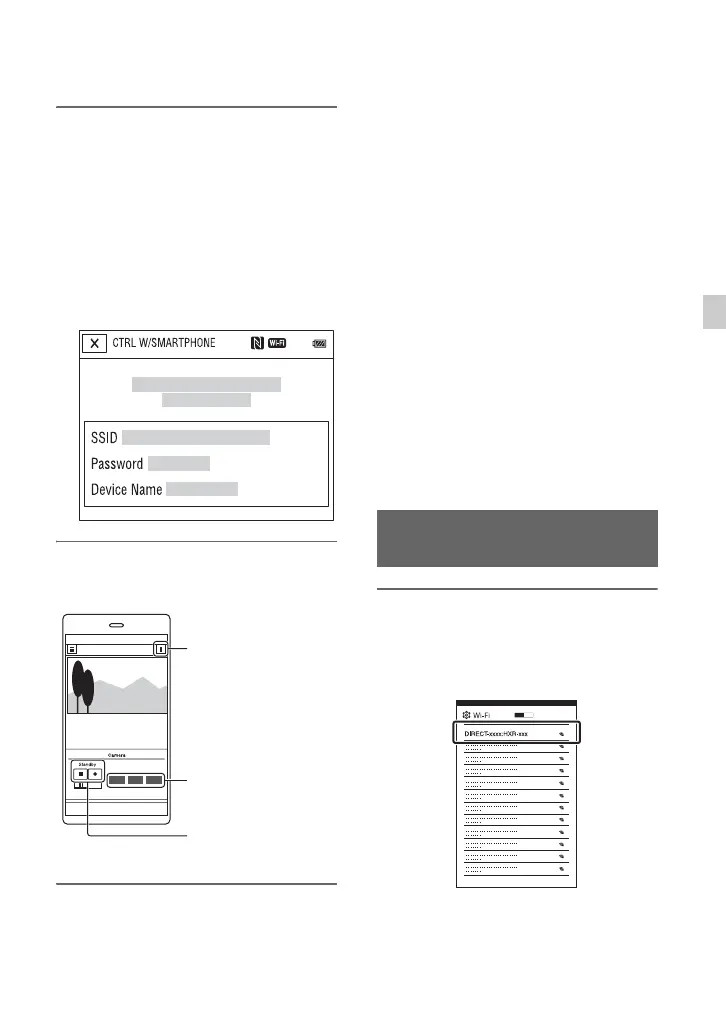
3 Connect the smartphone to the
camcorder, using the information
that appears on the screen when
the camcorder is ready to be
connected.
The connection method will depend on
the type of smartphone.
Android: page 89
iPhone/iPad: page 90
4 Operate the camcorder using the
smartphone.
b Notes
• Live view images may not be displayed
smoothly, depending on the smartphone
performance and/or transmission conditions.
• Movies cannot be saved on a smartphone.
• For details about usage restrictions, see
“Function limitations when recording” (p. 180).
z Tip
• You can assign [SMARTPHONE CONNECT]
to an ASSIGN button.
You can start [CTRL W/SMARTPHONE] by
pressing that ASSIGN button when the shooting
screen is displayed (p. 85).
Functions that can be controlled using
[CTRL W/SMARTPHONE]
• Recording start/stop
• Touch focus
– Available when using manual focus.
• Zooming
•Iris adjustment
b Note
• You cannot perform other operations during
touch focus.
1 Select [Settings] on your
smartphone, then select [Wi-Fi]
and the SSID (displayed on the
camcorder).
Setting button
Iris, Focus, and
Zoom buttons
Start/stop button
Connecting without using the
NFC function (Android)
Continued ,



 To Next Page