86
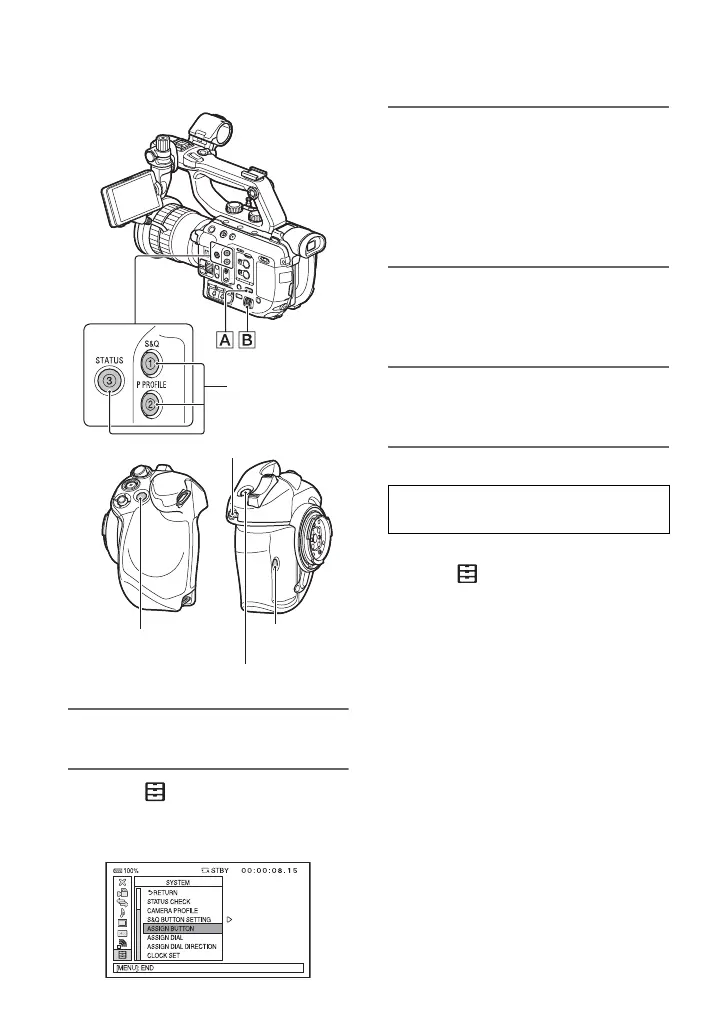
1 Press the MENU button A.
2 Select (SYSTEM) t [ASSIGN
BUTTON] with the SEL/SET dial
B.
3 Select the ASSIGN button to
which you want to assign a
function with the SEL/SET dial B,
then press the dial.
[--------] appears if no function is
assigned to the ASSIGN button.
4 Select the function that you want
to assign with the SEL/SET dial
B, then press the dial.
5 Select [OK] with the SEL/SET dial
B, then press the dial.
1 Press the MENU button A.
2 Select (SYSTEM) t [ASSIGN
DIAL] with the SEL/SET dial B.
3 Select the function that you want to
assign with the SEL/SET dial B, then
press the dial.
ASSIGN1 to 3
buttons
ASSIGN5 button
ASSIGN4 button
ASSIGN6
button
ASSIGN dial
Assigning a function to the ASSIGN
dial
Assigning functions to the ASSIGN buttons/dial (continued)



 To Next Page