46
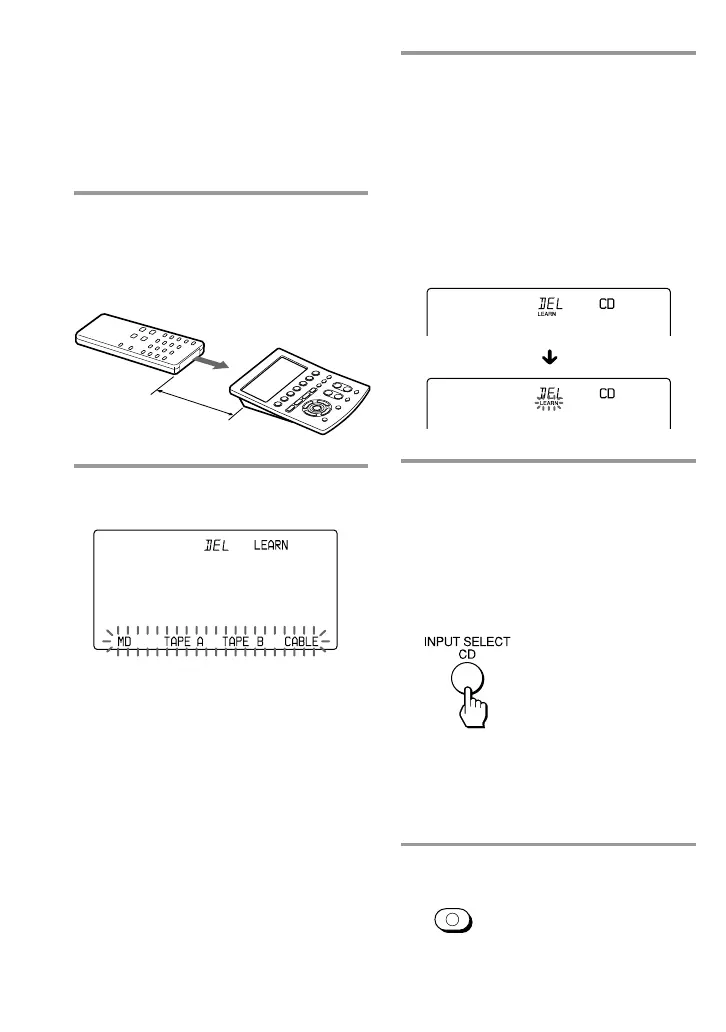
3 While pressing the Mode Display
key (LEARN), press the
Component Select button or the
Label key you want to “teach,”
and release both keys.
(To change the Label keys, press the
OTHER button repeatedly.)
The selected component name
appears on the Mode Display key, and
“LEARN” begins to flash.
4 Press and hold down the button
on the component’s remote
control (amplifier in this example)
until you hear a beep.
(If you release the button before
you hear a beep, the signal may
not be learned correctly.)
“LEARN” stops flashing and stays lit.
If “NG” flashes on the display
Learning did not succeed. Try Steps 3 and
4 again.
5 Press COMMANDER OFF.
Adding an Extra Function to the
Component Select Buttons
(continued)
COMMANDER
OFF
Example : To program the input
select signal of your amplifier to
the CD button
1 Place the RM-AV3000 head to
head with your component’s
remote control.
2 Follow Steps 2 and 3 on page 20
in “Learning Function”.
RM-AV3000
Remote control of
your component
about 2 – 4 inches
(5 – 10 cm) away


 To Next Page