79
Changing the Names of
the Label Keys or the
Component Names on
the Mode Display Key
You can change the display of the
Component names on the Mode Display
key or on the Label keys, the function
displays of components, the SYSTEM4 -
SYSTEM15 and PROG1 - PROG12 on the
Label keys to the most suitable name
using up to 8 characters or digits.
COMMANDER
OFF
MUTING
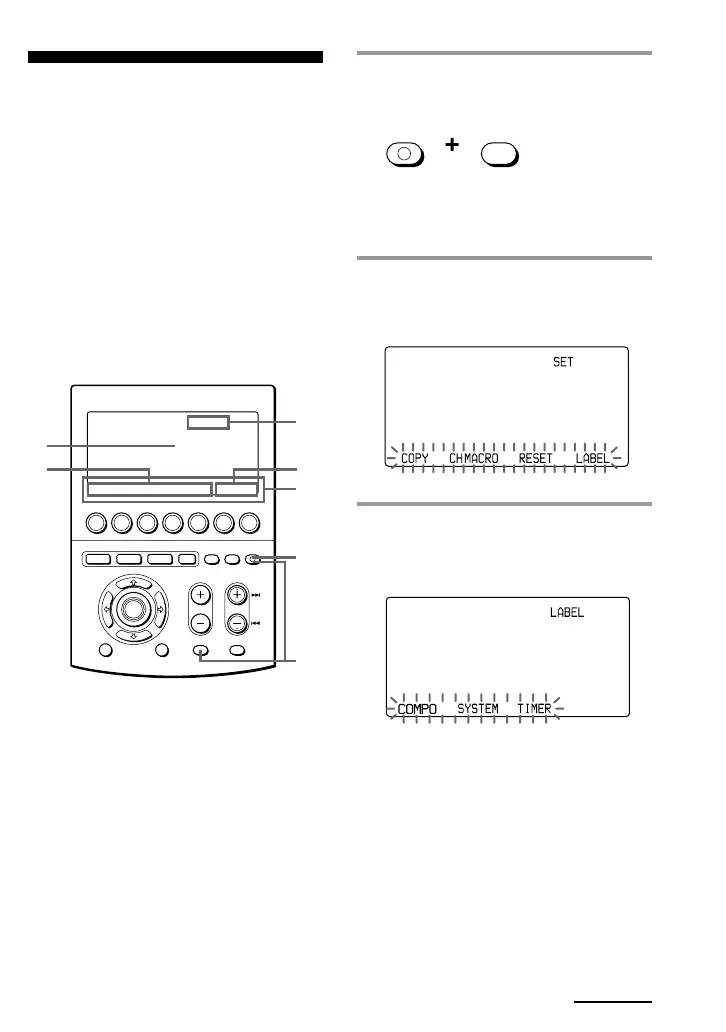
1 While pressing COMMANDER
OFF, press MUTING.
“SET” appears on the Mode Display
key.
2 Press the Mode Display key (SET)
once to display “LABEL” on one
of the Label keys on the display.
3 Press the LABEL key.
“LABEL” appears on the Mode
Display key.
MENU EXIT
COMMANDER
OFF
MORE321
TV STB VCR DVD CD AMP
OTHER
TIMER LIGHT
MUTING RECALL
CHANNELVOLUME
SYSTEM CONTROL
OK
2
3
5
7
1
4
6
Continued


 To Next Page