47
To clear the learned function of
the Component Select button
1 Follow Steps 2 and 3 on page 20 in
“Learning Function.”
2 While pressing the DEL key, press the
Component Select button which you
want to clear.
Notes
• You can program a signal by “learning” for a
Component Select button or a Label key for
which the Power-On function (page 43) has
been programmed. In this case, the Power-On
function is overwritten and cannot be used. If
you clear the “learned” signal from the
button, the Power-On function is resumed,
and you can use it again.
• You cannot program a System Control
function (page 38) for a Component Select
button or a Label key for which a signal has
been programmed by “learning.”
• You can program the Power-On function for a
Component Select button for which a signal
has been programmed by “learning,” but
then the Power-On function cannot be used.
If you clear a “learned” signal from the
button, you can use the Power-On function.
Assigning Other
Components to the
Component Select
Buttons or the Label
Keys
Copying the settings of a
Component Select button or
a Label key to another button
or key
You can copy the entire settings of a
Component Select button or a Label key
to another Component Select button or a
Label key. The settings of the component
code (page 12), the channel macro
function (page 58), the learned functions
(page 19) and character contents are
copied to a new button or key.
Notes
• You cannot copy the settings to a Component
Select button or a Label key for which any
learning function or channel macro function
has been programmed. (“NG” flashes.)
• The character contents are overwritten to a
new button or key.
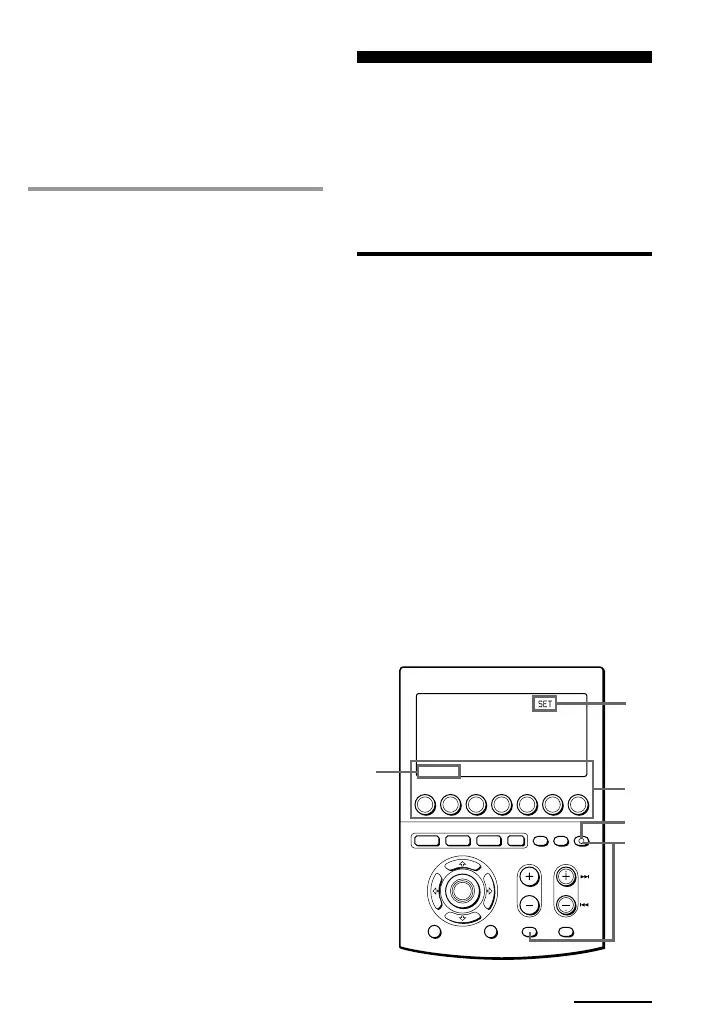
MENU EXIT
COMMANDER
OFF
MORE321
TV STB VCR DVD CD AMP
OTHER
TIMER LIGHT
MUTING RECALL
CHANNELVOLUME
SYSTEM CONTROL
OK
4,5
1
6
3
2
If you keep COMMANDER OFF
pressed for more than 2 seconds
The Commander turns off.
If you keep COMMANDER OFF
pressed for less than 2 seconds
The Commander returns to the
previously set mode.
Continued


 To Next Page