53
Another RM-AV3000
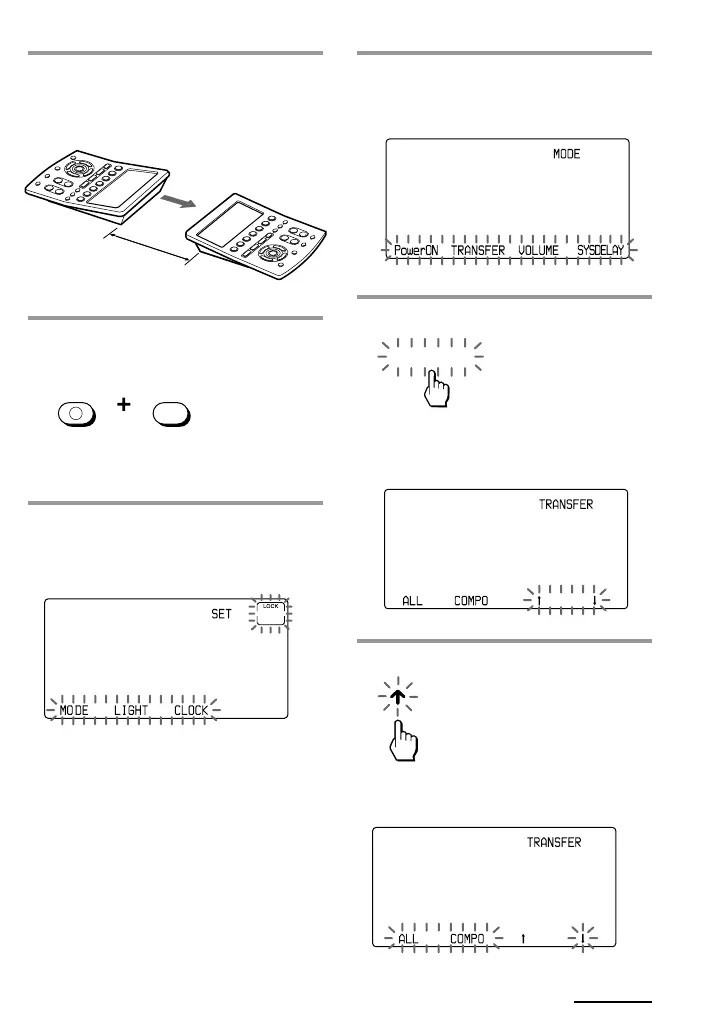
4 Press the MODE key.
“MODE” appears on the Mode
Display key.
5 Press the “TRANSFER” key.
“TRANSFER” appears on the Mode
Display key.
6 Press the X key.
X : Transfer data
x : Receive data
1 Place the RM-AV3000 head to
head with another RM-AV3000.
2 While pressing COMMANDER
OFF, press MUTING.
“SET” appears on the Mode Display
key.
3 Press the Mode Display key (SET)
twice to display “MODE” on one
of the Label keys on the display.
COMMANDER
OFF
MUTING
TRANSFER
about 2 – 4 inches
(5 – 10 cm) away
RM-AV3000
Continued


 To Next Page