4 (E)
Locations and Functions of Parts
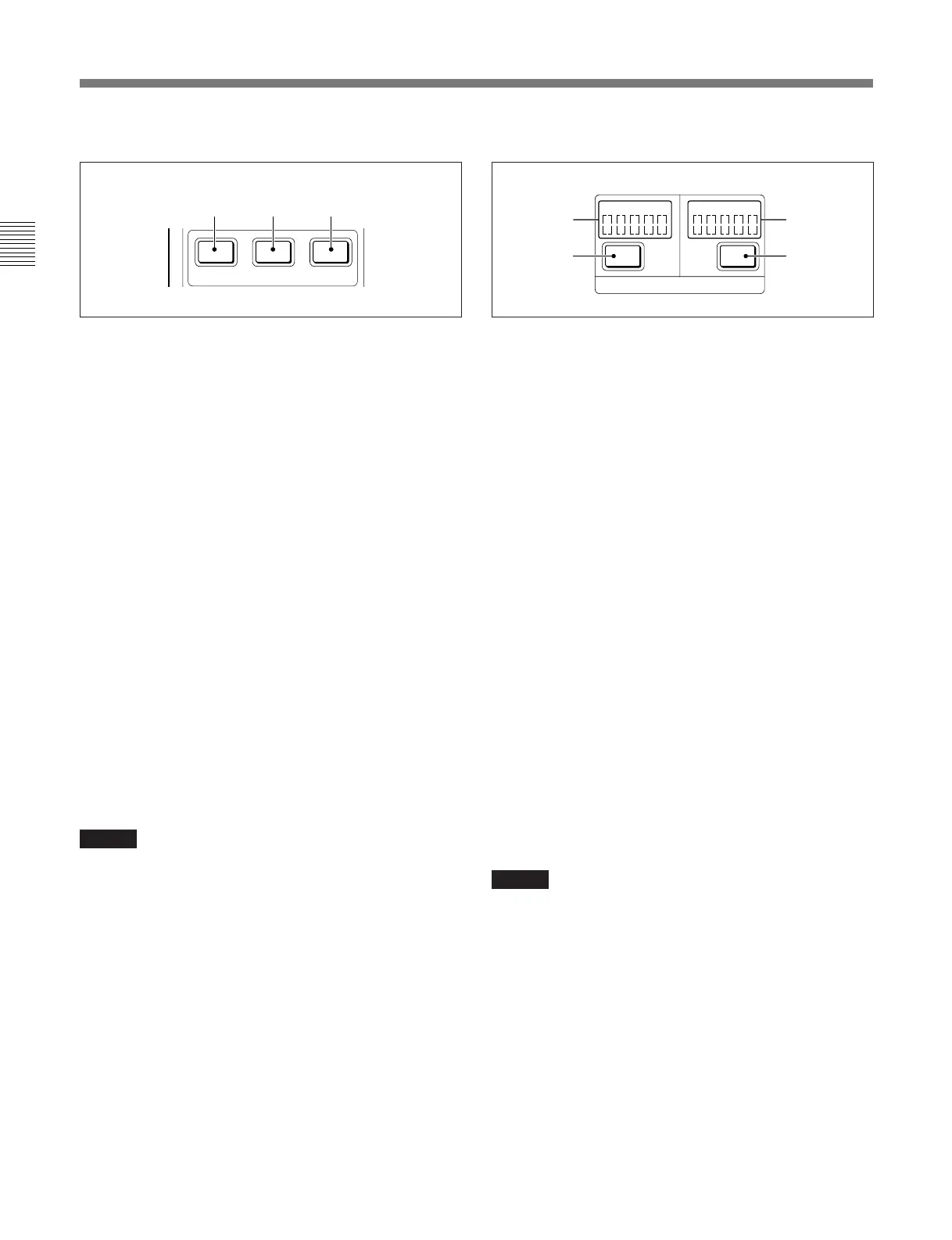
1 Shutter control block
a SHUTTER button (lights in amber)
Press and light up the button to set the camera to
Shutter mode. The current shutter speed is displayed
on the display of the menu operation block for a few
seconds.
In Shutter mode, the shutter speed can be adjusted with
the menu select knob (rotary encoder).
b ECS (Extended Clear Scan) button (lights in
amber)
Press and light up the button to set the camera to ECS
mode. The current ECS frequency is displayed on the
display of the menu operation block for a few seconds.
In ECS mode, the ECS frequency can be adjusted with
the menu select knob (rotary encoder).
c S-EVS (Super EVS) button (lights in amber)
Press and light up the button to set the camera to S-
EVS mode. The current S-EVS value is displayed on
the display of the menu operation block for a few
seconds.
In S-EVS mode, the S-EVS value can be adjusted with
the menu select knob (rotary encoder).
Notes
•When you change the shutter speed, ECS frequency,
or S-EVS value in the corresponding mode, the
display of the menu operation block shows it for a
few seconds.
•When this unit is in RM Configuration Menu mode
(page 9 (E)), the shutter speed, ECS frequency, and
S-EVS value cannot be adjusted.
2 Filter control block
a ND (ND filter) indicators
The indicator that corresponds to the currently selected
ND filter lights.
b ND (ND filter select) button
Press and light up the button when it is dark (Filter
camera control mode) to enable filter selection from
this unit.
When this button is lit, each time you press it, the ND
filter cyclically changes in the sequence of 1 → 2 → 3
→ 4 → 5 → 1 → . . . .
c CC (color temperature conversion filter)
indicators
The indicator that corresponds to the currently selected
CC filter lights.
d CC (color temperature conversion filter select)
button
Press and light up the button when it is dark (Filter
camera control mode) to enable filter selection from
this unit.
When this button is lit, each time you press it, the CC
filter cyclically changes in the sequence of A → B →
C → D → E → A → . . . .
Notes
•Once you press any of the filter select buttons, both
the buttons light. They go dark when filter selection
is made on the camera.
•Which filters may be selected depends on the camera
being used. For available filters, refer to the
Operation Manual of the camera.
•For a camera with four filters, you can change the
function of this button to skip 5 or E and switch from
4 to 1 or from D to A using the RM Configuration
menu.
However, when the connected camera has an
automatic filter-detection facility, setting with the
RM Configuration menu is not required.
See “Settings on the RM Configuration Menu” on page
9 (E).
SHUTTER
ECS S-EVS
abc
//
FILTER
12345 ABCDE
ND CC
b
a
d
c



 To Next Page