11 (E)
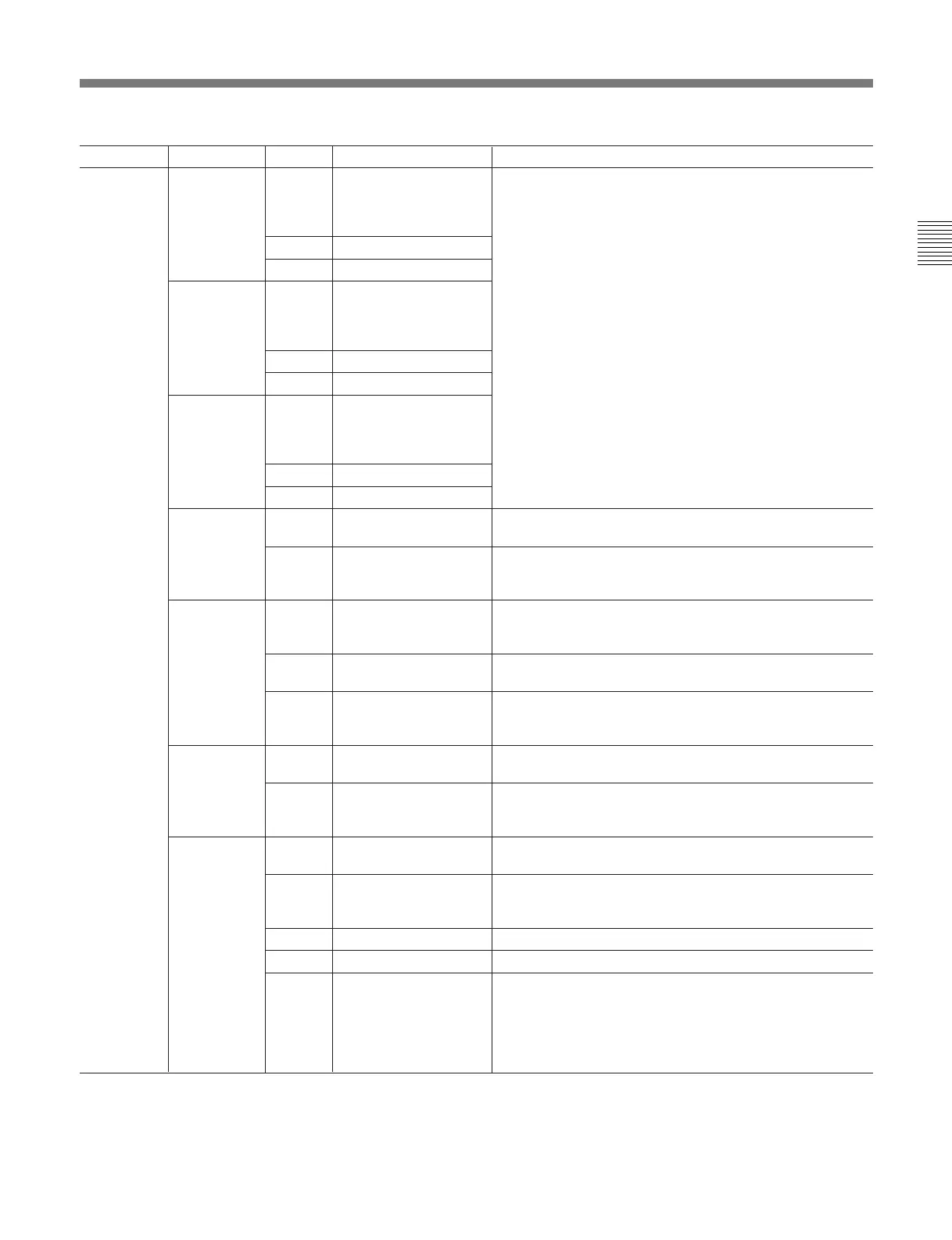
Category Subcategory Item Setting Contents
VR Setup Knee Item [Knee], Slope, Knee Sat
Ctrl [Rel], Abs
Scal 1/1, [1/2], 1/4
M Gamma Item Knee, Slope, Knee Sat
Ctrl [Rel], Abs
Scal 1/1, [1/2], 1/4
Detail Item Knee, Slope, Knee Sat
Ctrl [Rel], Abs
Scal 1/1, [1/2], 1/4
White Ctrl [Rel], Abs Selects the adjustment mode of the WHITE control knobs.
Rel: Relative mode Abs: Absolute mode
Scal 1/1, [1/2], 1/4 Selects the adjustment range of the WHITE control knobs
in Relative mode. The adjustment range is set as a fraction
of the entire variable range.
Black Item [Black], Flare Selects the function of the BLACK control knobs.
Black: Black balance adjustment
Flare: Flare balance adjustment
Ctrl [Rel], Abs Selects the adjustment mode of the BLACK control knobs.
Rel: Relative mode Abs: Absolute mode
Scal 1/1, [1/2], 1/4 Selects the adjustment range of the BLACK control knobs
in Relative mode. The adjustment range is set as a fraction
of the entire variable range.
M Black Ctrl Rel, [Abs] Selects the adjustment mode of the M BLACK control knob.
Rel: Relative mode Abs: Absolute mode
Scal 1/1, [1/2], 1/4 Selects the adjustment range of the M BLACK control knob
in Relative mode. The adjustment range is set as a fraction
of the entire variable range.
Iris Ctrl Rel, [Abs] Selects the adjustment mode of the IRIS control.
Rel: Relative mode Abs: Absolute mode
Scal 1/1, 1/2, [1/4] Selects the adjustment range of the IRIS control in Relative
mode. The adjustment range is set as a fraction of the
entire variable range.
Min [Cls], 22 to 1.0 Sets the minimum adjustment value (f) in Absolute mode.
Max Cls, 22 to 1.0 ([1.4]) Sets the maximum adjustment value (f) in Absolute mode.
Mode [RM], CAM Selects the variable range mode in Absolute mode.
RM: The iris is adjusted within the min. and max. values set
on this menu.
CAM: The iris is automatically adjusted according to the
lens file data of the camera (effective only with a camera
equipped with an automatic detection facility).
Detail Menu (Continued)
(Continued)
M-VMS, M Gamma,
BlkGamma, Detail,
SkinDtl
M-VMS, [MGamma],
BlkGamma, Detail,
SkinDtl
M-VMS, M Gamma,
BlkGamma, [Detail],
SkinDtl
Item: Selects the function of the control knobs.
Knee: Master knee point adjustment
Slope: Knee slope adjustment
Knee Sat: Knee saturation adjustment
M-VMS: Master V modulation shading adjustment
M Gamma: Master gamma adjustment
BlkGamma: Black gamma adjustment
Detail: Detail adjustment
SkinDtl: Skin detail adjustment
Ctrl: Selects the adjustment mode of the control knobs.
Rel: Relative mode
Abs: Absolute mode
Scal: Selects the adjustment range of the control knobs in
Relative mode. The adjustment range is set as a
fraction of the entire variable range.



 To Next Page