EasyManua.ls Logo

Sony RM-E100V - Page 12

Sony RM-E100V
23 pages
Print Icon
To Next Page IconTo Next Page
To Previous Page IconTo Previous Page
Loading...
Connections
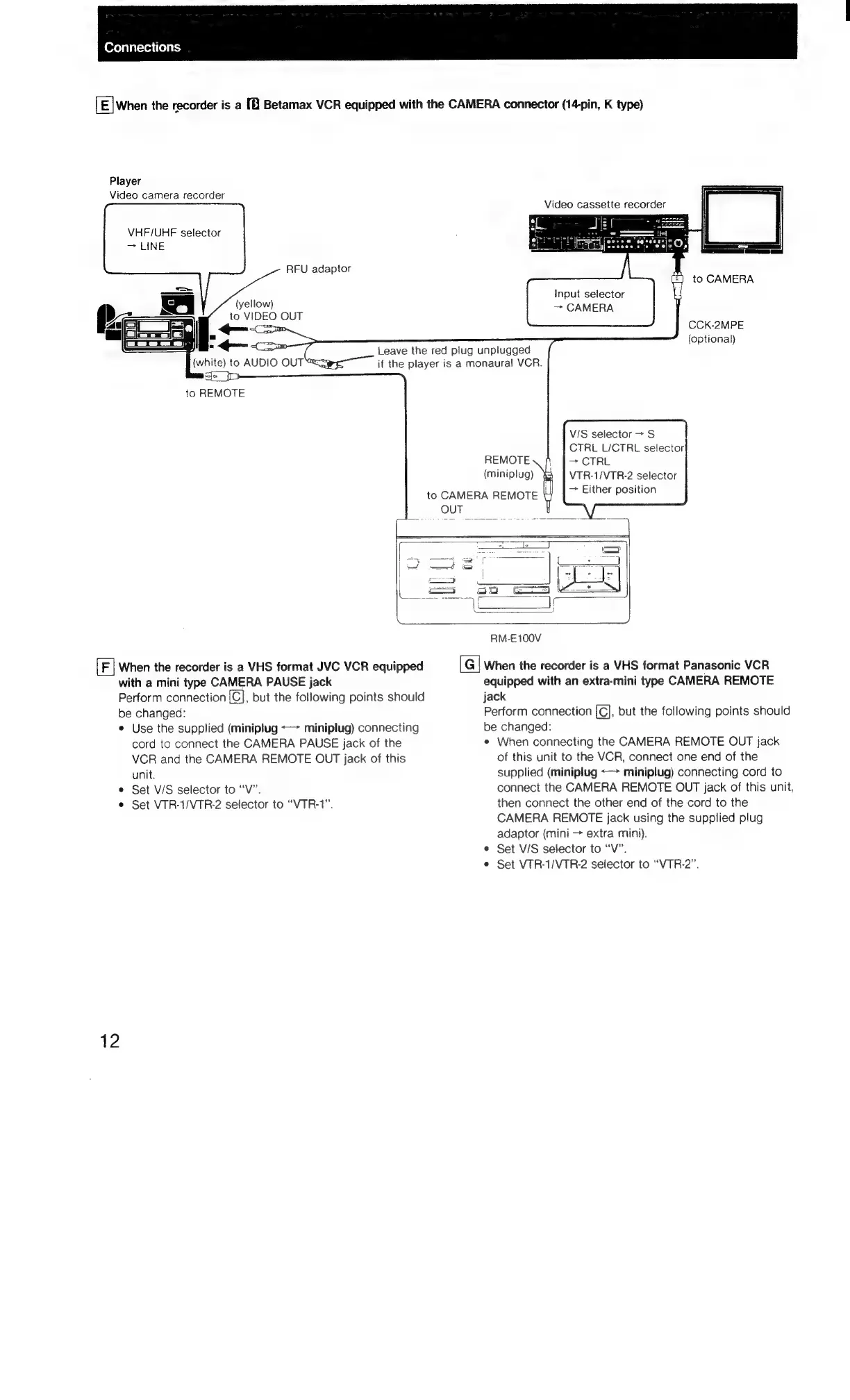
[E]When
the
recorder
is
a
[8
Betamax
VCR
equipped
with
the
CAMERA
connector
(14-pin,
K
type)
Player
Video
camera
recorder
VHF/UHF
selector
>
LINE
RFU
adaptor
Input
selector
—~
CAMERA
(yellow)
to
VIDEO
OUT
<p
CCK-2MPE
(optional)
Leave
the
red
plug
unplugged
if
the
player
is
a
monaural
VCR.
(white)
to
AUD!
sje
_
Ip
to
REMOTE
eng
V/S
selector
>
S
CTRL
L/CTRL
selector
—>
CTRL
VTR-1/VTR-2
selector
>
Either
position
REMOTE
(miniplug)
to
CAMERA
REMOTE
OUT
RM-E100V
When
the
recorder
is
a
VHS
format
JVC
VCR
equipped
[G]
When
the
recorder
is
a
VHS
format
Panasonic
VCR
with
a
mini
type
CAMERA
PAUSE
jack
equipped
with
an
extra-mini
type
CAMERA
REMOTE
Perform
connection
{C],
but
the
following
points
should
jack
be
changed:
Perform
connection
(el;
but
the
following
points
should
e
Use
the
supplied
(miniptug
<->
miniplug)
connecting
be
changed:
cord
to
connect
the
CAMERA
PAUSE
jack
of
the
When
connecting
the
CAMERA
REMOTE
OUT
jack
VCR
and
the
CAMERA
REMOTE
OUT
jack
of
this
of
this
unit
to
the
VCR,
connect
one
end
of
the
unit.
supplied
(miniplug
<->
miniplug)
connecting
cord
to
¢
Set
V/S
selector
to
“V”.
connect
the
CAMERA
REMOTE
OUT
jack
of
this
unit,
¢
Set
VTR-1/VTR-2
selector
to
“VTR-1”.
then
connect
the
other
end
of
the
cord
to
the
CAMERA
REMOTE
jack
using
the
supplied
plug
adaptor
(mini
>
extra
mini).
¢
Set
V/S
selector
to
“V”.
¢
Set
VTR-1/VTR-2
selector
to
“VTR-2”.
12

Related product manuals