EasyManua.ls Logo

Sony RM-E100V - Page 23

Sony RM-E100V
23 pages
Print Icon
To Previous Page IconTo Previous Page

Loading...
Reference
for
the
Connections
REMOTE
*
or
? ;
Either
CONTROL
L
(5
pin,
round}
CONTROL
L |
5
pin
5
pin
CTRLL
position
=
ite!
CTRL
S
a
vor
VTR
1%*
CONTROL
S
(minijack)
OUT
miniplug
miniplug
CTRL
VTR
2
or
CAMERA
(special
CAMERA
miclue
aoe
iakaniol
CTRL
Either
REMOTE
|__minijack)
|
REMOTE
OuT
|
M!niplug
<~
special
miniplug
position
CAMERA
(14
pin,
CAMERA
Either
CONNECTOR
K-type)
REMOTE
OuT
|
CCK-2MPE
(optional)
CTRL
position
REMOTE
SENSOR
CTRLS
RMT-E1S/E1V
Remote
control
unit
CTAL
VTR
1**
with
a
[fj
mark
OUT
(optional)
VTR
ec
|
Panasonic
(extra
CAMERA
miniplug
<>
miniplug
CTRL
VTR
2
9
|
CAMERA
REMOTE
minijack)
REMOTE
OUT
|
with
(mini
>
extra-mini)
plug
adaptor
>
+
_—-
hain
wo
pan
JVC
(mini-
CAMERA
+
‘5
ae,
>
|
CAMERA
PAUSE
jack)
REMOTE
OuT
|
Miniplug
<>
miniplug
CTRL
VTR
1
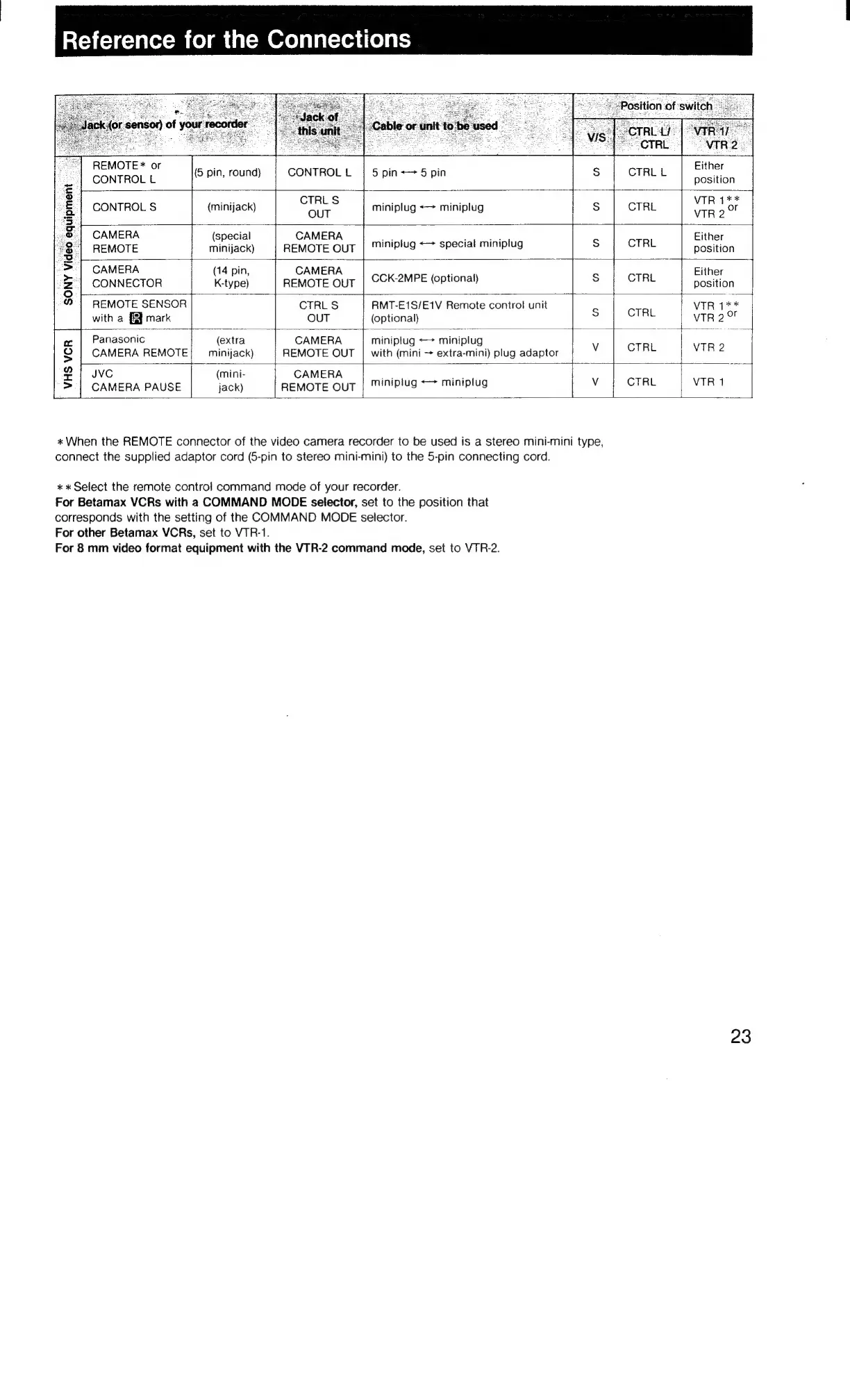
«When
the
REMOTE
connector
of
the
video
camera
recorder
to
be
used
is
a
stereo
mini-mini
type,
connect
the
supplied
adaptor
cord
(5-pin
to
stereo
mini-mini)
to
the
5-pin
connecting
cord.
*
«
Select
the
remote
control
command
mode
of
your
recorder.
For
Betamax
VCRs
with
a
COMMAND
MODE
selector,
set
to
the
position
that
corresponds
with
the
setting
of
the
COMMAND
MODE
selector.
For
other
Betamax
VCRs,
set
to
VTR-1.
For
8
mm
video
format
equipment
with
the
VTR-2
command
mode,
set
to
VTR-2.
23

Related product manuals