EasyManua.ls Logo

Sony RM-E100V - Page 6

Sony RM-E100V
23 pages
Print Icon
To Next Page IconTo Next Page
To Previous Page IconTo Previous Page
Loading...
Location
and
Function
of
Controls
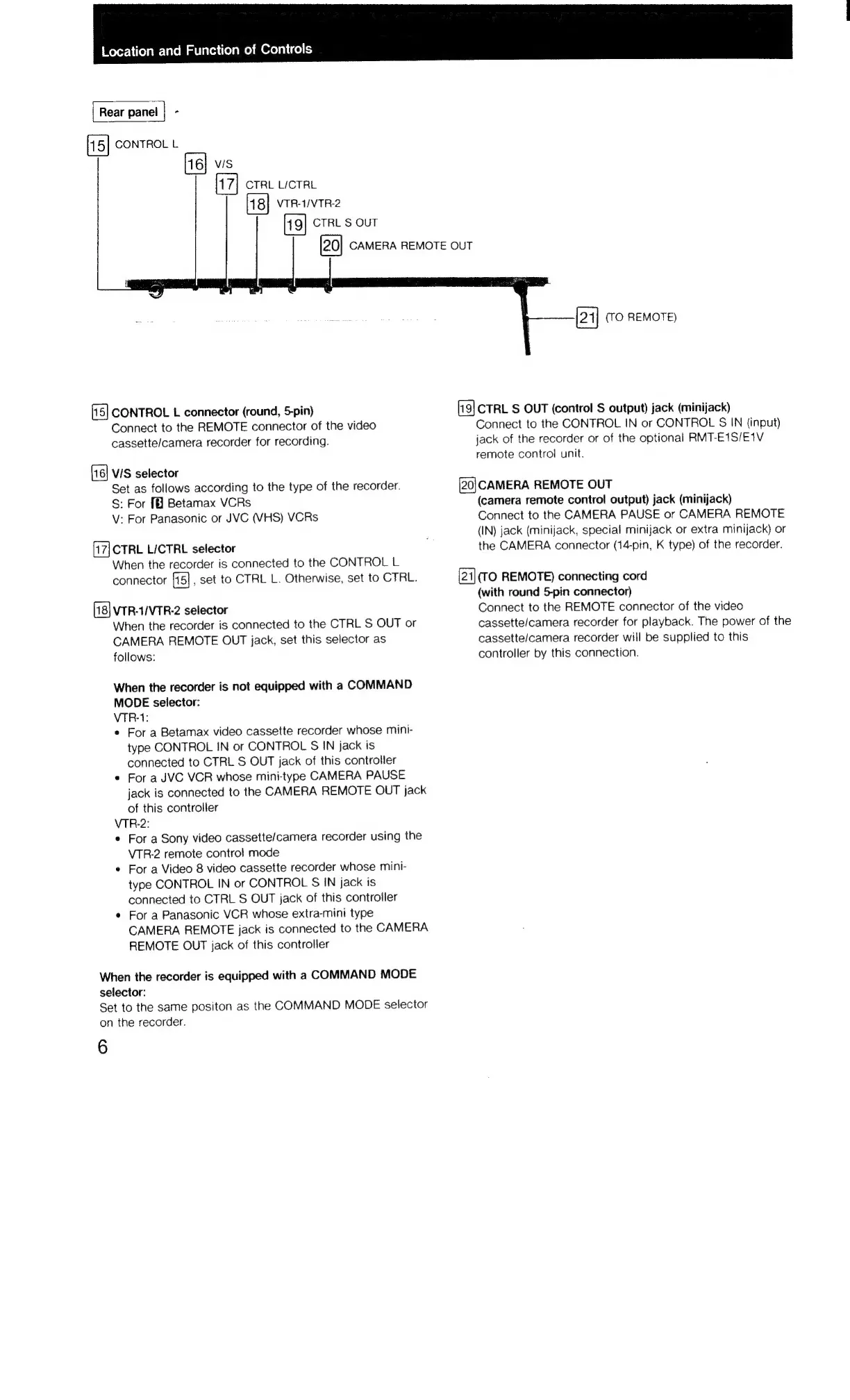
Rear
panei
|
-
CONTROL
L
vis
CTRL
LICTRL
VTRHIVTR-2
CTRL
S
OUT
CONTROL
L
connector
(round,
5-pin)
Connect
to
the
REMOTE
connector
of
the
video
cassette/camera
recorder
for
recording.
VIS
selector
Set
as
follows
according
to
the
type
of
the
recorder.
S:
For
Betamax
VCRs
V:
For
Panasonic
or
JVC
(VHS)
VCRs
CTRL
LICTRL
selector
When
the
recorder
is
connected
to
the
CONTROL
L
connector
_set
to
CTRL
L.
Otherwise,
set
to
CTRL.
VTR-1/VTR-2
selector
When
the
recorder
is
connected
to
the
CTRL
S
OUT
or
CAMERA
REMOTE
OUT
jack,
set
this
selector
as
follows:
When
the
recorder
is
not
equipped
with
a
COMMAND
MODE
selector:
VTR-1:
e
For
a
Betamax
video
cassette
recorder
whose
mini-
type
CONTROL
IN
or
CONTROL
S
IN
jack
is
connected
to
CTRL
S
OUT
jack
of
this
controller
e
For
a
JVC
VCR
whose
mini-type
CAMERA
PAUSE
jack
is
connected
to
the
CAMERA
REMOTE
OUT
jack
of
this
controller
VTR-2:
e
For
a
Sony
video
cassette/camera
recorder
using
the
VTR-2
remote
control
mode
*
For
a
Video
8
video
cassette
recorder
whose
mini-
type
CONTROL
IN
or
CONTROL
S
IN
jack
is
connected
to
CTRL
S
OUT
jack
of
this
controller
¢
For
a
Panasonic
VCR
whose
extra-mini
type
CAMERA
REMOTE
jack
is
connected
to
the
CAMERA
REMOTE
OUT
jack
of
this
controller
When
the
recorder
is
equipped
with
a
COMMAND
MODE
selector:
Set
to
the
same
positon
as
the
COMMAND
MODE
selector
on
the
recorder.
6
CAMERA
REMOTE
OUT
(TO
REMOTE)
CTRL
S$
OUT
(control
S
output)
jack
(minijack)
Connect
to
the
CONTROL
IN
or
CONTROL
S
IN
(input)
jack
of
the
recorder
or
of
the
optional
RMT-E1S/E1V
remote
control
unit.
(20|CAMERA
REMOTE
OUT
(camera
remote
control
output)
jack
(minijack)
Connect
to
the
CAMERA
PAUSE
or
CAMERA
REMOTE
(IN)
jack
(minijack,
special
minijack
or
extra
minijack)
or
the
CAMERA
connector
(14-pin,
K
type)
of
the
recorder.
(TO
REMOTE)
connecting
cord
(with
round
5-pin
connector)
Connect
to
the
REMOTE
connector
of
the
video
cassette/camera
recorder
for
playback.
The
power
of
the
cassette/camera
recorder
will
be
supplied
to
this
controller
by
this
connection.

Related product manuals