EasyManua.ls Logo

Sony RM-E100V - Page 9

Sony RM-E100V
23 pages
Print Icon
To Next Page IconTo Next Page
To Previous Page IconTo Previous Page
Loading...
connection
of
the
RM-E100V
The
connection
differs
according
to
the
connector
or
jack
of
the
recorder.
Notes
When
the
REMOTE
connector
of
the
video
camera
recorder
to
be
used
is
a
stereo
mini-mini
type,
connect
the
supplied
adaptor
cord
(5-pin
to
stereo
mini-mini)
to
the
5-pin
connecting
cord.
With
connections
{C],
[E],
[F]
and
[G],
only
the
start
and
pause
of
recording
during
automatic
assemble
editing
is
controlled
by
this
unit.
The
recorder
cannot
be
operated
by
pressing
the
<<,
BE,
Bm
or
Mm
(tape
transport)
button,
or
by
the
RECORDER
REC
or
VIDEO
EDIT
button
on
this
unit.
However,
for
connections
and
,
if
the
recorder
is
a
Sony
infrared
remote
control
VCR,
you
will
be
able
to
operate
the
recorder
with
these
buttons
by
performing
connection
[D]
instead.
You
cannot
make
more
than
one
connection
simultaneously
on
the
recorder’s
side.
This
unit
will
control
only
one
player
and
one
recorder.
For
connections
{B]
[G]
;
the
[R]
indicator
and
the
tape
transport
mode
indicators
for
the
recorder
are
not
displayed
in
the
display
window.
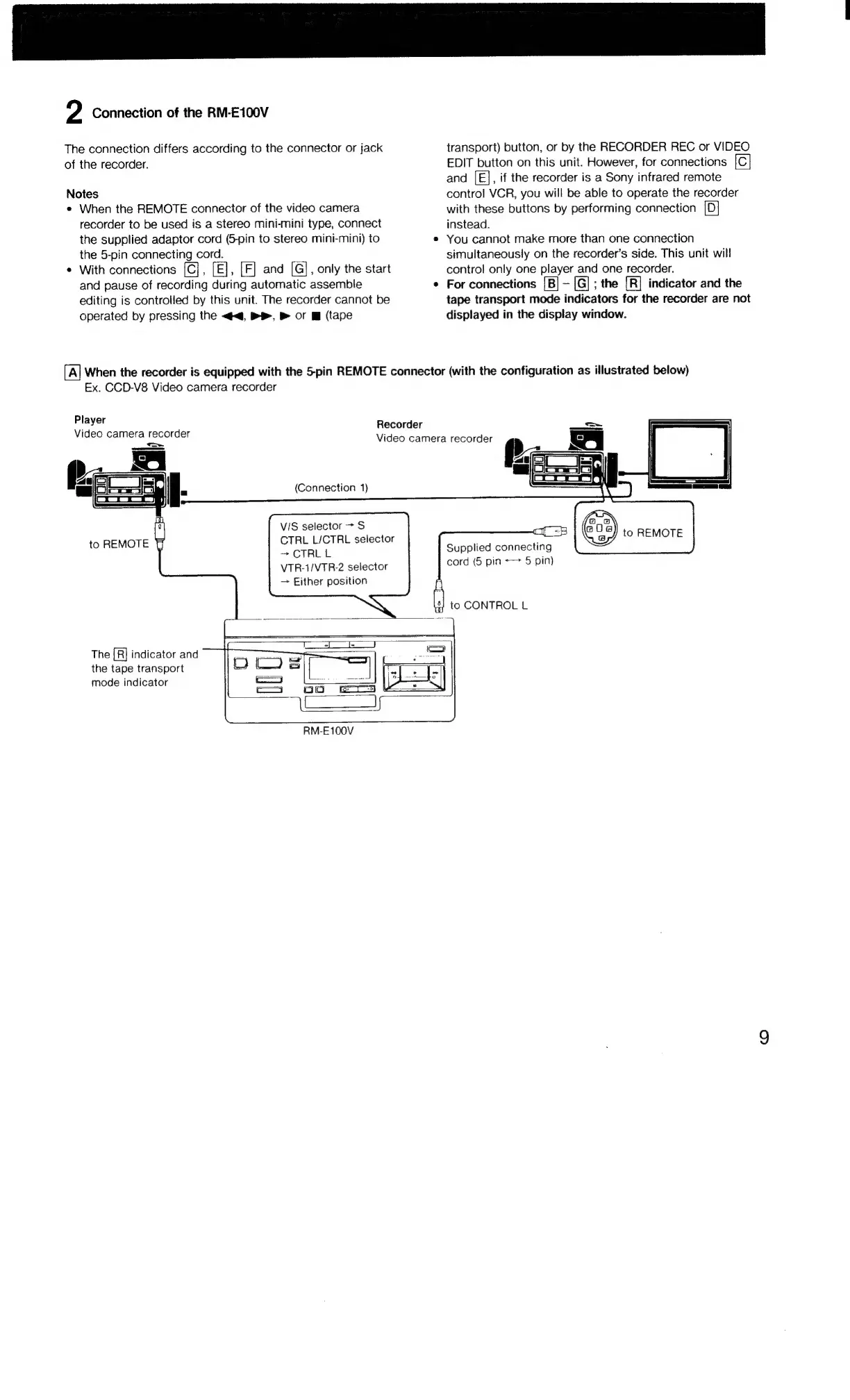
[A]
When
the
recorder
is
equipped
with
the
5-pin
REMOTE
connector
(with
the
configuration
as
illustrated
below)
Player
Video
camera
recorder
Ex.
CCD-V8
Video
camera
recorder
(Connection
1)
VIS
selector
>
S
to
REMOTE
>
CTRLL
VTR-1/VTR-2
selector
Either
position
Recorder
Video
camera
recorder
Le
|
|
Ae
as
CTRL
L/CTRL
selector
aif
8)
to
REMOTE
Supplied
connecting
cord
(5
pin
+>
5
pin)
+
to
CONTROL
L
The
[R]
indicator
and
the
tape
transport
mode
indicator
RM-E100V

Related product manuals