EasyManua.ls Logo

Sony RM-E700 - Page 31

Sony RM-E700
58 pages
Print Icon
To Next Page IconTo Next Page
To Previous Page IconTo Previous Page
Loading...
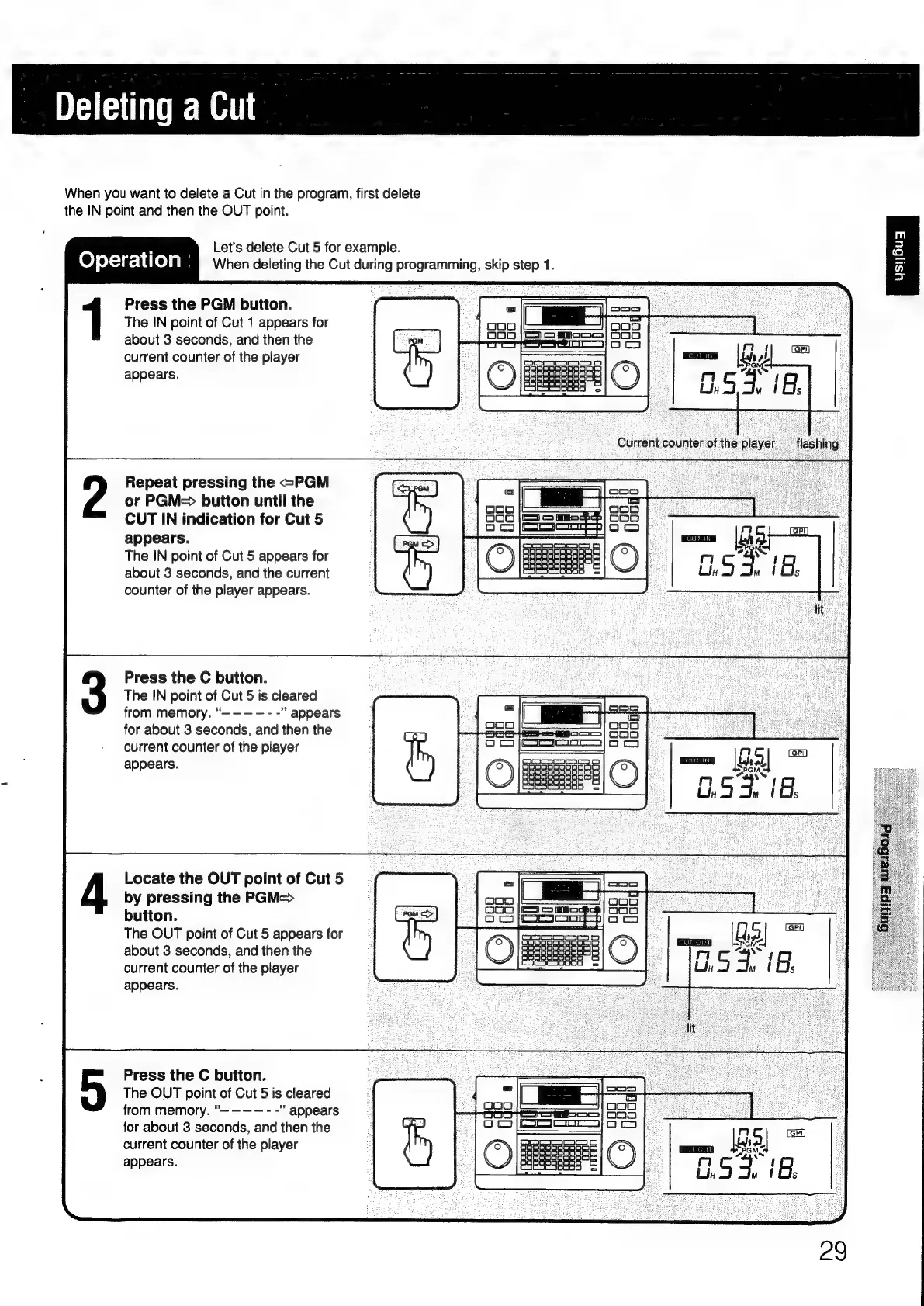
Deleting
a
Cut
When
you
want
to
delete
a
Cut
in
the
program,
first
delete
the
IN
point
and
then
the
OUT
point.
:
Let's
delete
Cut
5
for
example.
Operation
When
deleting
the
Cut
during
programming,
skip
step
1.
Press
the
PGM
button.
The
IN
point
of
Cut
1
appears
for
about
3
seconds,
and
then
the
current
counter
of
the
player
appears.
Repeat
pressing
the
<PGM
or
PGM->
button
until
the
CUT
IN
indication
for
Cut
5
;
nm
(ari
appears.
=
Lag
The
IN
point
of
Cut
5
appears
for
|
FE
ri
ce
xs
1
about
3
seconds,
and
the
current
Udy
mw
(Cs
counter
of
the
player
appears.
Press
the
C
button.
The
IN
point
of
Cut
5
is
cleared
from
memory.
appears
for
about
3
seconds,
and
then
the
current
counter
of
the
player
appears.
Locate
the
OUT
point
of
Cut
5
by
pressing
the
PGM=>
button.
The
OUT
point
of
Cut
5
appears
for
about
3
seconds,
and
then
the
current
counter
of
the
player
appears.
Press
the
C
button.
The
OUT
point
of
Cut
5
is
cleared
from
memory.
appears
ee
for
about
3
seconds,
and
then
the
Ses
g
|
rn
current
counter
of
the
player
<a.
2
$
GMS
appears.
3
:
ig
5
3.

Other manuals for Sony RM-E700

Related product manuals