EasyManua.ls Logo

Sony RM-E700 - Page 30

Sony RM-E700
58 pages
Print Icon
To Next Page IconTo Next Page
To Previous Page IconTo Previous Page
Loading...
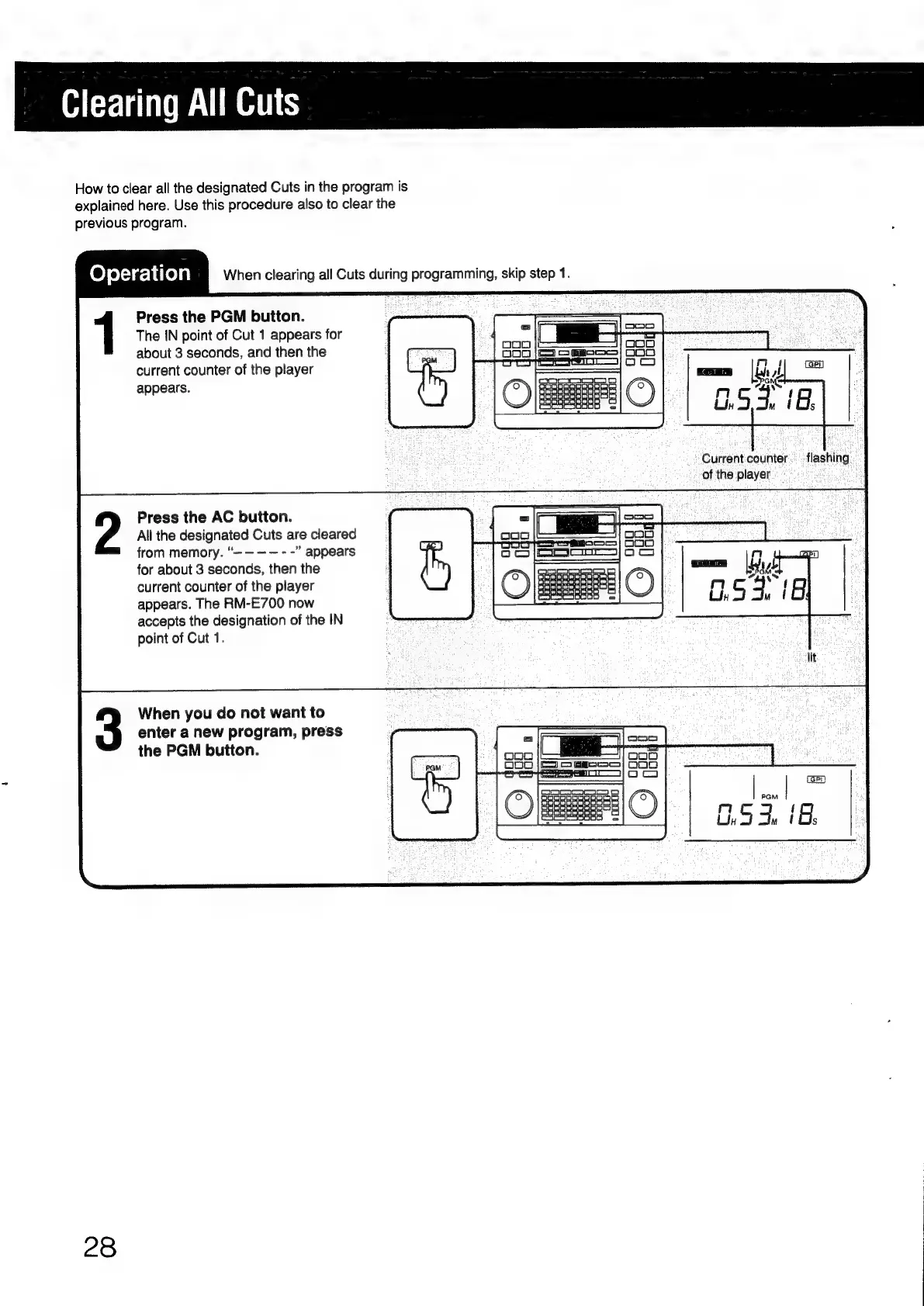
Clearing
All
Cuts
How
to
clear
all
the
designated
Cuts
in
the
program
is
explained
here.
Use
this
procedure
also
to
clear
the
previous
program.
Operation
When
clearing
all
Cuts
during
programming,
skip
step
1.
Press
the
PGM
button.
The
IN
point
of
Cut
1
appears
for
about
3
seconds,
and
then
the
current
counter
of
the
player
Omcaroaeac
a
appears.
0
=
Current
counter...
flashing
of
the
player:
Press
the
AC
button.
All
the
designated
Cuts
are
cleared
from
memory.
appears
for
about
3
seconds,
then
the
current
counter
of
the
player
appears.
The
RM-E700
now
accepts
the
designation
of
the
IN
point
of
Cut
1.
When
you
do
not
want
to
enter
a
new
program,
press
the
PGM
button.
PGM
G5
du
|
28

Other manuals for Sony RM-E700

Related product manuals