EasyManua.ls Logo

Sony RM-E700 - Page 29

Sony RM-E700
58 pages
Print Icon
To Next Page IconTo Next Page
To Previous Page IconTo Previous Page
Loading...
Changing
the
IN
and
OUT
Points
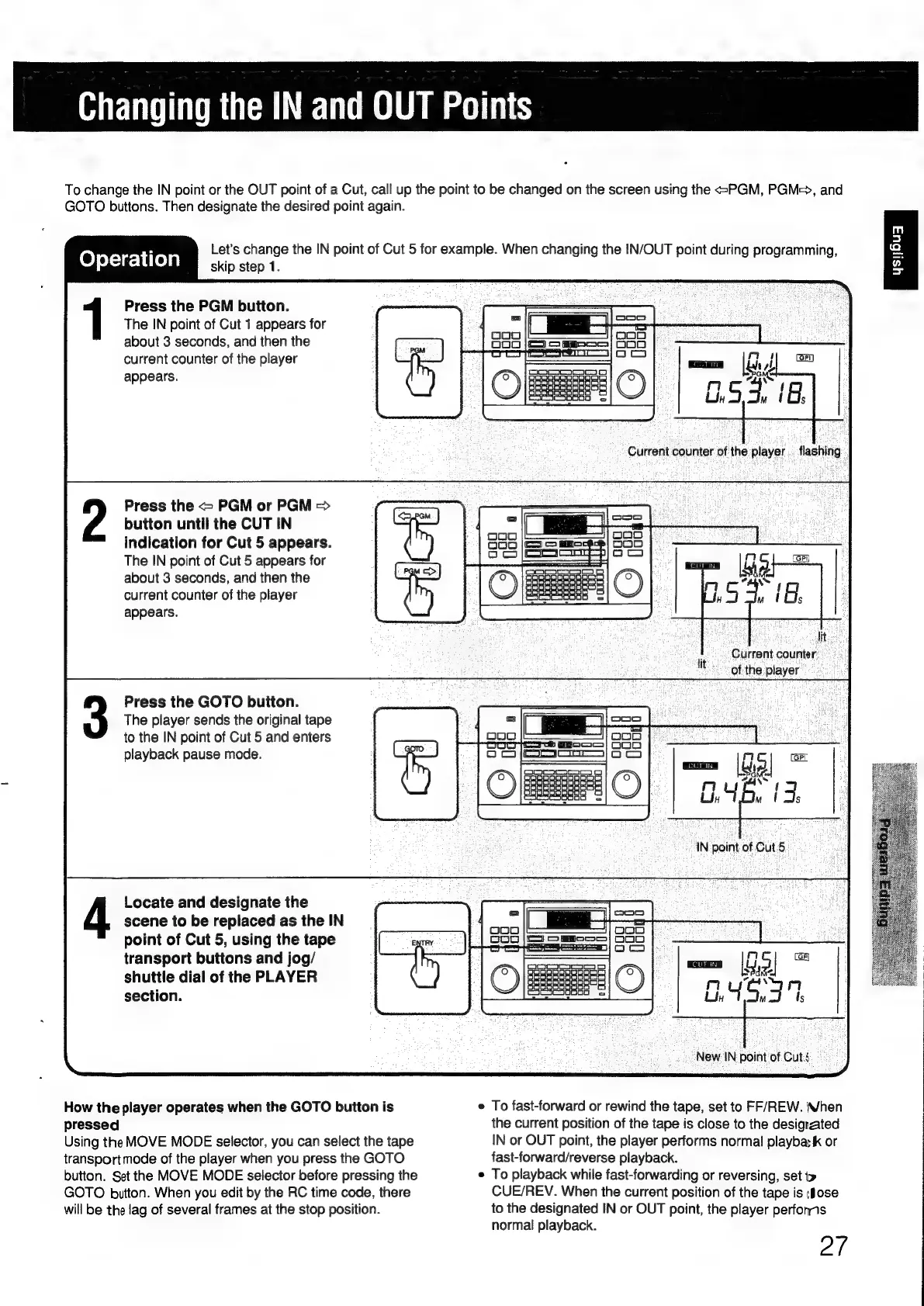
To
change
the
IN
point
or
the
OUT
point
of
a
Cut,
call
up
the
point
to
be
changed
on
the
screen
using
the
=PGM,
PGM=>,
and
GOTO
buttons.
Then
designate
the
desired
point
again.
Let’s
change
the
IN
point
of
Cut
5
for
example.
When
changing
the
IN/OUT
point
during
programming,
Operation
skip
step
1.
Press
the
PGM
button.
The
IN
point
of
Cut
1
appears
for
about
3
seconds,
and
then
the
current
counter
of
the
player
appears.
Press
the
=
PGM
or
PGM
>
button
until
the
CUT
IN
indication
for
Cut
5
appears.
The
IN
point
of
Cut
5
appears
for
about
3
seconds,
and
then
the
current
counter
of
the
player
appears.
Press
the
GOTO
button.
The
player
sends
the
original
tape
to
the
IN
point
of
Cut
5
and
enters
playback
pause
mode.
Locate
and
designate
the
scene
to
be
replaced
as
the
IN
point
of
Cut
5,
using
the
tape
transport
buttons
and
jog/
shuttle
dial
of
the
PLAYER
section.
How
the
player
operates
when
the
GOTO
button
is
pressed
Using
the
MOVE
MODE
selector,
you
can
select
the
tape
transport
mode
of
the
player
when
you
press
the
GOTO
button.
Set
the
MOVE
MODE
selector
before
pressing
the
GOTO
button.
When
you
edit
by
the
RC
time
code,
there
will
be
the
lag
of
several
frames
at
the
stop
position.
mi
Pi
n
uy
.
Udy
mu
IN
point
of
Cut5
gal
=
:
;
dite
3
Current
counter:
lt
“of
the
player
BAS.
New
IN
point
of
Cuts.
e
To
fast-forward
or
rewind
the
tape,
set
to
FF/REW.
When
the
current
position
of
the
tape
is
close
to
the
designated
IN
or
OUT
point,
the
player
performs
normal
playba:
k
or
fast-forward/reverse
playback.
*
To
playback
while
fast-forwarding
or
reversing,
set
CUE/REV.
When
the
current
position
of
the
tape
is
(Jose
to
the
designated
IN
or
OUT
point,
the
player
perfonns
normal
playback.
2/

Other manuals for Sony RM-E700

Related product manuals