EasyManua.ls Logo

Sony RM-E700 - Page 28

Sony RM-E700
58 pages
Print Icon
To Next Page IconTo Next Page
To Previous Page IconTo Previous Page
Loading...
Program
Editing—To
Edit
Scenes
in
Succession
To
minimize
the
lag
between
the
program
and
the
edited
tape
It
is
inevitable
that
a
lag
occurs
between
the
program
and
the
edited
tape.
There
are
three
causes.
One
of
them
is
that
the
IN
and
OUT
points
are
designated
by
the
counter
readings.
To
minimize
the
lag
by
other
two
causes,
we
suggest
the
following.
e
The
IN
and
OUT
points
are
set
by
the
counter
reading,
and
there
is
a
lag
between
the
playback
picture
and
the
counter
reading
of
the
player*.
e
There
is
a
lag
at
the
start
time
or
at
the
recording
pause
of
the
recorder.
*
There
is
no
lag
when
you
edit
by
the
RC
time
code.
We
recommend
using
the
picture
search
to
designate
the
IN
and
OUT
points.
Perform
the
timing
adjustment
referring
to
the
brochure:
How
to
use
the
“Timing
Adjustment”
section
of
the
Demonstration
Tape
for
more
accurate
recording
of
the
IN
and
OUT
points
during
program
editing.
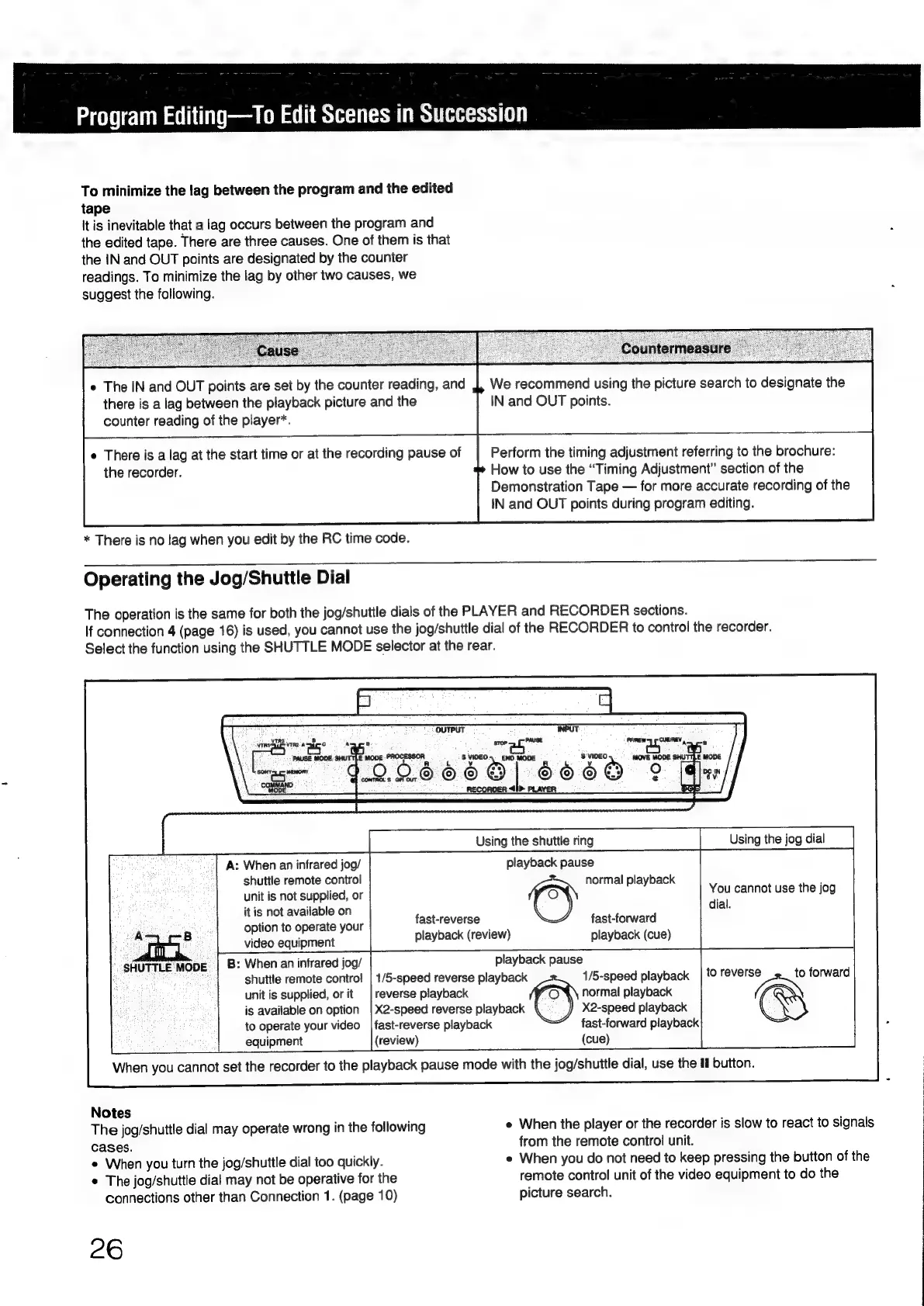
Operating
the
Jog/Shuttle
Dial
The
operation
is
the
same
for
both
the
jog/shuttle
dials
of
the
PLAYER
and
RECORDER
sections.
If
connection
4
(page
16)
is
used,
you
cannot
use
the
jog/shuttle
dial
of
the
RECORDER
to
control
the
recorder.
Select
the
function
using
the
SHUTTLE
MODE
selector
at
the
rear.
NTRS
sro
MEMORY’
COMMAND
MODE
A:
When
an
infrared
jog/
shuttle
remote
control
unit
is
not
supplied,
or
it
is
not
available
on
option
to
operate
your
video
equipment
:
When
an
infrared
jog/
OA
B
SHUTTLE
MODE
is
available
on
option
equipment
(review)
ve
renege
Ne
B
dabcanon
8
Vio
“aoa
mega
way
et
oO
|
Using
the
shuttle
ring
fast-reverse
playback
(review)
X2-speed
reverse
playback
to
operate
your
video
|fast-reverse
playback
shuttle
remote
contro!
|
1/5-speed
reverse
playback
r
1/5-speed
playback
unit
is
supplied,
or
it
|
reverse
playback
normal
playback
Using
the
jog
dial
playback
pause
normal
playback
y
is
You
cannot
use
the
jog
@
dial.
fast-forward
playback
(cue)
playback
pause
to
aN
forward
X2-speed
playback
Ss
fast-forward
playback
(cue)
When
you
cannot
set
the
recorder
to
the
playback
pause
mode
with
the
jog/shuttle
dial,
use
the
H
button.
Notes
The
jog/shuttle
dial
may
operate
wrong
in
the
following
cases.
e
When
you
turn
the
jog/shuttle
dial
too
quickly.
¢
The
jog/shuttle
dial
may
not
be
operative
for
the
connections
other
than
Connection
1.
(page
10)
26
e
When
the
player
or
the
recorder
is
slow
to
react
to
signals
from
the
remote
control
unit.
«
When
you
do
not
need
to
keep
pressing
the
button
of
the
remote
control
unit
of
the
video
equipment
to
do
the
picture
search.

Other manuals for Sony RM-E700

Related product manuals