EasyManua.ls Logo

Sony RM-E700 - Page 35

Sony RM-E700
58 pages
Print Icon
To Next Page IconTo Next Page
To Previous Page IconTo Previous Page
Loading...
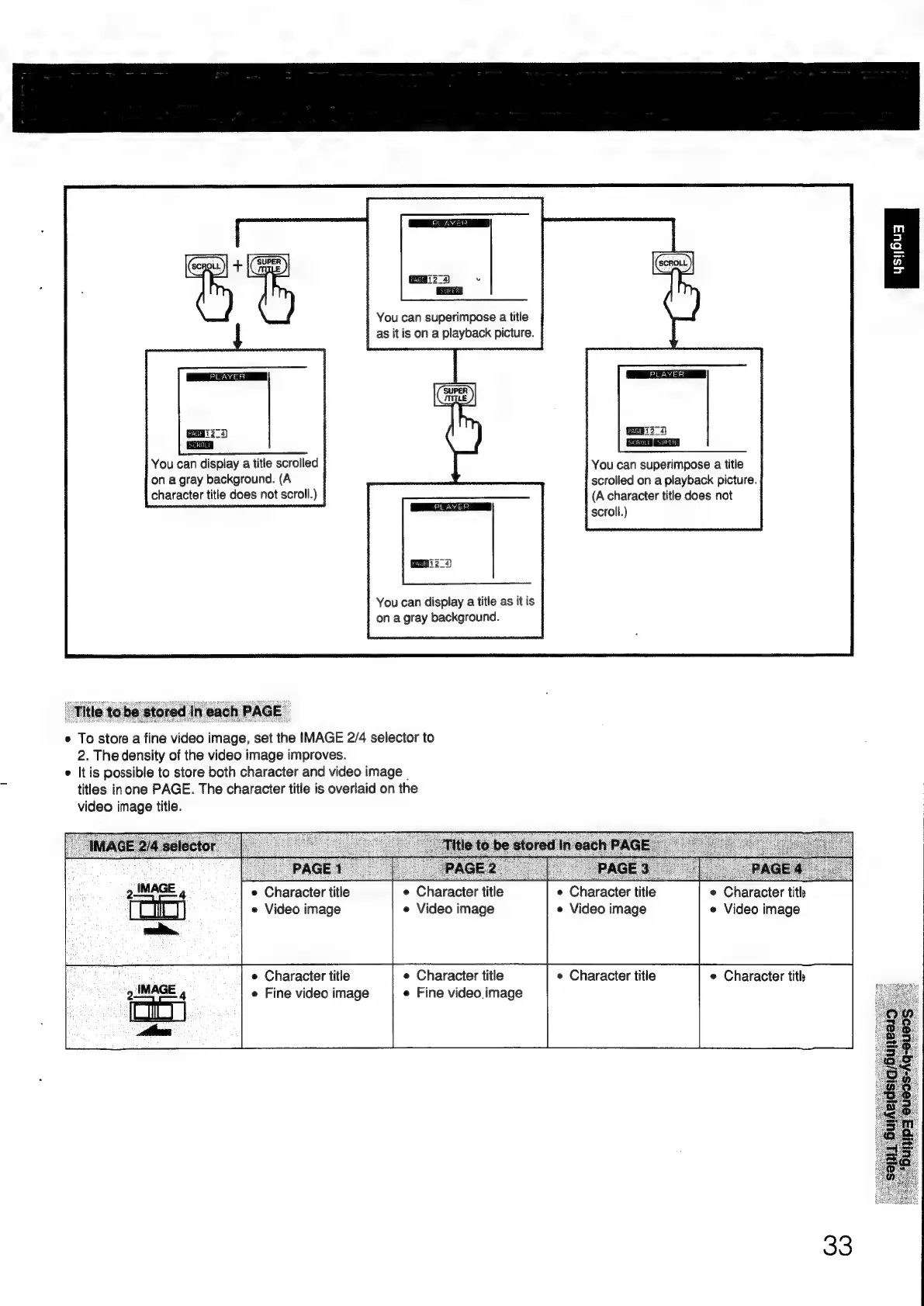
You
can
superimpose
a
title
as
it
is
on
a
playback
picture.
You
can
display
a
title
scrolled
on
a
gray
background.
(A
character
title
does
not
scroll.)
You
can
display
a
title
as
it
is
on
a
gray
background.
e
To
store
a
fine
video
image,
set
the
IMAGE
2/4
selector
to
2.
The
density
of
the
video
image
improves.
e
Itis
possible
to
store
both
character
and
video
image
|
titles
inone
PAGE.
The
character
title
is
overlaid
on
the
video
image
title.
e
Character
title
e
Video
image
e
Character
title
e
Video
image
e
Character
title
e
Video
image
e
Character
title
e
Fine
video.image
e
Character
title
e
Fine
video
image
e
Character
title
[PAG
EE
You
can
superimpose
a
title
scrolled
on
a
playback
picture.
(A
character
title
does
not
scroll.)
e
Character
title
e
Video
image
e
Character
title

Other manuals for Sony RM-E700

Related product manuals