EasyManua.ls Logo

Sony RM-E700 - Page 36

Sony RM-E700
58 pages
Print Icon
To Next Page IconTo Next Page
To Previous Page IconTo Previous Page
Loading...
Creating
a
Character
Title
Use
the
title
keyboard
to
create
a
character
title.
How
to
Use
the
Title
Keyboard
To
input
a
character
After
pressing
the
PAGE
and
CHARACTER
buttons,
press
the
desired
letter
key.
Check
the
mode
indicators
under
the
CAPITAL,
SHIFT
and INS
buttons.
While
the
CAPITAL
indicator
is
lit,
the
title
keyboard
is
in
the
mode
to
input
capital
letters.
While
the
SHIFT
indicator
is
lit,
the
title
keyboard
is
in
the
mode
to
input
the
letters
on
the
right
part
of
the
key.
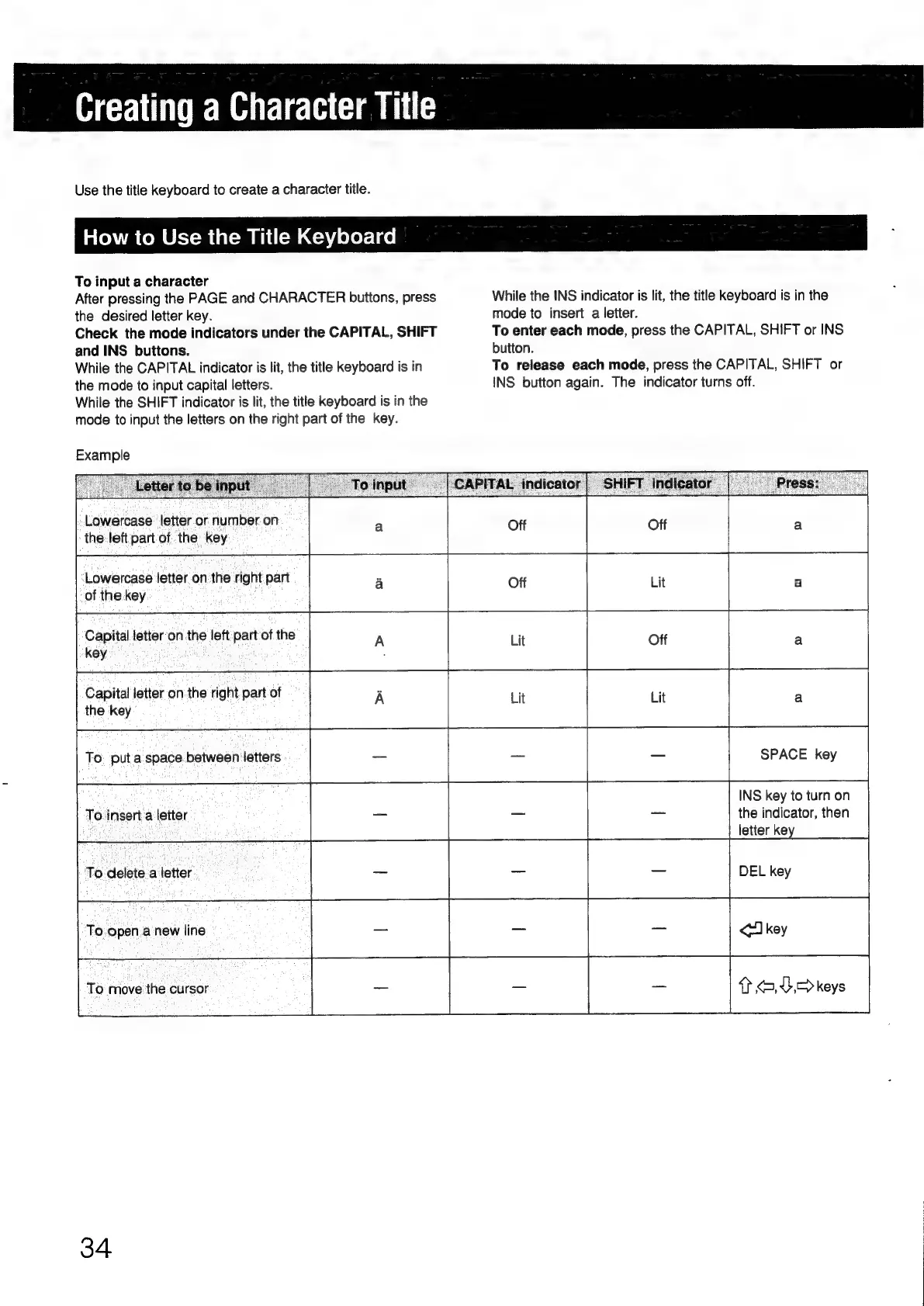
Example
Lowercase
letter
or
number
on
the:
left
part
of.
the:
key
Lowercase
letter
on
the
right
part
of
the
key
‘Capital
letter‘on
the
left
part
of
the
-key
Capital
letter
on
the
right.
part
of
the
key
To.
insert.
a
letter
To
delete.a
letter
To:open.a
new
line
To
move
the
cursor
34
While
the
INS
indicator
is
lit,
the
title
keyboard
is in
the
mode
to
insert
a
letter.
To
enter
each
mode,
press
the
CAPITAL,
SHIFT
or
INS
button.
To
release
each
mode,
press
the
CAPITAL,
SHIFT
or
INS
button
again.
The
indicator
turns
off.
Off
a
Lit
a
Off
a
Lit
a
_
SPACE
key
INS
key
to
turn
on
a
the
indicator,
then
letter
key
=
DEL
key
=
Tkey
7
<,E.>
keys

Other manuals for Sony RM-E700

Related product manuals