EasyManua.ls Logo

Sony RM-E700 - Page 37

Sony RM-E700
58 pages
Print Icon
To Next Page IconTo Next Page
To Previous Page IconTo Previous Page
Loading...
‘eyercle-liteimm
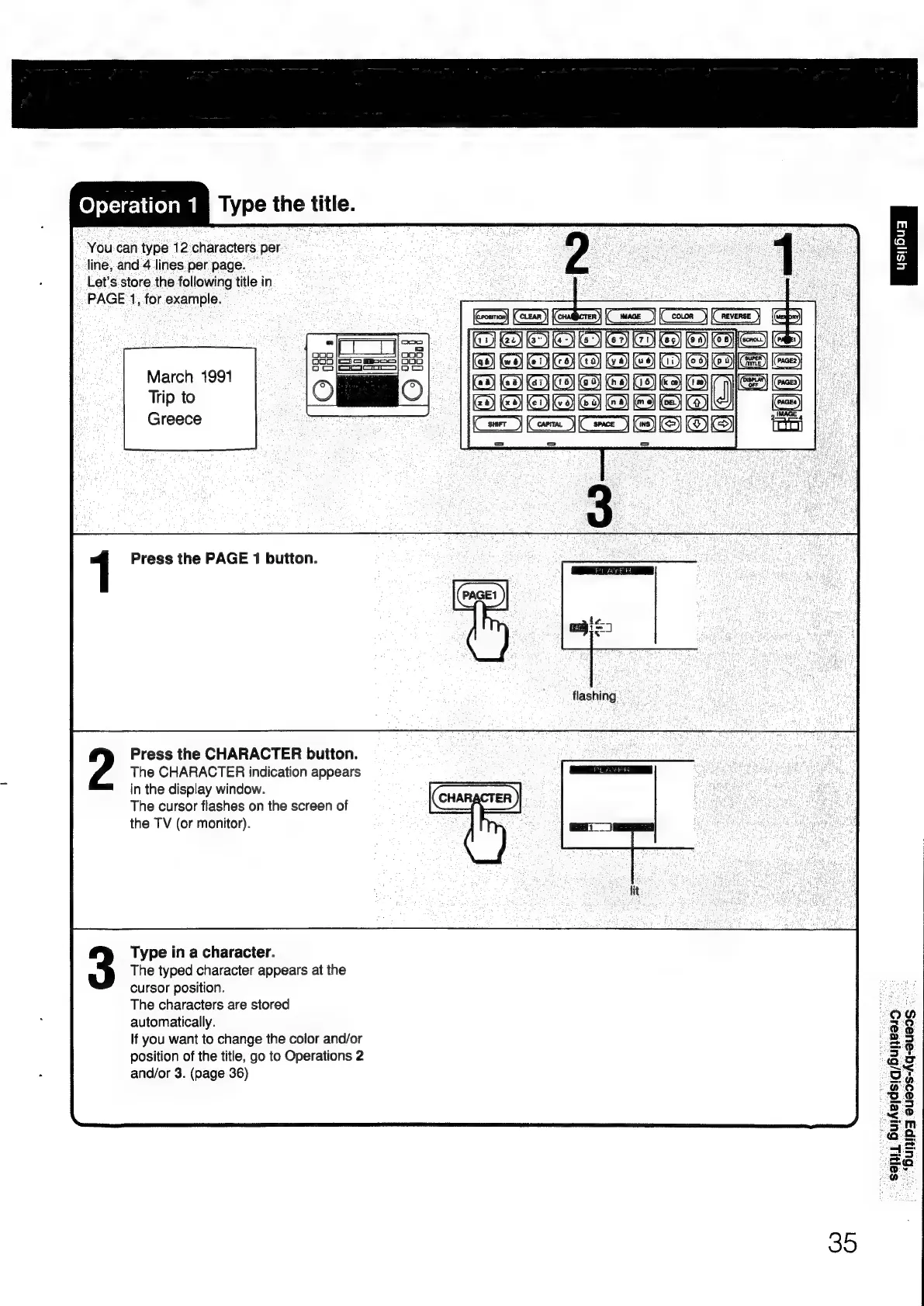
lype
the
title.
“You
can
type
12'characters
per
-
»
line,
and
4
lines.
per
page.
Let’s
store
the
following
title
in
PAGE
1,
for
example.
March
1991
Trip
to
Greece
1
Press
the
PAGE
1
button.
Press
the
CHARACTER
button.
The
CHARACTER
indication
appears
in
the
display
window.
The
cursor
flashes
on
the
screen
of
the
TV
(or
monitor).
Type
in
a
character.
The
typed
character
appears
at
the
cursor
position.
The
characters
are
stored
automatically.
If
you
want
to
change
the
color
and/or
position
of
the
title,
go
to
Operations
2
and/or
3.
(page
36)
WOOO
AGI
ed
ey
eae)
Ge)
BOO
DID
CI
eIIED
c=)
oes)
IMAGE
4
icin}
35
"Sonus
Butera
suneeio
~
“Bunipg
eueds-Aq-eueos
=

Other manuals for Sony RM-E700

Related product manuals