Startup Guide
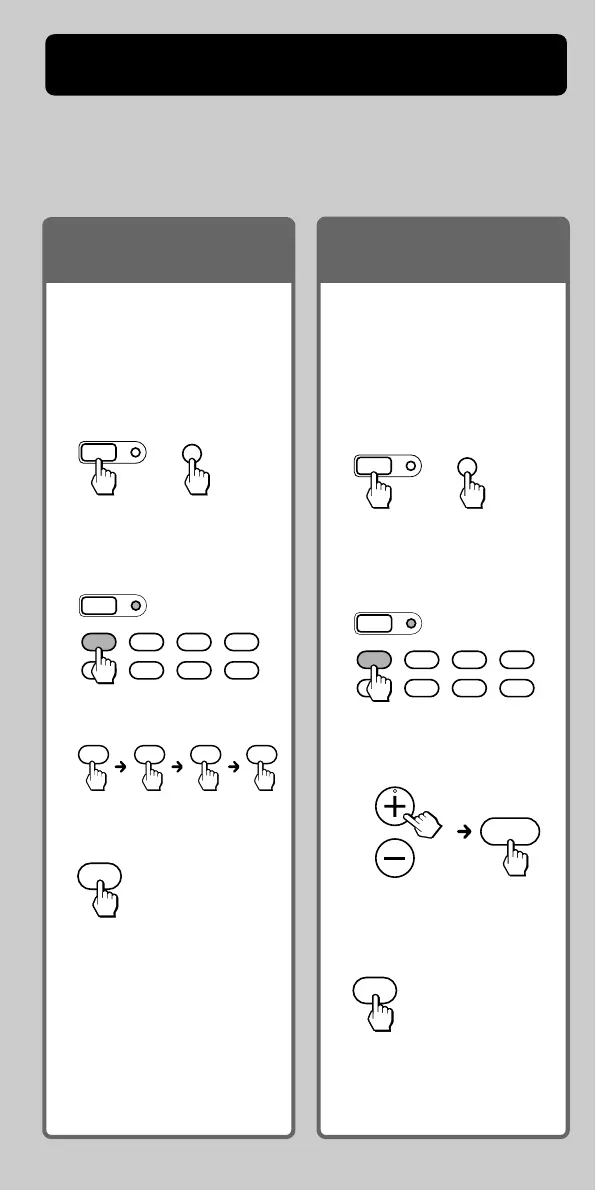
This guide shows you how to set the Remote Commander to operate
your components.
First, find the four-digit component code number for your
component, referring to the supplied “Component code numbers.”
Example: To set up a TV of
the code number “8011”
1 Set the Remote
Commander for code input
mode.
2 Press the desired
Component Select button.
3 Enter the code number.
4 Finish setting.
SET
MENU
+
Press SET and MENU.
SET
SATDVDTV CBL
TAPE
CDVCR AMP
ENT
Press ENT.
You can search for the
component code available for
your component.
1 Set the Remote
Commander for code
input mode.
2 Press the desired
Component Select button.
3 Transmit code number
signals in turn.
4 Finish setting.
SET
MENU
+
Press SET and MENU.
SET
SATDVDTV CBL
TAPE
CDVCR AMP
PROGRAM
1
ENT
Press ENT.
8 0 1 1
For more details, see page
13
.
Press PROGRAM + or PROGRAM
–, and then 1. Repeat until
your component reacts.
If you have the code
number
If you cannot find the
code number
For more details, see page
10
.
4
GB



 To Next Page